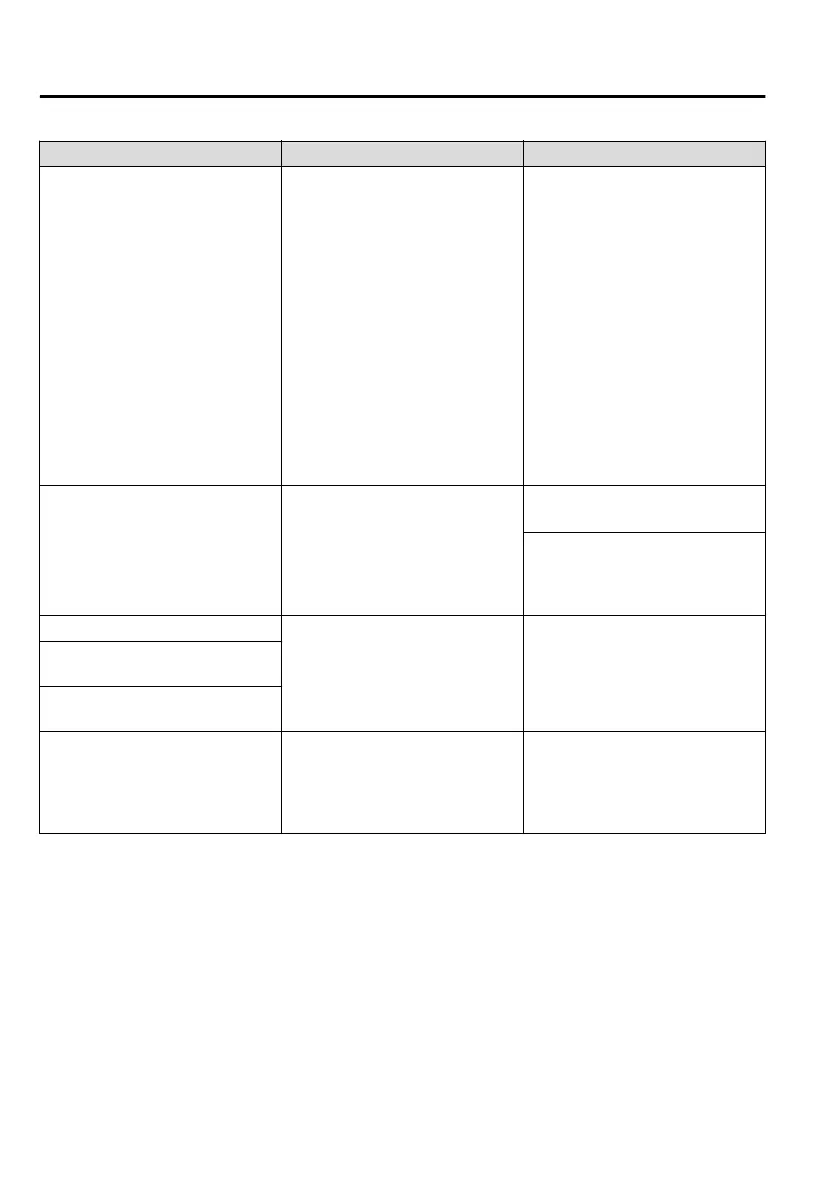
Symptom Cause Solution method
Pairing cannot be performed again
The pairing information paired to
the Bluetooth
®
unit or device is not
recognised correctly.
Perform pairing using the following
procedure:
1. Delete the applicable Blue-
tooth
®
device on the Mazda
Connect.
2. Delete “Mazda” from the Blue-
tooth
®
search screen of the
Bluetooth
®
device.
3. Perform pairing again.
If pairing is not possible after trying
the procedure, turn off the power of
the Bluetooth
®
device once, then
turn it back on. If pairing is still not
possible after this, contact an expert
repairer, we recommend an Author-
ised Mazda Repairer.
It takes time for automatic connec-
tion
There are a lot of paired Bluetooth
®
devices.
Delete the pairing information for
unused Bluetooth
®
devices.
If it takes time for an automatic con-
nection even though the above oper-
ation has been done, do a manual
connection.
Unable to perform pairing
The Bluetooth
®
function and the
Find Mode/Visible setting
*1
on the
device may turn off automatically
after a period of time has elapsed
depending on the device.
Check whether the Bluetooth
®
func-
tion and the Find Mode/Visible set-
ting
*1
on the device are turned on
and pairing or reconnect.
Does not connect automatically
when starting the engine
Automatically connects, but then
disconnects suddenly
Disconnects intermittently
The device is in a location in which
radio wave interference can occur
easily, such as inside a bag in a rear
seat, in a rear pocket of a pair of
pants.
Move the device to a location in
which radio wave interference is
less likely to occur.
Interior Features
Audio Set
5-78
CX-8_8HJ9-EI-19E_Edition2_old 2020-4-15 13:00:04



 To Next Page