Black plate (246,1)
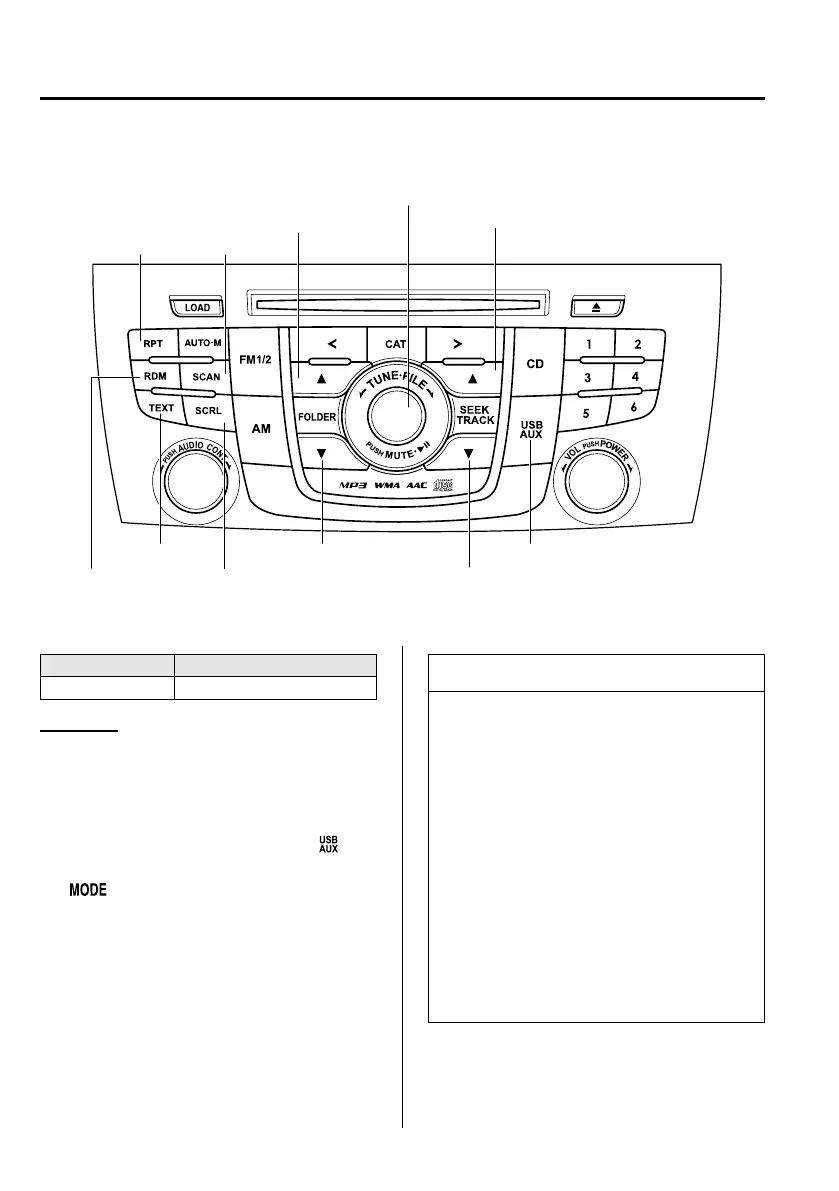
qHow to use USB mode
Text button
Scroll button
Scan button
Folder down button Source change button
Track down/Reverse buttonRandom button
Play/Pause button/File dial
Folder up button
Repeat button
Track up/Fast-forward button
The figure is an example showing type A unit.
Type Playable data
USB mode MP3/WMA/AAC file
Playback
1. Switch the ignition to ACC or ON.
2. Press the power/volume dial to turn the
audio system on.
3. Press the source change button (
)of
the audio unit or the mode switch
(
) of the audio control switches
on the steering wheel to switch to the
USB mode and start playback.
NOTE
l
When the USB device is not
connected, the mode does not switch
to USB mode.
l
When there is no playable data in the
USB device, “NO CONTENTS” is
indicated.
l
Playback of the USB device is in the
order of the folder numbers. Fo lders
which have no MP3/WMA/AAC
files are skipped.
l
Do not remove the USB device
while in the USB mode. The data
may be damaged.
6-52
Interior Comfort
Audio System
Mazda5_8DF6-EI-13J_Edition7 Page246
Thursday, March 9 2017 8:35 PM
Form No.8DF6-EI-13J



 To Next Page