11- 11 -
OPERATING PARAMETERS
5.
THE PRESENT MANUAL IS PROPERTY OF THE MANUFACTURER. ANY REPRODUCTION, EVEN PARTIAL, IS PROHIBITED.
5.1 DATE/CLOCK
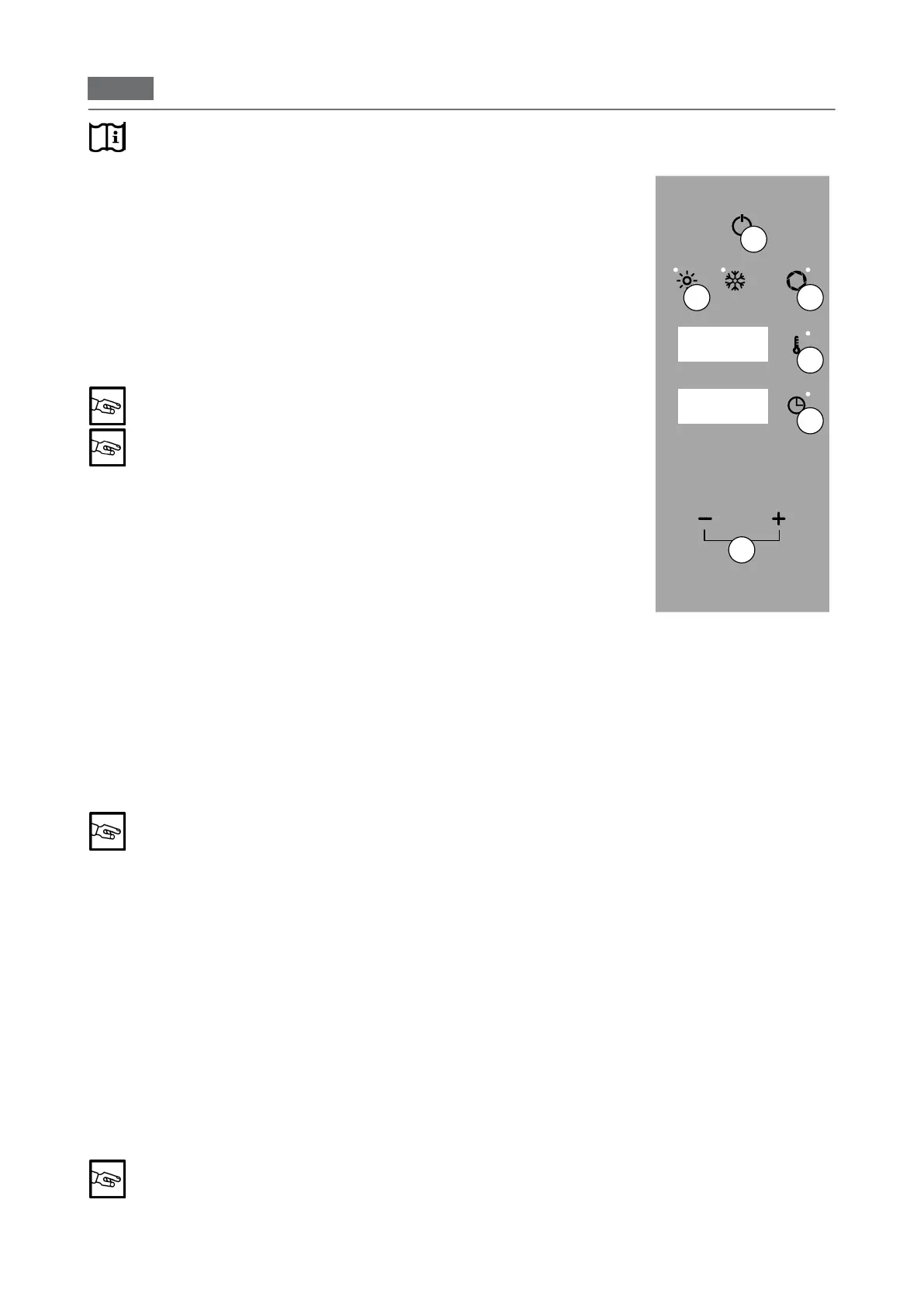
To set the date and time, in main menu mode, press and hold the "TIME" and
"TEMPERATURE" keys simultaneously for three seconds (Fig 1/B+C).
Example: Display 1 shows “YEAR”
Display 2 shows "2019".
Press "TIME" (Fig 1/B) and using "MINUS" and "PLUS" (Fig 1/D) set the current
year.
Press "TEMPERATURE" (Fig 1/C) and using the "MINUS" and "PLUS" (Fig
1/D) select "MONTH" (Fig 1 - Display 2).
Press "TIME" (Fig 1/B) and using "MINUS" and "PLUS" (Fig 1/D) set the current
month.
To save the "DAY", "HOUR" and "MIN" repeat the operations abo-
ve.
After 20 seconds of inactivity, the oven goes into "STAND BY".
Pressthe"ON/OFF"keyfor5seconds(Fig1/A)toconrm.Atriplebeepcon-
rmsthesave.
Press "ON/OFF" (Fig 1/A) to exit without saving
5.2 SETTING THE TEMPERATURE
Press "ON/OFF" to activate the main menu (Fig. 1/A).
Press "TEMPERATURE" (Fig 1/C) and use the "MINUS", and "PLUS" (Fig 1/D)
to set the temperature from 40° to 250°.
Press"TEMPERATURE"toconrm(Fig1/C).
Press "ON/OFF" (Fig 2/A) to exit without saving
5.3 SETTING THE TIME
Press the "ON/OFF" button (Fig 1/A).
Press the "TIME" key (Fig 1/B) and use the "MINUS", "PLUS" keys (Fig 1/d) TO
setthetimefrominnity,1minuteand09:00hours/minutes.
The set cooking time is shown on Display 2.
Press"TIME"toconrm(Fig1/B).
THE TIME MUST BE SET IN ORDER TO START THE OVEN.
In"innity"mode,thetimetoincreaseisdisplayedandin"settime"mode,the
countdown time is shown (Fig. 1/B - Display 2).
Press "ON/OFF" (Fig 2/A) to exit without saving
5.4 SETTING THE HUMIDITY
Press "ON/OFF" to activate the main menu (Fig. 1/A).
Hold down "CONVECTION" for 3 seconds (Fig 1/E).
Press "MINUS" and "PLUS" (Fig 1/D) and set a value between 0 and 5.
Press "ON/OFF" (Fig 2/A) to exit without saving
5.5 SETTING THE VENT VALVE
Press "ON/OFF" to activate the main menu (Fig. 1/A).
Press the "VENT" key (Fig 1/F - LED on/VENT OPEN, LED off/VENT CLOSED)
to open or close the motor vent valve.
Selecting "VENT OPEN" mode allows the humidity to escape from
the cooking compartment while "VENT CLOSED" keeps the humi
-
dity inside.
Display 3
Display 1
Display 2
A
D
B
C
E F
Before proceeding thoroughly read the "Description of the operating modes"


 To Next Page