12- 12 -
OPERATING PARAMETERS
5.
THE PRESENT MANUAL IS PROPERTY OF THE MANUFACTURER. ANY REPRODUCTION, EVEN PARTIAL, IS PROHIBITED.
5.6 SETTING THE SPEEDS
FOR THE FAN (FAN SPEED)
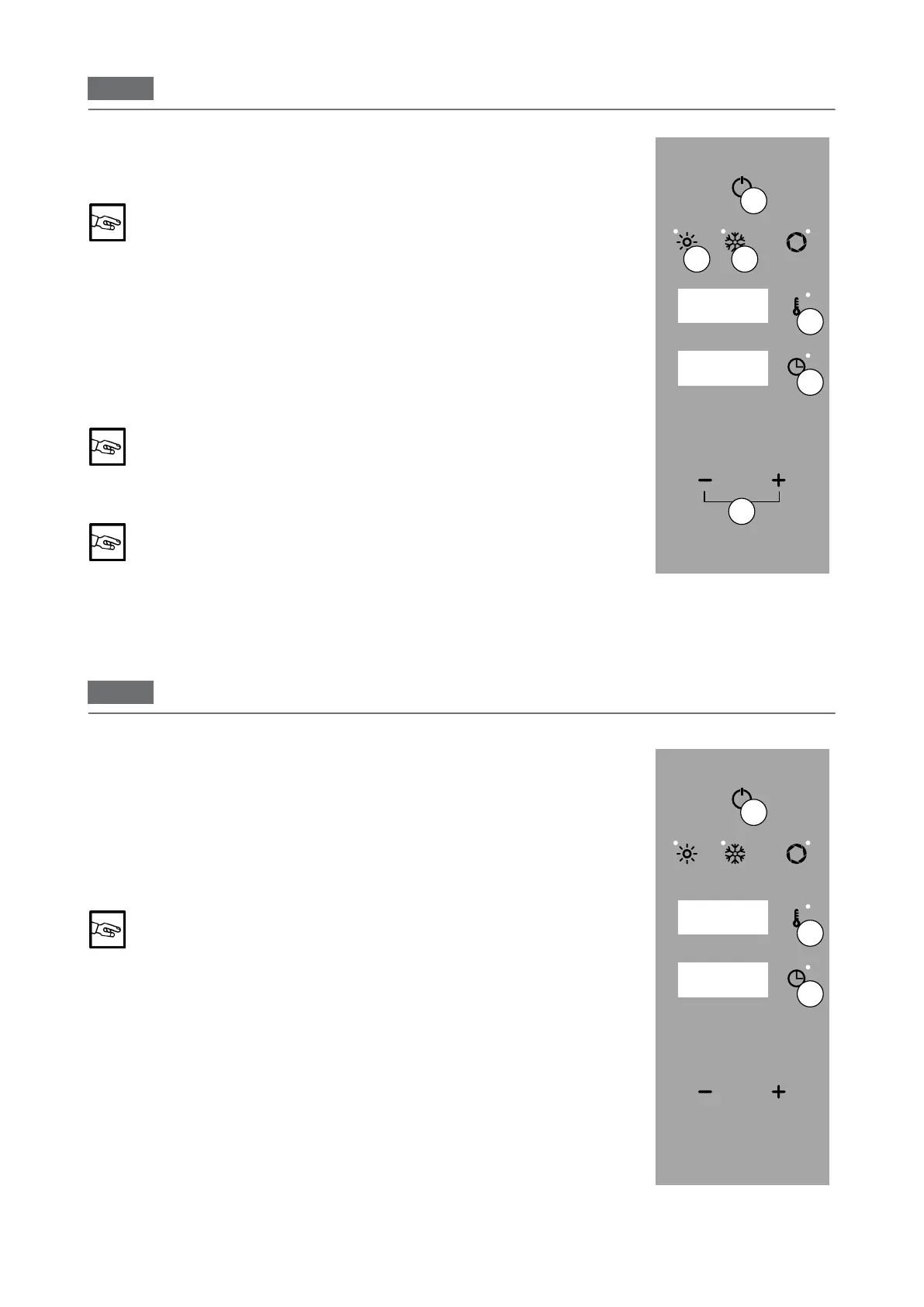
Press "ON/OFF" to activate the main menu (Fig. 2/A).
Using "MINUS" and "PLUS" select a value between 1 and 3.
To set the fan speed, no parameter must be selected.
Press "ON/OFF" (Fig 2/A) to exit without saving
5.7 SETTING
QUICK COOLING
To quickly lower the temperature in the oven chamber, press "VENTILATION"
in main menu mode (Fig. 2/F).
Press "TEMPERATURE" (Fig 2/C) and use the "MINUS", and "PLUS" (Fig 2/D)
to set the temperature up to a minimum of 40°.
To start quick cooling, a temperature must be set that is ≤31° C
compared to the oven.
Press the "TIME" key (Fig 2/B) and use the "MINUS" and "PLUS" keys (Fig 2/D)
to set the "INFINITY" time (Fig 2 Display 2).
THE TIME MUST BE SET IN ORDER TO START COOLING.
Whencoolingiscomplete"END"ashesonthescreen(Display1and2).Press
the "ON/OFF" button (Fig 2/A) twice to return to the main menu.
Press "ON/OFF" (Fig 2/A) to interrupt the function.
Display 3
Fig.2
Display 1
Display 2
A
D
B
C
E F
COOKING PARAMETERS
6.
6.1 CONVECTION
Press "ON/OFF" to activate the main menu (Fig. 1/A).
Set the temperature (see 5.2 Setting the temperature).
Set the time (see 5.3 Setting the time).
If necessary, set the "Vent valve" (see 5.5 Setting the vent valve), the fan speed
(see 5.6 Setting the fan speed) and the humidity function (see 5.4 Setting the
humidity)
THE TIME MUST BE SET IN ORDER TO START THE OVEN.
OnDisplay2thetimestartstocountdown(settimemode)orincrease(innity
time mode).
Press "ON/OFF" (Fig 1/A) to exit without saving
Display 3
Fig.1
Display 1
Display 2
A
B
C


 To Next Page