38
(6) HI tone control
The HI tone control allows you to adjust the treble signal for each channel.
• Control button turned fully to the left means maximum reduction
• Control button turned fully to the right means maximum increase
• Central position (felt by a light clicking into place) means that the signal is not
being altered (neutral).
• Setting range +/- 15dB for 12kHz
(7) MID tone control
The MID tone control allows you to adjust the middle tone signal for each channel.
• Control button turned fully to the left means maximum reduction
• Control button turned fully to the right means maximum increase
• Central position (felt by a light clicking into place) means that
the signal is not being altered (neutral).
• Setting range +/- 15dB
(7a) MID frequency control
This control regulates the central frequency for the MID controls (7) in other words
the frequency at which the level regulator is active. The central frequency can be set
to anything from 0,1kHz to 8kHz.
(8) LOW tone control
The LOW tone control allows you to adjust the bass signal for each channel.
• Control button turned fully to the left means maximum reduction
• Control button turned fully to the right means maximum increase
• The central position (felt by a light clicking into place) means that the signal
remains unaltered (neutral setting).
• Setting range +/- 15dB for 80Hz
(9) MON control
The MON controls adjust the level of the channel that is running from the monitor
send output. The monitor channel signal is adjusted using the channel fader and is
independent from the (prefader) fader setting.
• Position "1" = minimum level
• Position "10" = maximum level
(10) FX control
The FX controls adjust the level of the channel that is running from the FX send out-
put. The FX channel bus signal is emitted from the FX send output. The FX channel
signal is adjusted using the channel fader and is independent from the (post-fader)
fader setting.
• Position "1" = minimum level
• Position "10" = maximum level
51
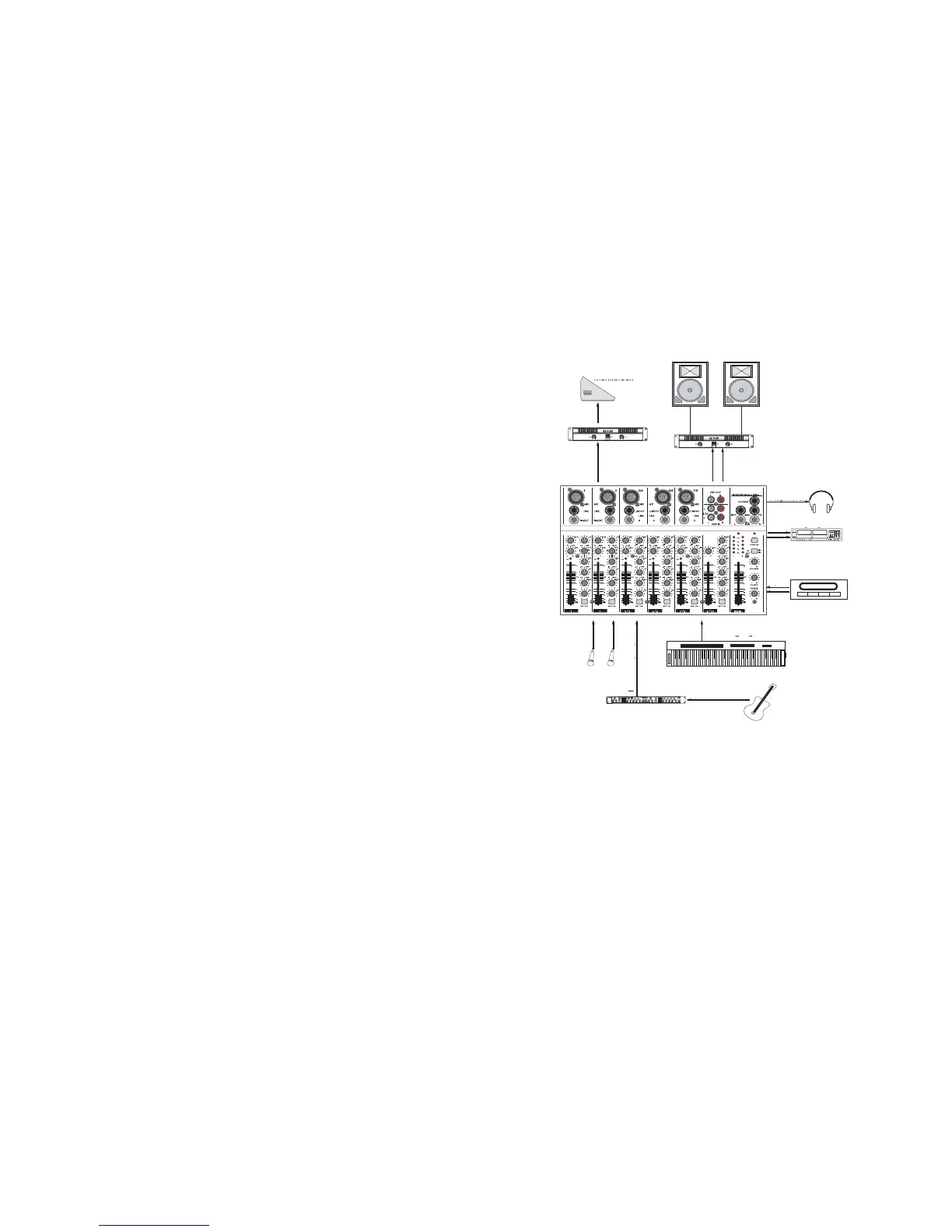
Example of connection:
Initial operation
Only put the appliance into operation when you have become fami-
liar with its features and these operating instructions. Check all
connections once again for correctness.
Sound reproduction appliances when in operation can reach high
volume levels, that could lead to you damaging your hearing.
Do not listen to excessively loud music for longer periods of time.
This applies in particular to listening to music through headphones
as your hearing may be impaired.
PA amplifier
monitor speaker
PA loudspeaker
PA amplifier
MAIN output L/R
REC output L/R
Cassette player
CD-PLAYER
LINE input L/R
Compressor / Limiter
Guitar
Keyboard / Synthesizer
MIC-
Input
LINE input L/R
TAPE IN
MON SEND output
left right
Headphones


 To Next Page
 Loading...