EasyManua.ls Logo

McCulloch 250 - Page 25

McCulloch 250
32 pages
Print Icon
To Next Page IconTo Next Page
To Previous Page IconTo Previous Page
Loading...
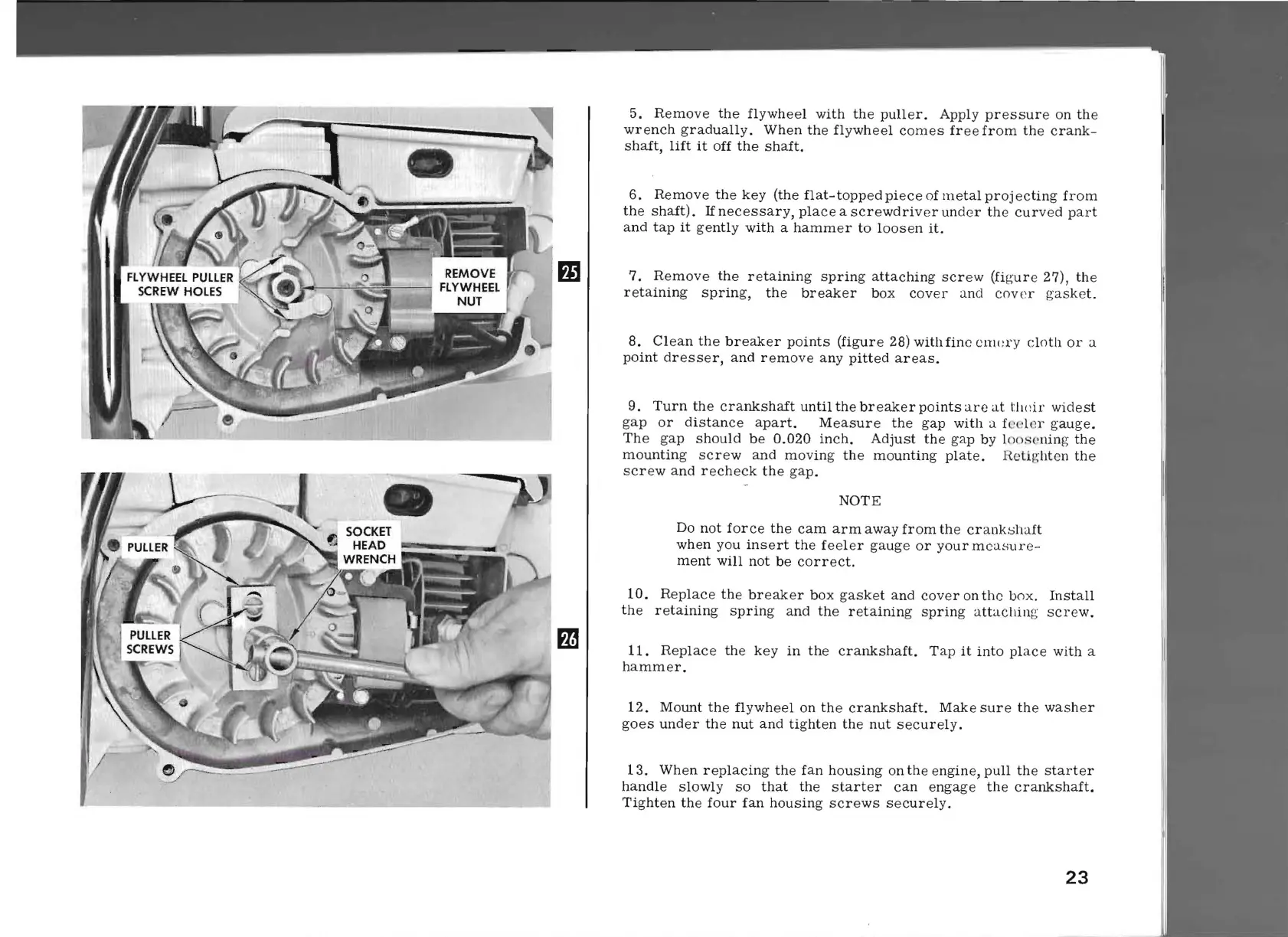
5.
Remove
the
flywheel
with
the
puller.
Apply
pressure
on
the
wrench
gradually.
When
the
flywheel
comes
free
from
the
crank-
shaft,
lift
it
off
the
shaft.
6.
Remove
the
key
(the
flat-topped
piece
of
metal
projecting
from
the
shaft).
If
necessary,
place
a
screwdriver
under
the
curved
part
and
tap
it
gently
with
a
hammer
to
loosen
it.
mI
7.
Remove
the
retaining
spring
attaching
screw
(figure
27),
the
retaining
spring,
the
breaker
box
cover
ancl
cover
gasket.
8.
Clean
the
breaker
points
(figure
28)
with
fine
cnwl'Y
cloth
or
a
point
dresser,
and
remove
any
pitted
areas.
9.
Turn
the
crankshaft
until
the
breaker
points
are
at
tlldr
widest
gap
or
distance
apart.
Measure
the
gap
with
a fe
eler
gauge.
The
gap
should
be
0.020
inch.
Adjust
the
gap
by l()()sening
the
mounting
screw
and
moving
the
mounting
plate.
Rcti/!:hten
the
screw
and
recheck
the
gap.
NOTE
Do
not
force
the
cam
arm
away
from
the
crank~haft
when
you
insert
the
feeler
gauge
or
your
measur
e-
ment
will
not
be
correct.
10.
Replace
the
breaker
box
gasket
and
cover
on
the
box.
Install
the
retaining
spring
and
the
retaining
spring
attachin
g
screw.
m
11.
Replace
the
key
in
the
crankshaft.
Tap
it
into
place
with
a
hammer.
12.
Mount
the
flywheel
on
the
crankshaft.
Make
sure
the
washer
goes
under
the
nut
and
tighten
the
nut
securely.
13.
When
replacing
the
fan
housing
on
the
engine,
pull
the
starter
handle
slowly
so
that
the
starter
can
engage
the
crankshaft.
Tighten
the
four
fan
housing
screws
securely.
23

Related product manuals