DRIVING CONTROLS
HANDLING AND POWERTRAIN CONTROLS
76
Launch control
Launch control is designed to offer the
maximum acceleration from a standing start.
WARNING: Before initiating launch
control, ensure that the prevailing road
and traffic conditions are suitable for
performing maximum acceleration
manoeuvres.
NOTE: Launch control can be operated in
either automatic or manual modes and
any handling or powertrain mode, but only
when the active dynamics panel is activated.
NOTE: The launch sequence can be
deactivated at any point by carrying out
any of the following actions:
applying the parking brake;
pressing the ACTIVE button to switch off
the vehicle dynamics panel;
or pressing the launch button to switch off
launch control
NOTE: If there is a fault or the launch
procedure has not been followed correctly,
a warning message Launch mode unavailable -
see Owners Manual will be shown in the left-
hand display. Repeat the launch procedure,
ensuring that it is followed correctly. If the
warning message remains, contact a McLaren
Dealer.
1. Depress the brake pedal firmly with your left
foot and select first gear.
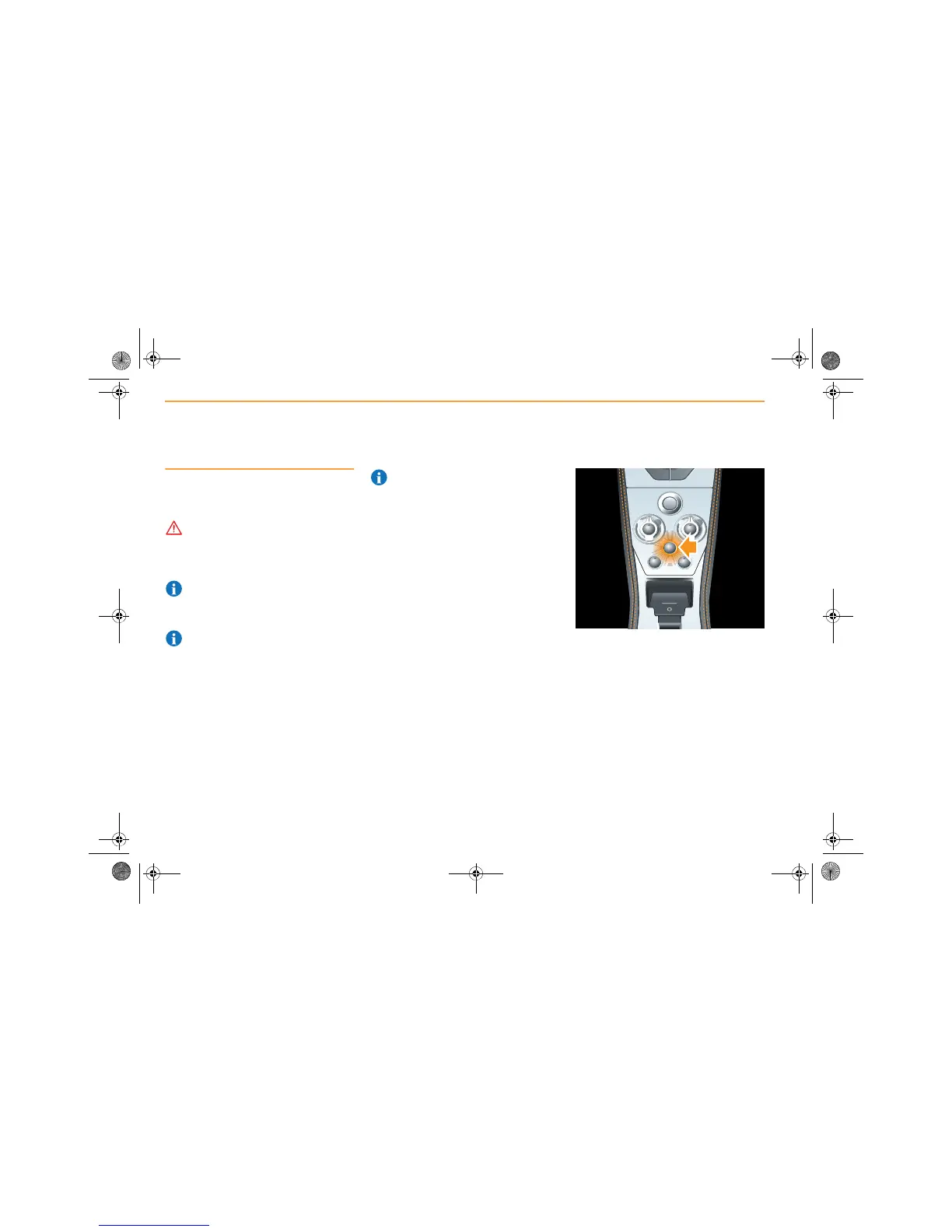
2. Press the ACTIVE button (arrowed) to
switch on the active dynamics panel.
S
N
T
AERO
S
N
T
MANUAL
START
ENGINE
STOP
WINTER
LAUNCH
ACTIVE
P



 To Next Page