7
16-FIRST APP START-UP AND ASSOCIATION WITH MCZ STOVES
Technical Dept. - All rights reserved - Reproduction prohibited
MANUAL MODE
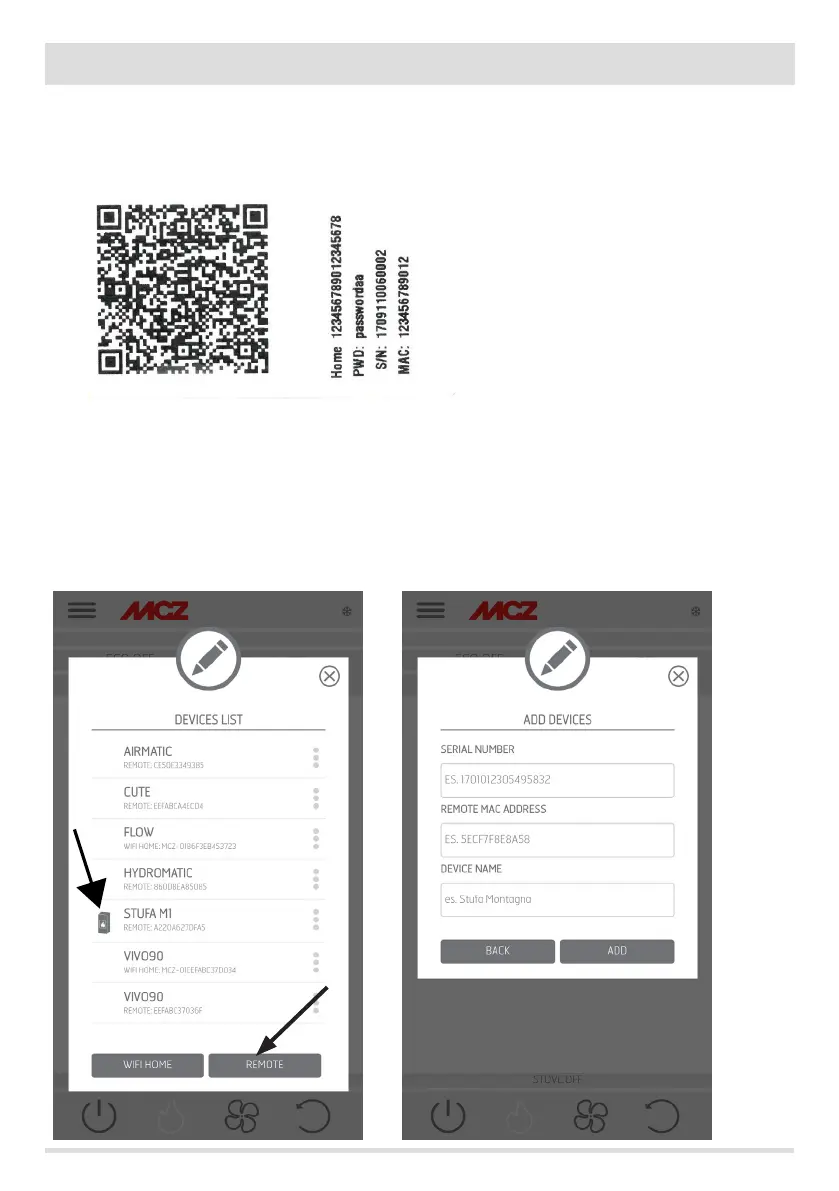
The QR code and the passwords are located at the back of the stove and in the warranty. In this case, the codes must be used.
If the stove cannot be congured using the QR code, it can be done using the DIRECT or REMOTE key.
To congure operation in HOME WI-FI mode, click on the “DIRECT” key and the “select device” screen opens. The stoves nearby are scanned;
select your stove and enter the password (located near the QR code at the top) and a stove identication name (for example “living room
stove”) to easily identify the stove/s in the list of congured devices.
To congure operation in REMOTE WI-FI mode, click on the “REMOTE” key and the “SELECT DEVICE” screen opens. Fill in all the elds with
the codes on the label (near the QR code at the bottom) and a stove identication name (for example “living room stove”) to easily identify
the stove/s in the list of congured devices.
EXAMPLE OF QR AND PASSWORD LABEL


 To Next Page