8
17-STOVE ACCESSORY CONFIGURATION
Once the app has been congured, you can communicate with the stove in Home mode and also congure stove accessories from the app:
• REMOTE WI-FI module (if any)
• WI-FI temperature probe (not supplied)
In order to congure the accessories, the mobile phone must be near the accessories.
CONFIGURATION OF REMOTE WI-FI MODULE FROM MCZ MAESTRO APP
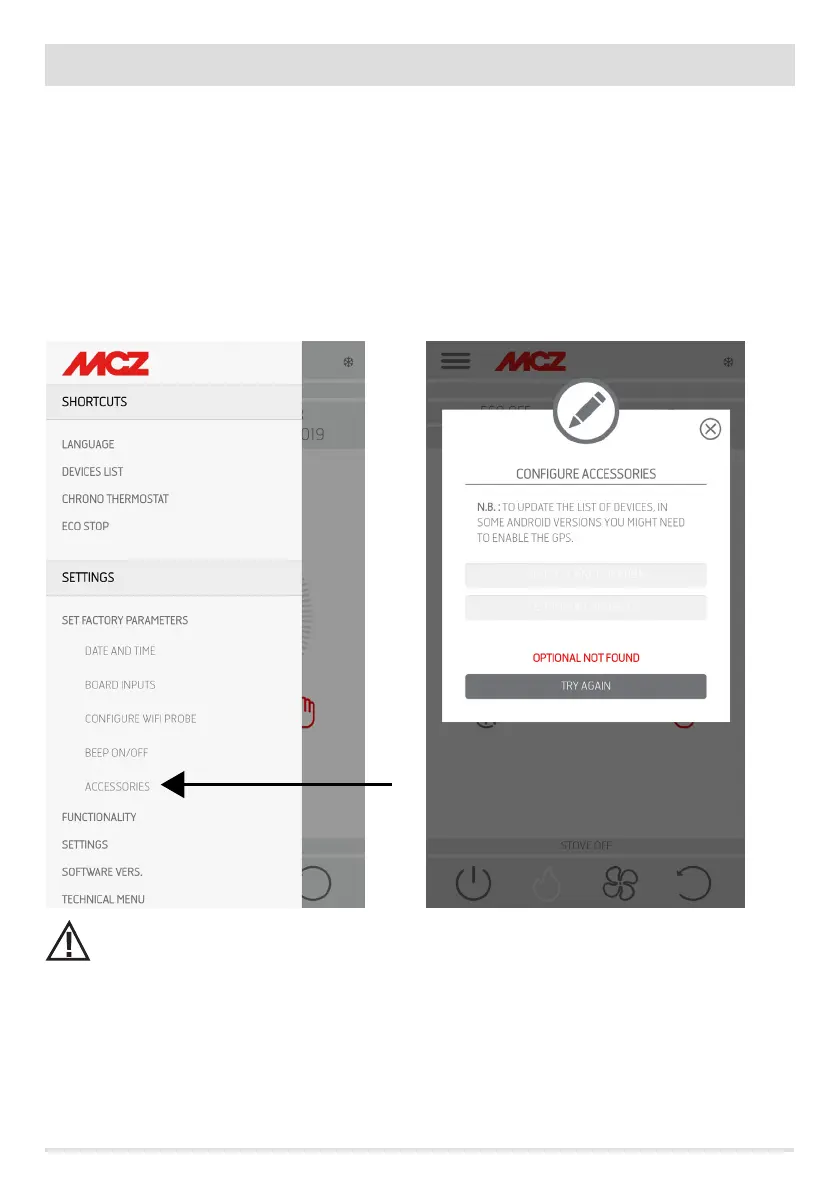
To do this, connect to the stove in home mode through the app. From the “settings” / “basic settings” menu, select the congure accessories
item: if there are still accessories to be congured, the two keys can be selected.
click congure remote ------ a screen opens, displaying nearby Wi-Fi routers. Select the router providing the internet connection and enter
the respective password. From now on, if the router provides a stable internet connection, it is possible to command the stove remotely.
The access password to the network by the Maestro App must have a maximum of 32 characters. For longer
passwords, for example generated automatically by the router upon initial installation, the length must be modied
according to the procedures for your router.
Additional functions
Once the remote stove Wi-Fi module has been connected to the home router, every time the router is available, the remote stove Wi-Fi
module will reconnect automatically.
If the router is replaced or the password is changed, the remote stove Wi-Fi module will revert to conguration mode as it can no longer
connect.
The WI-FI modules have an auto-reset mechanism.
REMOTE CONFIGURATION
CONFIGURE PROBE T°


 To Next Page