9
17-STOVE ACCESSORY CONFIGURATION
Technical Dept. - All rights reserved - Reproduction prohibited
CONFIGURATION OF WI-FI TEMPERATURE PROBE FROM MCZ MAESTRO APP
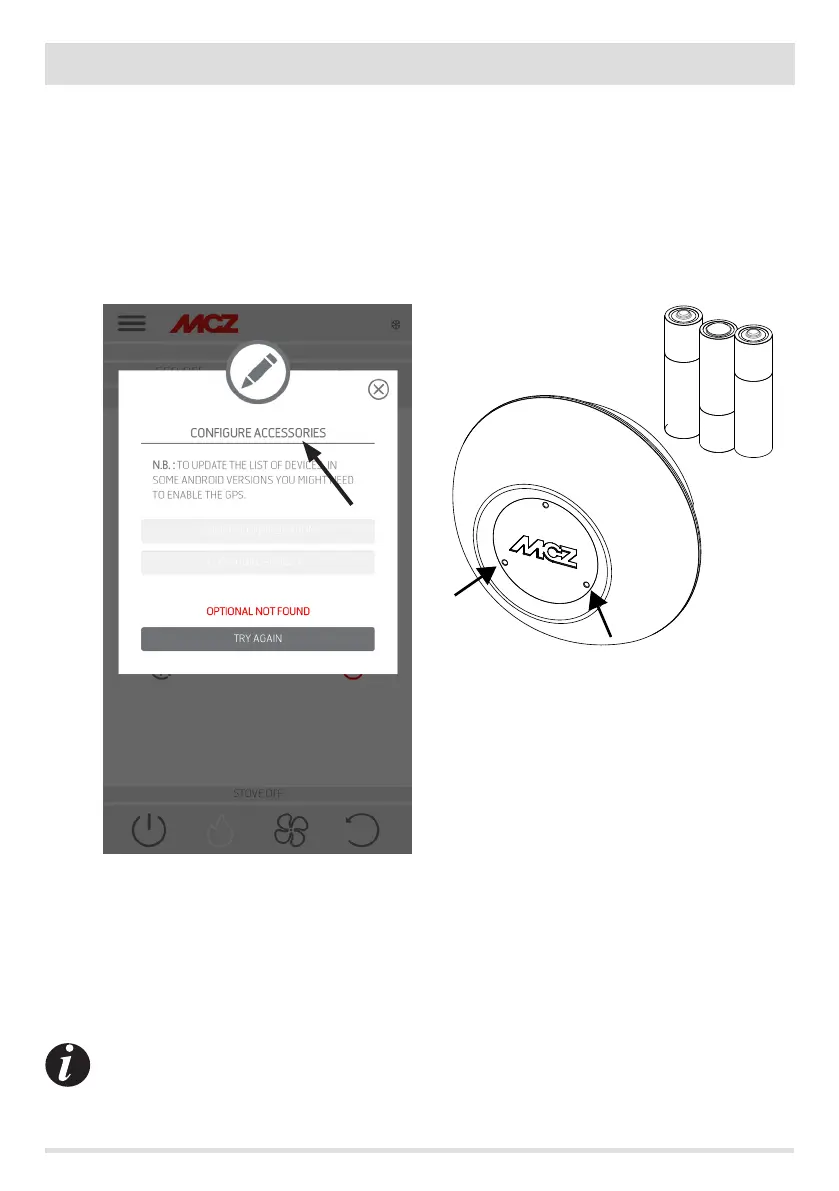
The Wi-Fi temperature probe (ACCESSORY) is supplied without batteries. From when the batteries are inserted, the probe can be congured
within the next 8 minutes. Therefore insert the three AA batteries shortly before you are ready to proceed with the conguration.
Then:
• insert two batteries immediately, then insert the third after placing the sensor next to the Wi-Fi emergency panel (approximately
2 cm)
• wait for the beep-beep indicating that pairing has successfully occurred (it must occur within 10”)
• connect to the stove through the app in home mode
• access the settings - basic settings - accessories menu - selecting the congure accessories item
If the Wi-Fi temperature probe is available for conguration, the key can be selected, while if the key stays disabled check that the probe
batteries are charged, or check that the maximum available time has not elapsed.
In this case, remove the batteries and put them back in, or press the reset button by inserting a paper clip in the hole to the right of the
sensor dome. From this time on, the 8 minutes for conguration start over again.
If the probe is ready for conguration click the key in the app screen, click T° probe conguration ------ the screen will show the stoves
that the Wi-Fi probe can be associated with; select your stove and enter the home Wi-Fi password (see QR code label).
Once the Wi-Fi probe is connected, you can congure the stove to use the remote sensor; to do this use the shortcut by clicking on the
temperature indicator at the top right of the app screen and select the “Wi-Fi probe” as the temperature input. Or from the setup menu
choose to congure ambient input and select the “Wi-Fi probe” temperature input.
Should it be necessary to reset the Wi-Fi probe, because already coupled to another device or congured incorrectly,
use two paper clips. With the rst one, press and hold the key below the bottom left hole and with the other one,
press the key below the right hole once.
Repeat the conguration procedure indicated at the start of the page.
REMOTE CONFIGURATION
CONFIGURE PROBE T°
TEMPERATURE SENSOR


 To Next Page