Step 3:
Treating your body
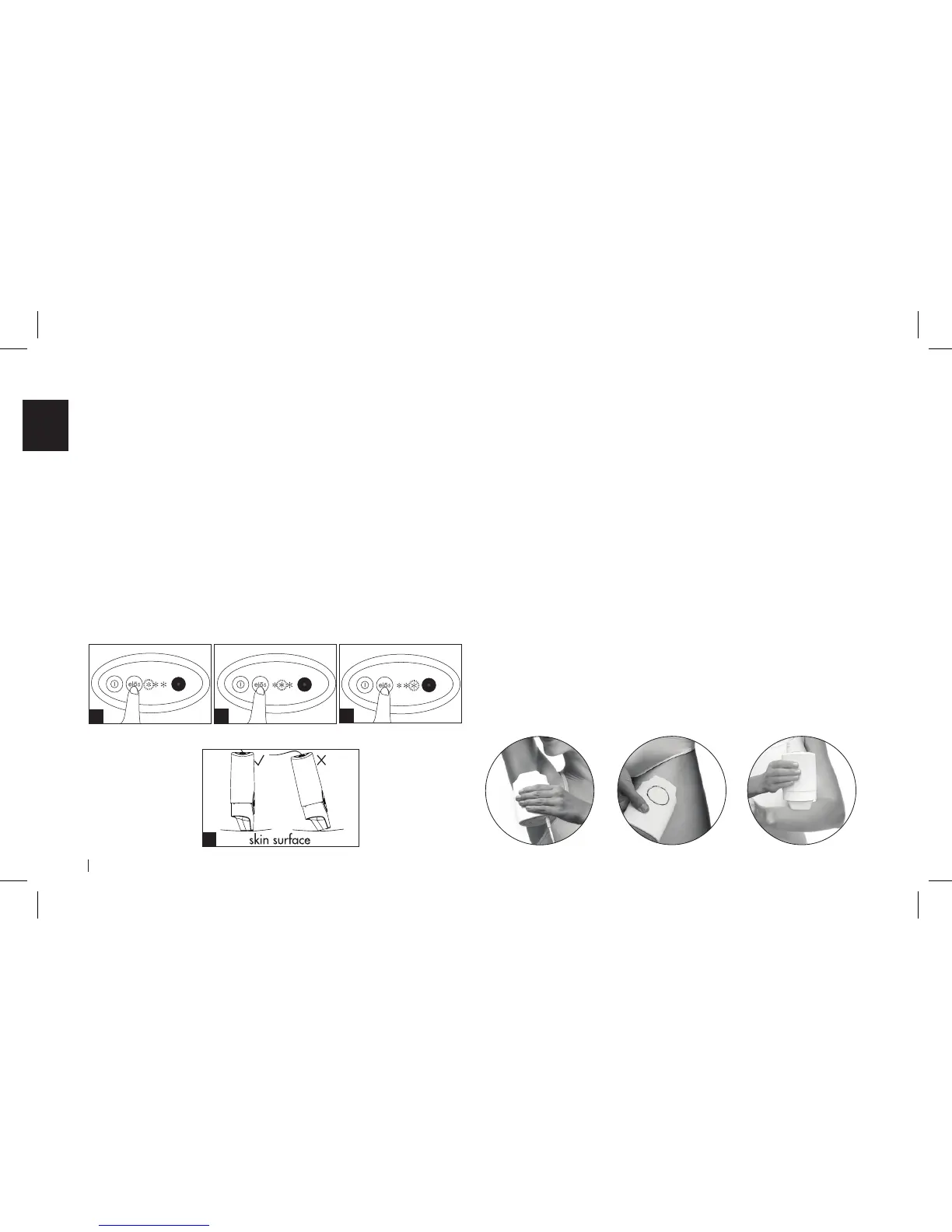
Gently place the device on your skin, so that both RF
contact bars are in complete contact with the skin (image
D). The device will not work unless both RF contact bars are
touching your skin.
• The mē will emit ashes of bright light - this is the elōs
energy at work.
• Slowly glide the device over the treatment area, without
lifting the device move to the next spot only after the
treatment ash has been emitted.
• Continue gliding the device over the area so that you
pass over the same area 2-3 times.
A
D
Step 2:
Activate
Press the power button to turn on your mē device and
select your energy level (LOW, MEDIUM or HIGH):
• LOW: Press the elōs button once to select the lowest
energy level. The left energy level indicator light will
turn blue (image A) and you will hear the fan inside the
device.
• MEDIUM or HIGH: Use the elōs button to select higher
energy levels for greater efcacy (image B, C). Always
start treating on LOW and if you are comfortable, move
to MEDIUM or HIGH energy level for greater efcacy.
B
C
LOW MEDIUM HIGH


 To Next Page