14 Mecmesin Assembly and Installation of –i System Test Stands
6.3 Start Emperor
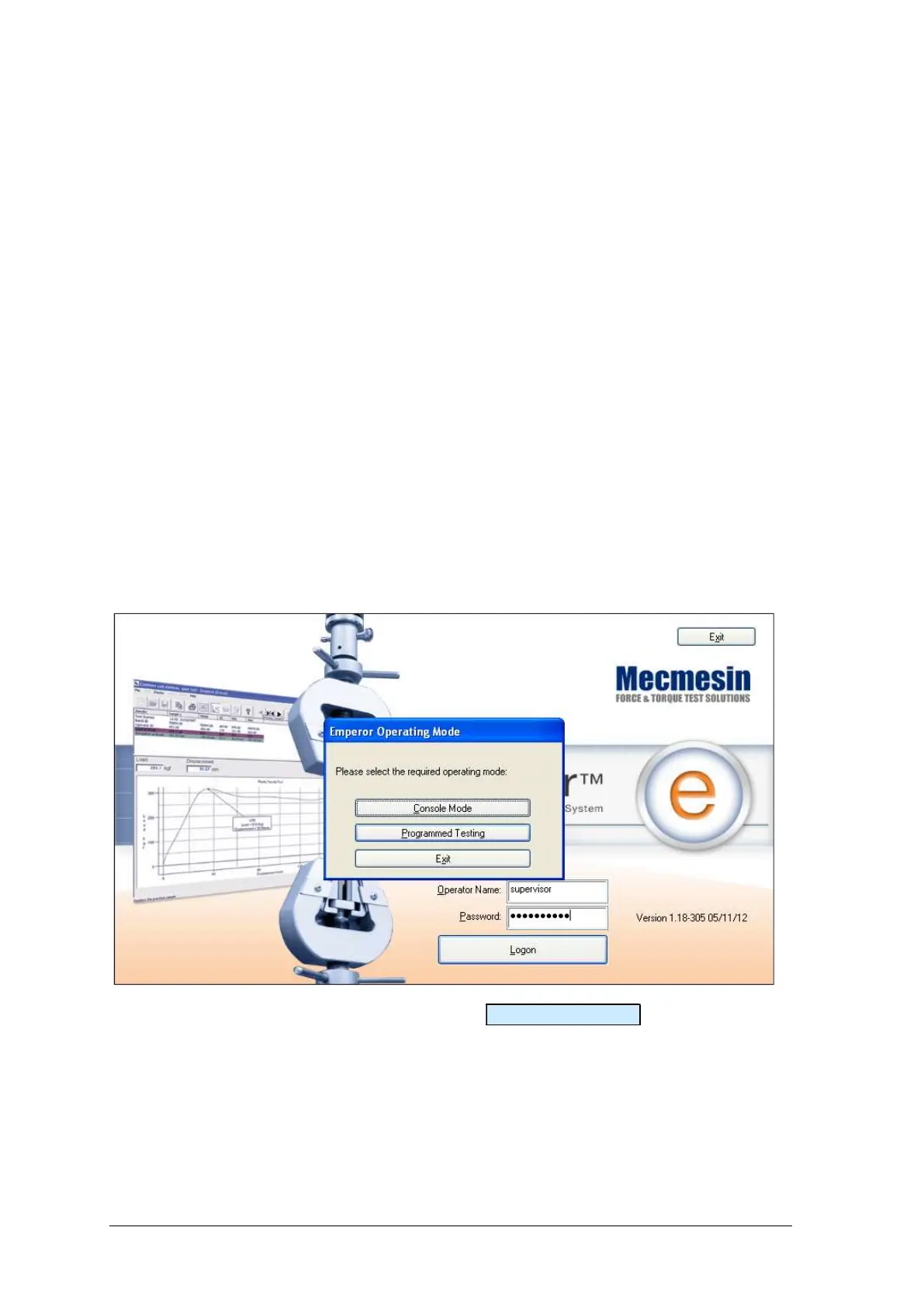
Start the program by using the Emperor icon that was installed on your computer
desktop—the splash screen is displayed.
Emperor software provides two levels of user, and a password is used to restrict access to
either a simple choice of pre-defined tests or some limited functions, or to give access to
the full capabilities of the Emperor system.
Operators can select from tests that are pre-defined, and for which reports have already
been written, and some functions that can be assigned to each user account.
Masters have full access to all the functions of the Emperor system. The master user has
control over which users are operators and masters.
Logon with a Master level username and password. If this is the first time you have
started the program, you can use:
Default Username: supervisor
Default Password: supervisor
Note: both the username and password are case-sensitive.
On the Operating Mode selection screen, click on Programmed Testing .
This will start Emperor, and you can set your system preferences, user accounts, create
and run test programs, review results, perform calculations for analysis, produce test
reports and export data for use elsewhere. For full details, see the manual: Emperor
Programming for Mecmesin Test Systems.


 To Next Page