page 18
% TAMP EV
% TAMP EV sub-menu 1
(SET)
% TAMP EV sub-menu 2
(PERCENTAGE)
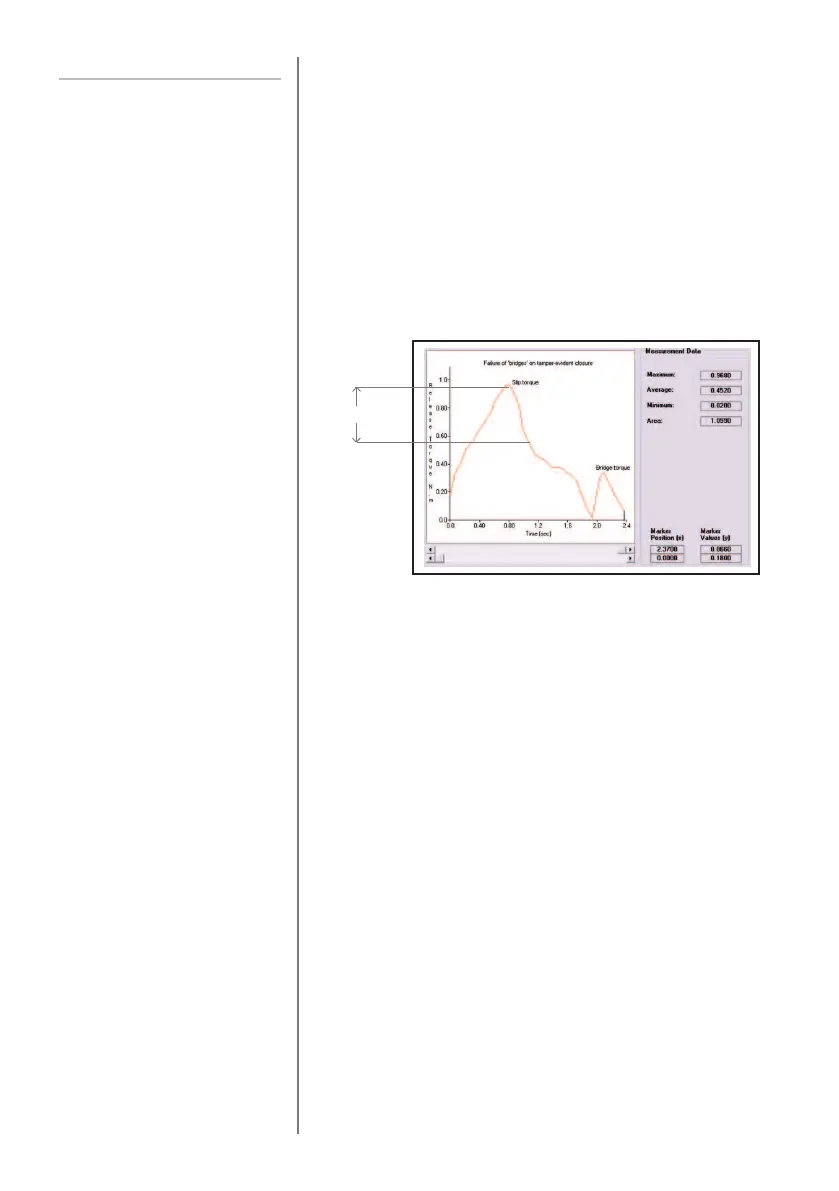
When testing tamper-evident caps and seals, the Tornado
enables the value at both the slip torque (1st peak) and
bridge torque (2nd peak) to be measured and displayed.
Once calculated, either result or both can be transmitted to
a peripheral device (see COMMS on page 23).
Different designs for tamper-evident seals can produce
slightly different profiles when tested. To accommodate this,
the Tornado has an adjustable feature (% drop) to ensure
the correct values are calculated on different types of seal.
The % drop feature is based on the capacity of the Tornado
unit, and refers to the amount that the 1st peak to be
calculated must drop before the software starts to look for
the 2nd peak. The default setting is based on a drop of 5%
(see Fig. 9). This can be adjusted depending upon the
profile of the cap to be tested.
To enable the % TAMP EV function, press and hold the
MENU key until page 1 of the main menu appears. Press
the DOWN key to move the cursor to % TAMP EV and
press the ENTER key.
The display will show % DROP OFF and SET.
Press the ENTER key to change OFF to ON.
Press the DOWN key to move the arrow cursor to SET and
press the ENTER key.
Use the UP and DOWN keys to set the percentage to the
desired value and press the ENTER key.
5%
For illustration only
Fig. 9



 To Next Page