11
10
9
8
5
6
7
4
3
2
1
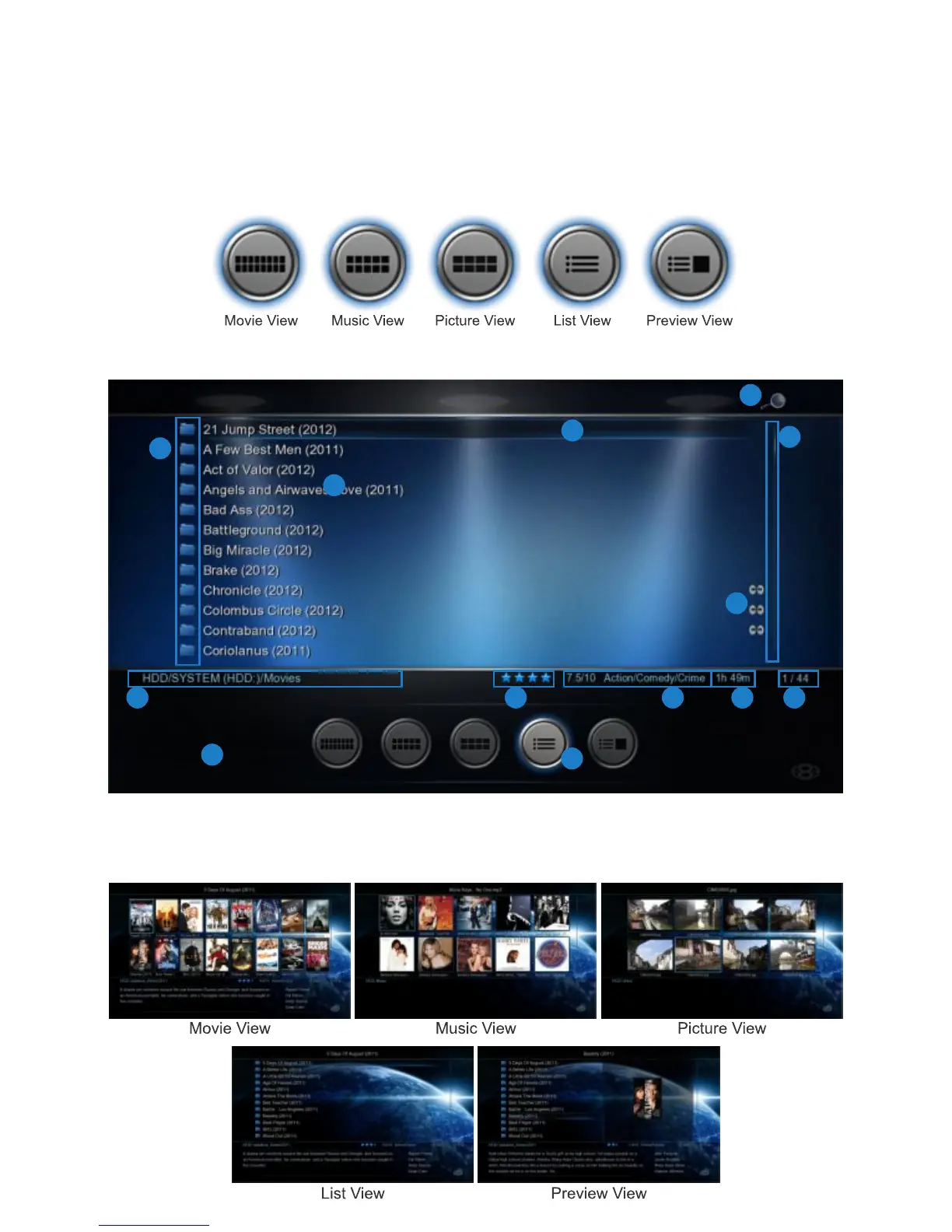
1. Media Icons 2. File Name 3. Focus Bar 4. Scroll Bar 5. Folder Path 6. Metadata Rating 7. Metadata Genre
8. Metadata Movie Length 9. Watched Indicator 10. Index 11. View Icons 12. JukeBox Icon 13. XML Info
Page20
12
13
MEDIA LIBRARY
The X3 Media Library has five built in standard views ie Movie, Music, Picture, List, and Preview. The
Media Library has been designed so that the view can be easily changed on the fly. In the Media Library
you have the option of changing the Views Manually or you can enable the ‘Auto View’ option in the Setup
Menu. If the ‘Auto View’ option is enabled the X3 will automatically save the last used ‘View’ of the folder.
The next time you enter the same folder it will automatically change to the saved View. Auto View mode
requires that the X3 has ‘write’ permissions as it needs to save a xml file to each folder. Auto View is
disabled in Jukebox mode.


 To Next Page