Page13
WIRED NETWORK CONNECTION AND SETUP
The X3 can be connected to your local network by means of a RJ45 CAT5 cable. The X3 is supplied
standard with a UPnP facility, Samba Client and NFS that allows connection to your local area network via a
router or switch. You can share media files from your PC or NAS and stream media content to the X3 and
you can use the X3 as a Media Server to stream media content to other devises on your network.
Press the “Setup” button on the X3 Remote or “Setup” on the Home Page then select “Network” option in
the Setup window then select ‘Wired Lan Setup’.
Network configuration allows for either automatic or manual IP setup.
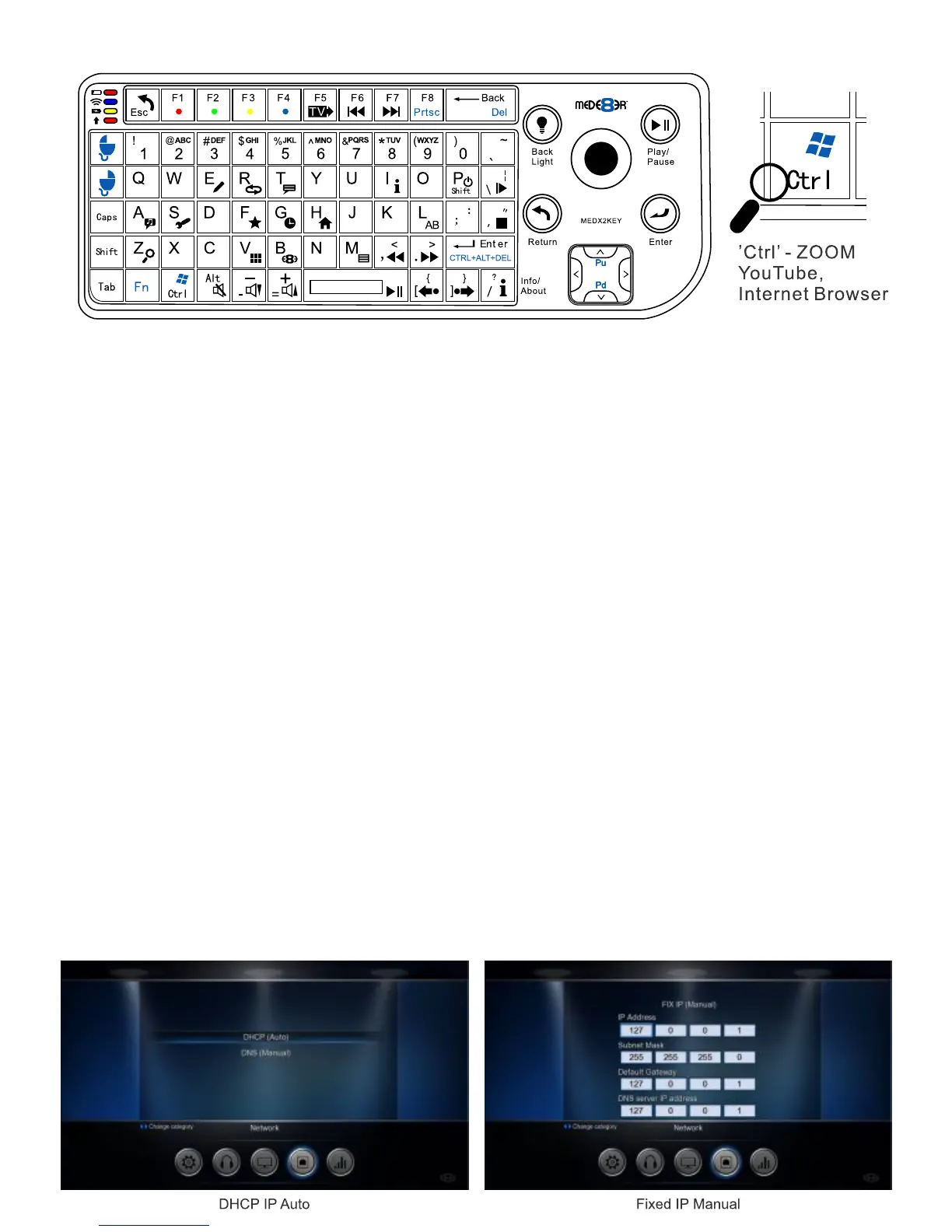
DHCP IP (AUTO)
Choose this option if you want your router to assign a dynamic IP address to the X3. This option is easy to
use and recommended for normal users.
FIX IP (MANUAL)
This option allows you to assign a static IP address to the X3. This option requires modifying network
settings of the X3 and is recommended for advanced users. To set a Static IP for your X3, enter the
IP Address, Subnet Mast, Gateway and DNS Server Address as relevant to your router.
ESC: RETURN SPACE: PLAY
ENTER: SELECT(ENTER)
'0': 0 '1': 1 '2': 2 '3': 3 '4': 4 '5': 5 '6': 6 '7': 7 '8': 8 '9': 9
'-': VOL_DOWN '+': VOL_UP
'P' + 'SHIFT' : POWER OFF
'R(r)': REPEAT 'T(t)': SUBTITLE
'I(i)': INFO 'A(a)': AUDIO
'G(g)': GOTO 'H(h)': HOME
'Z(z)': ZOOM '/(?)': Info / About
‘’Ctrl’ (z) : ZOOM YouTube, Internet Browser
‘’Ctrl’ (i) : ZOOM VIDEO FULL SCREEN Internet Browser
‘’Ctrl’ (quotation marks) : EXIT BROWSER - Stop Icon
',(<)': FRWD '.(>)': FFWD
'F(f)': Favourite 'E(e)': EDIT
'M(m)': MENU 'S(s)': Setup
'V(v)': View 'L(l)': AB
'\(|)': SLOW '’ (”)': STOP
'/(?)': Info / About '[({)': Back Skip
'](})': Forward Skip 'W(w)': Launch Web Browser
'B(b)': Browser - Devices
'Alt': Mute 'FI': Red button
'F2': Green button 'F3': Yellow button
'F4': Blue button 'F5': TV Sys
'F6': Previous Chapter 'F7': Next Chapter
'F8': Menu - Internet Browser
USB Keyboard Function Keys (based on MEDX2KEY) Optional Extra


 To Next Page