9
Play a Song
This drum module has a total of 60 preset songs.
Note: The preset song setting is 001 after you slide on power.
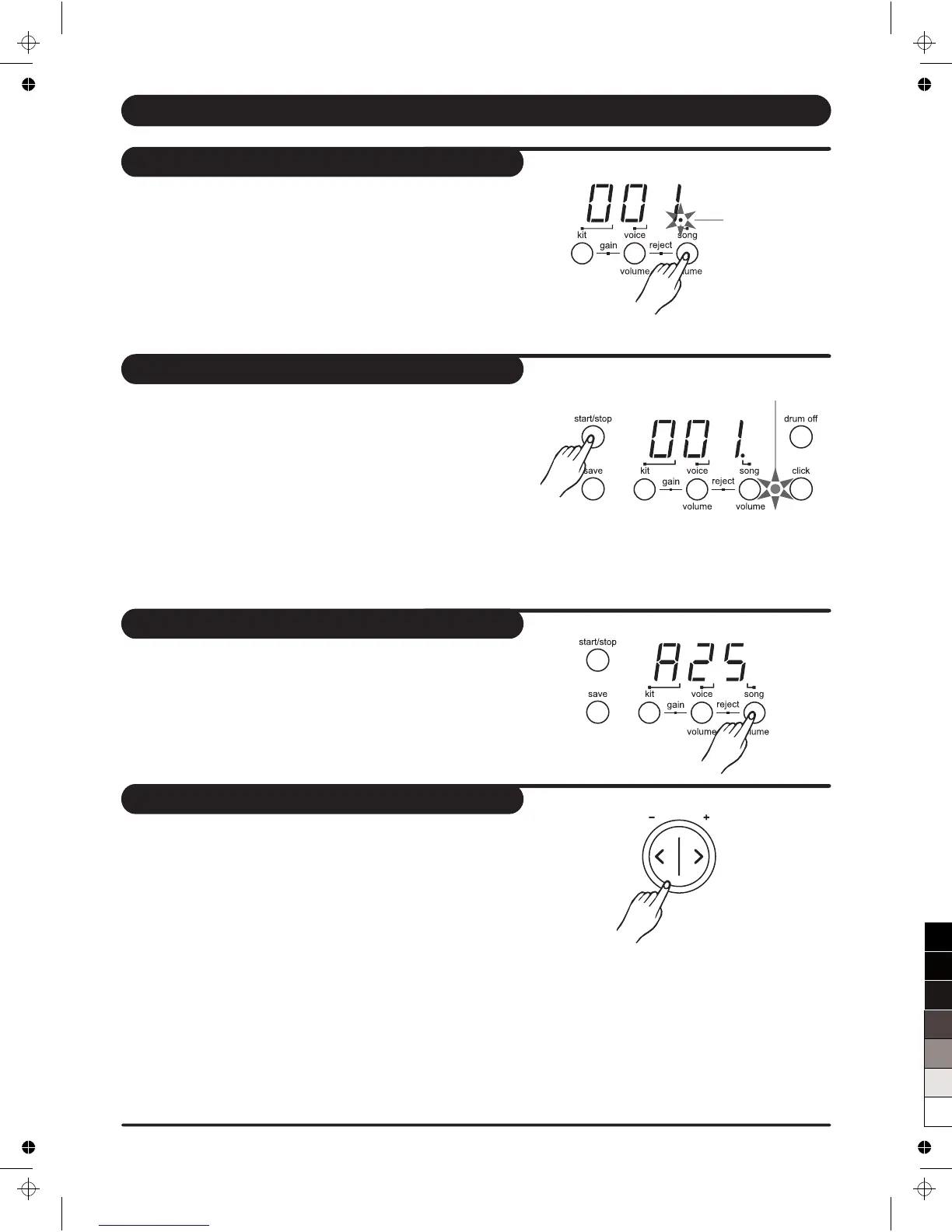
1. Press [ song / volume ] button.
The song indicator lights and the current song's number appears.
2. Press [ + ] or [ - ] buttons to select one of the song and listen to it.
Song numbers 001 - 060 are preset songs.
(Reference song list : page 16.)
1. Press [ start/stop ] button and the beat indicator is flashing.
The song will start playback from the beginning.
2. You can stop the song during playback by pressing the
[ start/stop ] button.
* The ASSIGN pad's indicator flashes at the first beat of each
measure.
Note: The ASSIGN pad's indicator can be lighted off by pressing
both [hi-hat control] and [kick] buttons at the same time.
Song indicator
1. Press the [ song / volume ] button to select the volume of
song. Display shows : " A XX".
(XX = level value, 00 to 31)
2. Press [ + ] or [ - ] buttons to adjust the volume of song
accompaniment.
1. Press the [ tempo + ] or [ tempo - ] buttons. D
[ tempo + ] or [ tempo - ] buttons to increase or
decrease the tempo. ( tempo value in the range of 30 to 280)
*
isplay shows
the current tempo value.
2. Press the
Holding down either a [ tempo +] or [ tempo - ] buttons to
change the setting in a high speed.
* Press [ tempo + ] and [ tempo - ] buttons at the same time
to reset the tempo to default value.
Note: About 2 seconds after you stop pressing the [Tempo]
button, display changes to show your selected song, voice
or kit number instead of tempo value.
Select a song
Listen to the song
Adjust the song's volume
Adjust the song's tempo
Beat indicator
tempo



 To Next Page