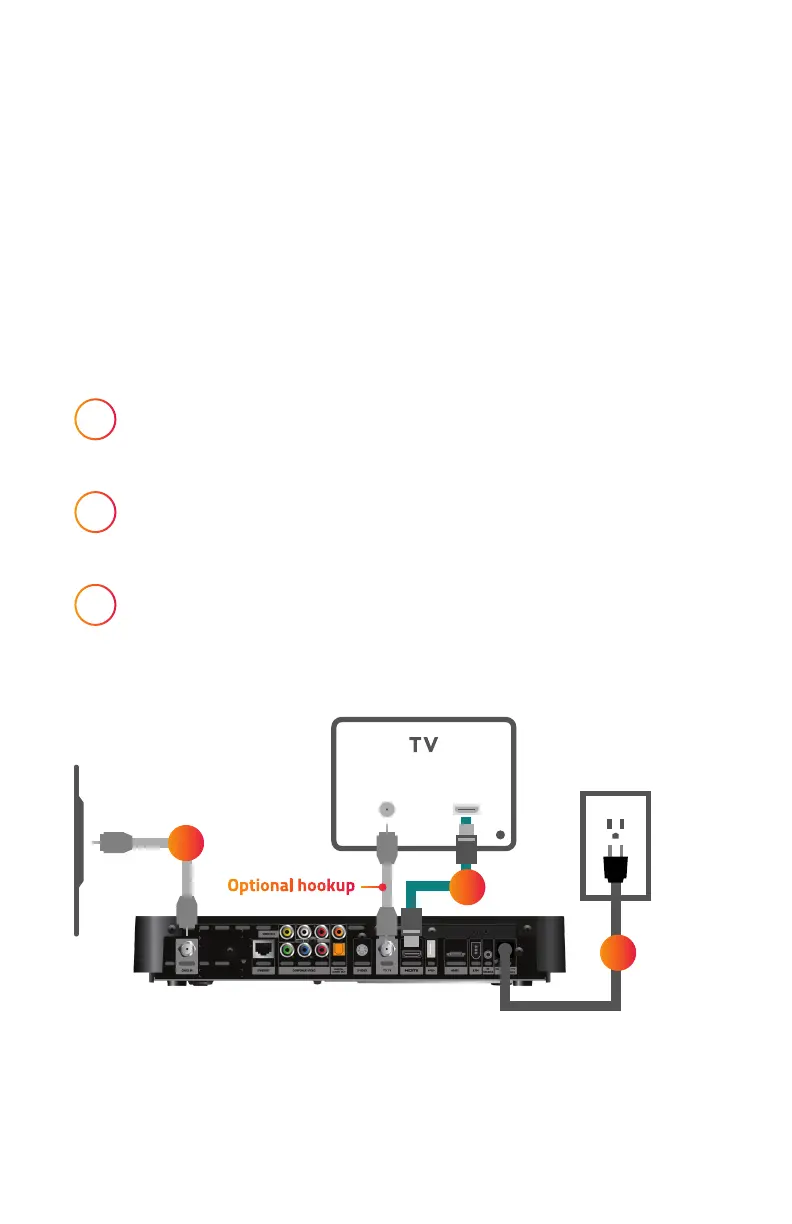
Step 2: Connect Your New DVR Cable Box
1
Connect coaxial cable from the wall outlet to
Cable IN on the back of your DVR Cable Box.
2
Connect HDMI cable from the back of your DVR Cable Box
to the HDMI input* on your HDTV.
3
Connect power cord from the back of your DVR Cable Box
to the power outlet.
*Please make note of the HDMI input used on the TV as you’ll need to tune your television
to this input once you turn it on.
OPTIONAL: If you do not have an HDMI port on the back of your television, connect the
second coaxial cable from the back of the television to the port on the new box labeled TO TV.
HDMI IN
CABLE/
ANTENNA IN
WALL
CABLE
OUTLET
1
2
3
Optional hookup


 To Next Page