MediaTek LinkIt™ Smart 7688 User Manual
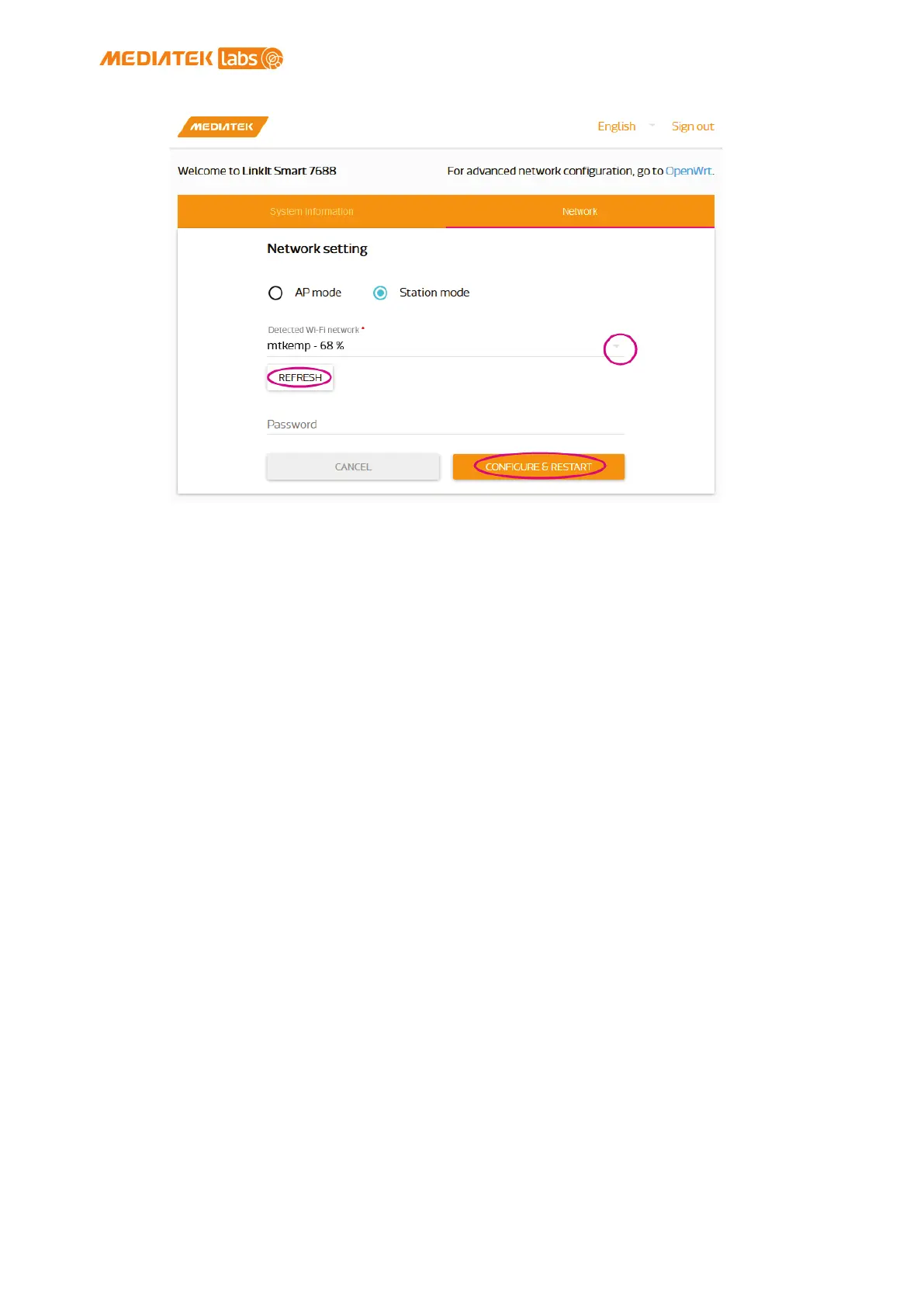
Figure 21 Changing to Station mode in Web UI
3) A message window will pop up letting you know the device is
connecting to the AP you’ve selected.
4) Notice the Wi-Fi LED, it should blink once a second, this
indicates LinkIt Smart 7688 is in Station mode.
5) To change LinkIt Smart 7688 back to AP mode, press the Wi-Fi
Reset button for at least 5 seconds and release. When you
see three short blinks on Wi-Fi LED, it is in AP mode.
2.4.11. Viewing System Information from the Web UI
You can view LinkIt Smart 7688’s system information from any browser. After
you’ve connected the LinkIt Smart 7688 to a network, open a browser and
type http://myLinkIt.local in the URL box and sign in 2.4.1”Accessing Web UI”.
Click the Configure button under System information and the following
information will display, as shown in Figure 22:
• Device name
• MAC address
• Current IP address
• Account/Password
• Bootloader/Firmware version
© 2015, 2016 MediaTek Inc.
Page 34 of 38
This document contains information that is proprietary to MediaTek Inc.
Unauthorized reproduction or disclosure of this information in whole or in part is strictly prohibited.


 To Next Page