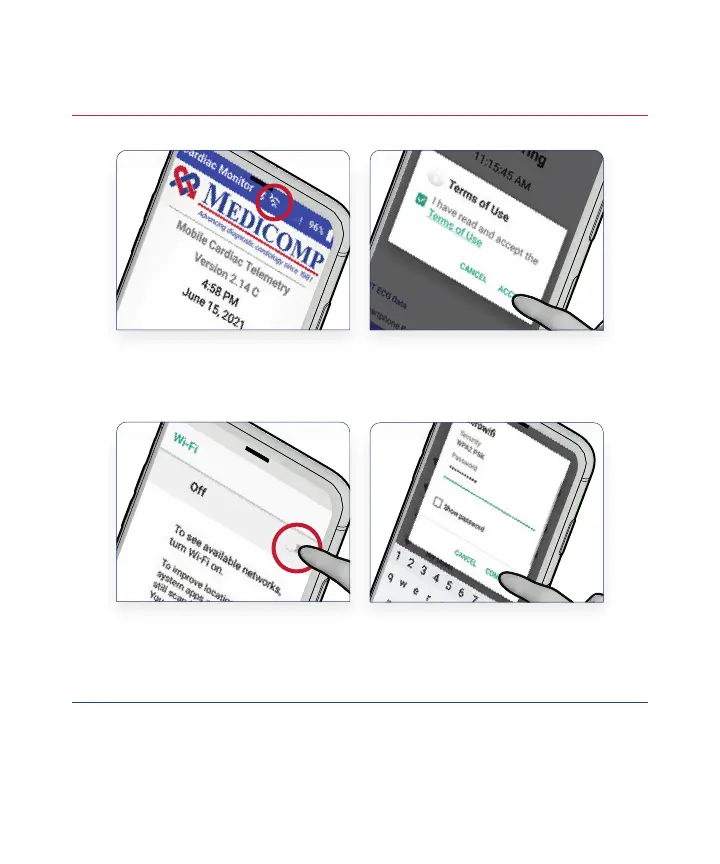
Connecting the Monitor to Wi-Fi
Your Heart Monitor will automatically connect to a cellular
network, however, if you choose to connect your monitor to a Wi-Fi
network, it will help ensure the data collected is quickly transmitted
to our cardiac monitoring centers.
!
Tap the Wi-Fi Symbol at
the Top of the Home Screen
on Medicomp’s Phone
Toggle the Wi-Fi Switch
to the “On” Position and
Select Your Network
Read and Accept the
Terms of Use
Enter Your Password,
Press Connect, and
Verify Your Connection
1
3
2
4
18



 To Next Page