Views
15
Safety
Handling
Components Help Appendix
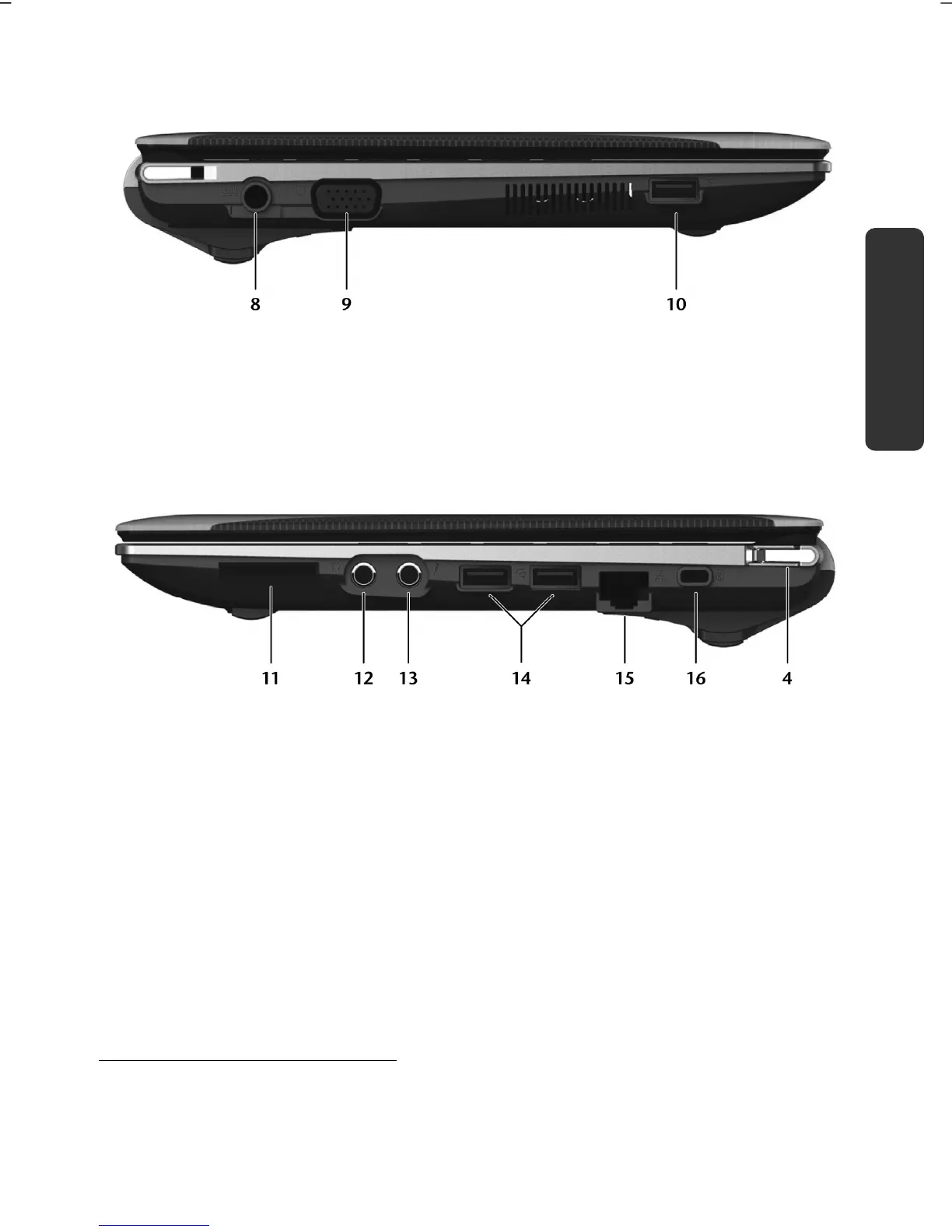
Left Side
(Diagram the same)
8 - Power Socket ....................................................................... ( p. 28)
9 - External Monitor Port VGA ...................................................... ( p. 36)
10 - USB 3.0 Port
*
......................................................................... ( p. 50)
Right Side
(Diagram the same)
11 - Multimedia Card Reader ....................................................... ( p. 48)
12 - Audio Out .............................................................................. ( p. 43)
13 - Microphone ........................................................................... ( p. 43)
14 - USB 2.0 Port .......................................................................... ( p. 50)
15 - LAN Port (RJ-45) .................................................................... ( p. 44)
16 - Kensington
®
lock .................................................................... ( p. 51)
4 - Power ON/OFF ...................................................................... ( p. 27)
**
USB 3.0 connections are backwards compatible. A higher speed requires a PC peripheral
that supports USB 3.0. The standard transfer rates that are acheived by means of USB 2.0
will apply otherwise.



 To Next Page