25 of 78
Telephone: 1300 884 987
Internet: www.medion.com.au
After Sales Support
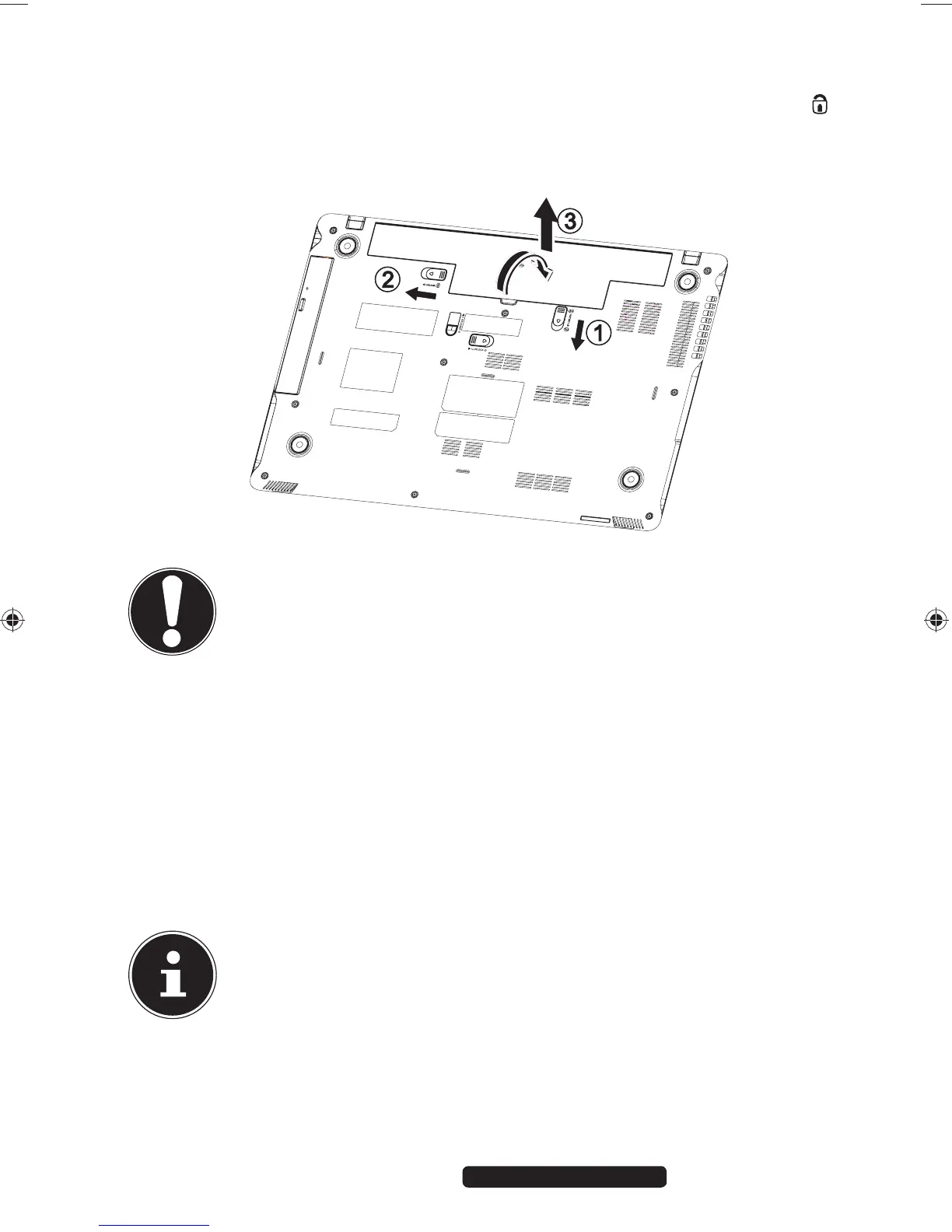
6.3.2. Removing the Battery
To remove the battery pack, slide the battery lock to the ‘lock open’ position
and remove the battery pack from the compartment.
CAUTION!
Do not remove the battery while the Notebook is switched on
or data may be lost.
Take care when storing the battery and when using the
Notebook that the contacts on the battery and the Notebook
are not soiled or damaged. This could cause malfunctions.
6.3.3. Charging the Battery
The battery is charged using the mains adapter. When the mains adapter is
connected and switched on, the battery charges automatically regardless of
whether or not the Notebook is switched on or not. A complete charge takes a
few hours with the Notebook switched off. With the Notebook switched on, the
charging process takes significantly longer.
PLEASE NOTE!
The charging process is interrupted if the battery voltage or
temperature gets too high.
99222 E6232 Aldi AUS RC2 Content.indd 2599222 E6232 Aldi AUS RC2 Content.indd 25 29.01.2013 09:26:5729.01.2013 09:26:57














 To Next Page