29 of 78
Telephone: 1300 884 987
Internet: www.medion.com.au
After Sales Support
7.4. Connecting an External Monitor
The Notebook has a VGA connection socket (11) as well as an HDMI port (13) for an
external monitor.
Shut down your Notebook correctly.
Plug the external monitor’s signal cable into the VGA socket on the Notebook
(11). Alternatively, you can use the digital HDMI connection (High Definition
Multimedia Interface) (13) to transmit picture and sound signals.
Connect the external monitor to the mains and switch it on.
Now switch your Notebook on.
Once the operating system has loaded, the external monitor will be detected. A
number of options are available. You can access these as follows:
Run the Desktop App.
Move the mouse pointer into the top right or bottom corner of the display and
click
Settings.
Then click Personalisation.
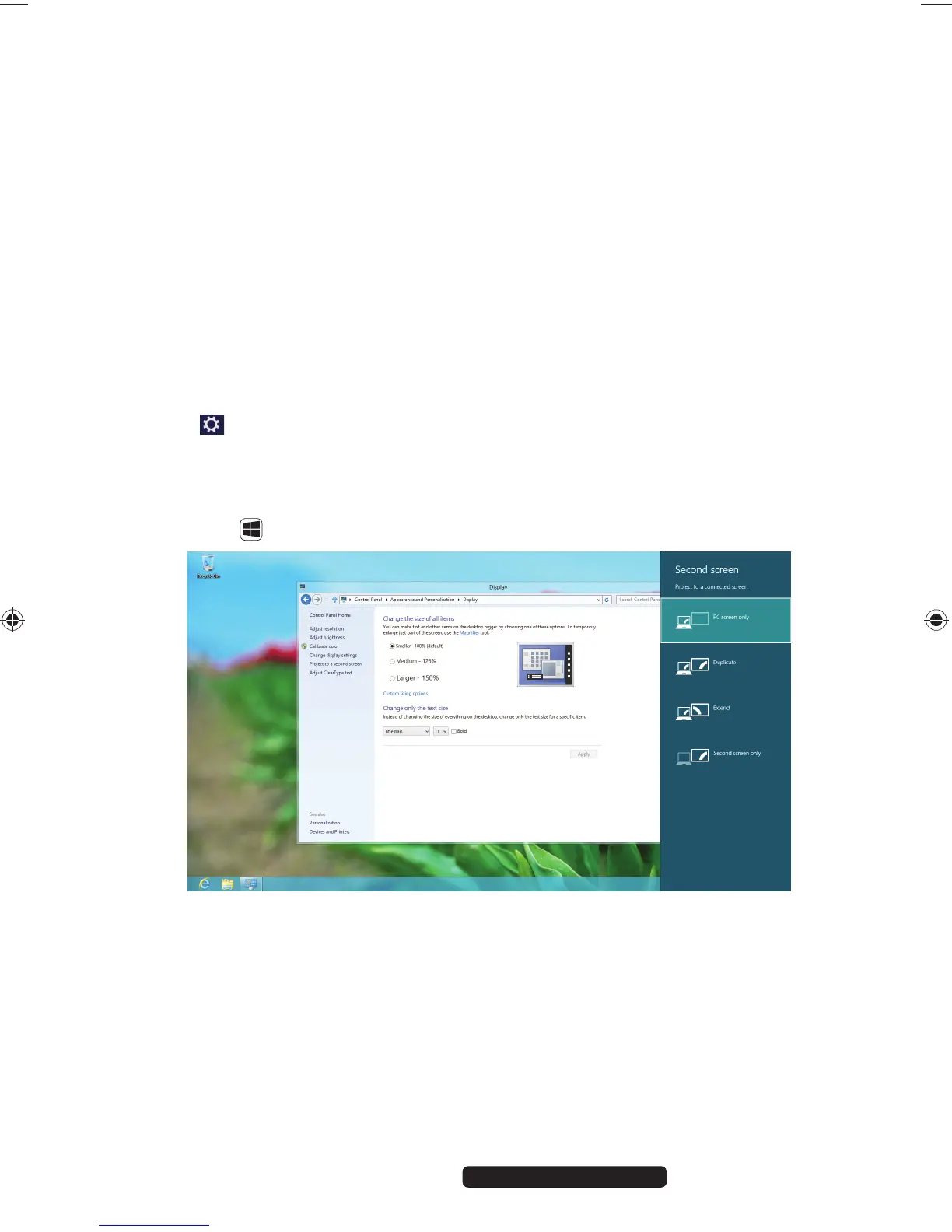
In the dialogue box, first select the Display option and then Project to a second
screen.
Press the + P buttons at the same time to open this menu quicker.
Under Project to a second screen choose from the following options:
− PC screen only
− Duplicate
− Extend
− Second screen only
99222 E6232 Aldi AUS RC2 Content.indd 2999222 E6232 Aldi AUS RC2 Content.indd 29 29.01.2013 09:26:5829.01.2013 09:26:58














 To Next Page