55
DE
EN
NL
FR
IT
ES
10. DAB mode
You can listen to radio via DAB in this mode.
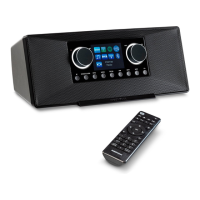
Fold up the antenna.
Briefly press and hold the
button to switch on the radio.
If necessary, press the Mode button several times until DAB is shown on the dis-
play.
When the device is used for the first time, it automatically starts in DAB
mode and independently performs a complete search for stations re-
ceived.
DAB and the antenna symbol with the current reception strength are shown
on the display. In principle, the more vertical bars that are displayed, the better the
reception.
If you have poor reception or no reception, adjust the antenna position
or the device location.
10.9.1. Full scan
If you have moved the device to a different location, (new station area such as a dif-
ferent region), you should perform a new full station search manually.
Press the Menu button.
Use the Enter Tune -/+ controller to select the <Full scan> menu and press the
Enter Tune -/+ controller to confirm your selection.
The device now automatically carries out a station search and all DAB+ stations that
can be received are stored.
10.9.2. Manual tune
Manually set the required frequency band here.
Press the Menu button.
Use the Enter Tune -/+ controller to select the <Manual tune> menu and press
the Enter Tune -/+ controller to confirm your selection.
Use the Enter Tune -/+ controller to select the required frequency band and
press the Enter Tune -/+ controller to confirm your selection.
43320 ML Content Final.indb 5543320 ML Content Final.indb 55 12.07.2022 09:31:5212.07.2022 09:31:52


 To Next Page