BP5BB5LR_UMEN_V05-20170703 9
versions as well. Windows XP Help, as well as the documentation of Bluetooth
dongles, contains detailed information how wireless devices can be used, and this
is described in detail in our software Help as
well.
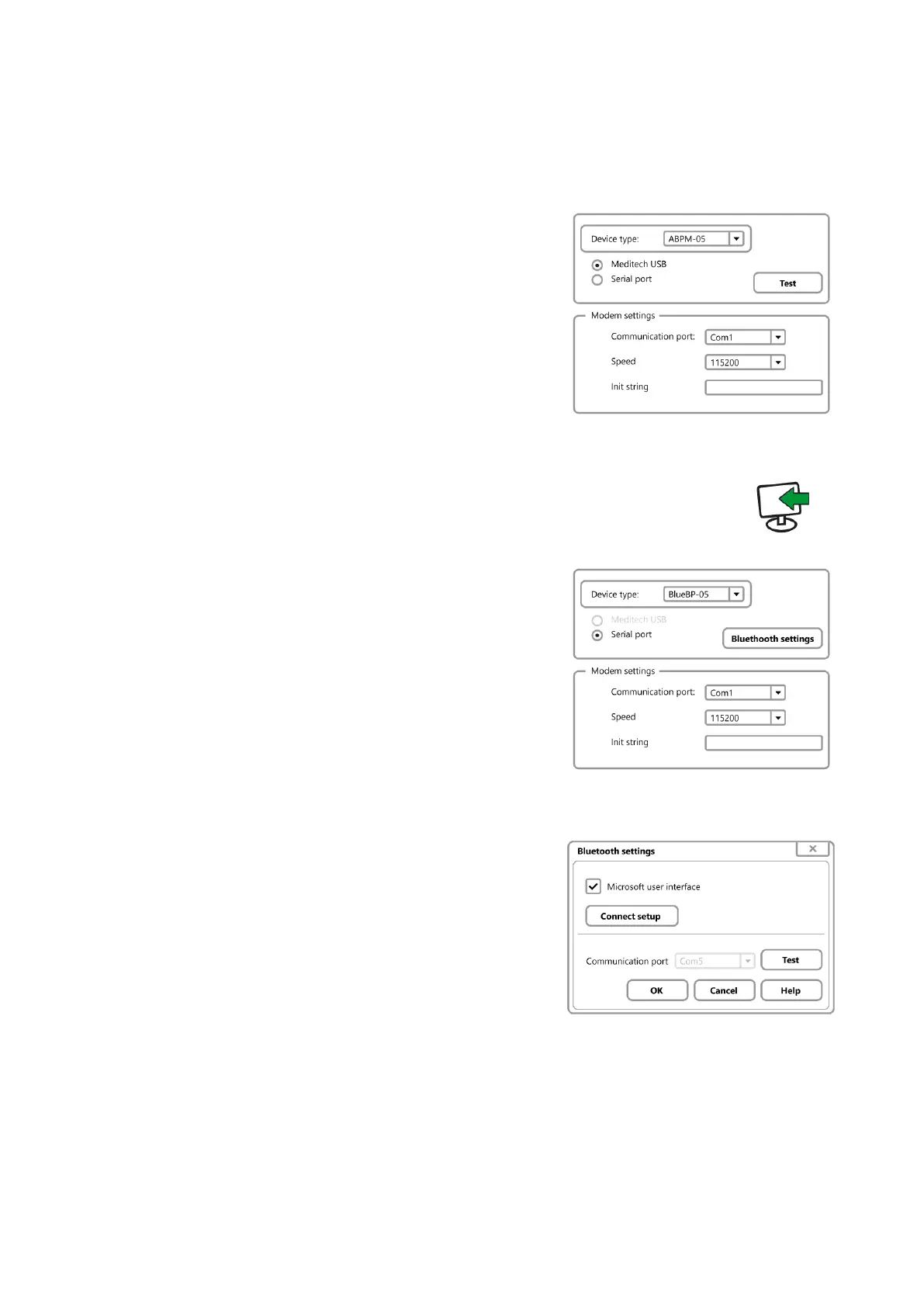
3. Test communication
ABPM-05
CardioVisions:
Tools/Options/Communication.
Select ABPM-05, select the type of your
interface unit, select the required port or
simply click on Test.
EasyABPM: Device/Read data.
BlueBP-05
If you want to use a BlueBP-05 with
Bluetooth under Windows XP SP 2, follow the
steps below. With other Windows versions,
please refer to the documentation of the
Bluetooth device used in your computer.
Start CardioVisions and click
Tools/Options/Communication, select
BlueBP-05 and click on Bluetooth settings.
In the appearing dialog, click on the Connect
setup button to go to the next step.


 To Next Page