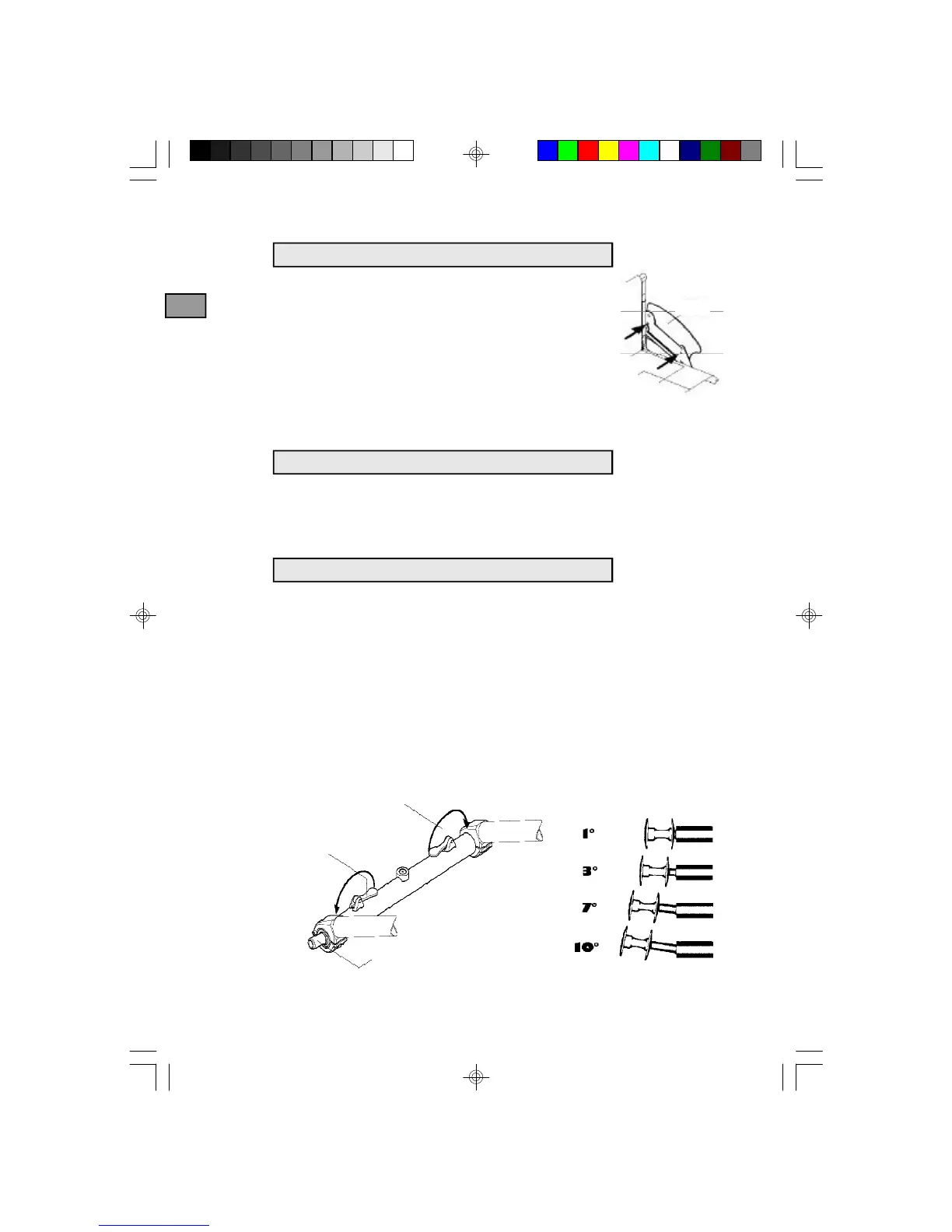
Side-guards
The side-guard is fixed to a supporter plate. You can
change the position of your side-guards or remove
them as follows: loosen the 2 Allen screws (open-
ended spanner 8mm or 10mm and Allen key 3mm).
Level the side-guard with the backwheel and position
it in front of the next available hole. Tighten screws
firmly.
CAUTION: Beware not to use the side-guards as a support while
transfering as this may cause injuries !
Tyre covers
To remove, simply pull the tire covers upwards.
To adjust, slighlty loosen the 2 screws binding the clip to the tire cover.
Level the tyre cover with the tyre. Tighten the screws again.
Axle receiver
30
Side-
guard
GB
Eccentric lever
Vario-Ax: Adjustable camber bar
Camber adjustment
Loosen the eccentric levers. Hold the backwheel through the spokes,
around the hub and pull it outwards until you reach the desired camber
(1°, 3°, 7°, 10°). Press the eccentric lever back into place. Operate the
same way for the other side, taking care that the camber is the same for
both wheels.
CAUTION: Before closing the eccentric levers, make sure that the
axle receiver has snapped into one of the 4 camber
positions inside the bar.
Eccentric lever
k-Serie D_GB.p65 27.03.02, 11:4130




 To Next Page