12
3 - Troubleshooting
4 – Replacing the Batteries
Caution: The thermometer does not operate with dead or low batteries and does not allow
connection to an external power supply.
1) Before replacing the batteries, ensure the device is o.
2) Pull the battery cover forward as indicated by the arrow.
3) Remove the old batteries.
4) Insert two AAA-size batteries. Ensure correct polarity as indicated inside the battery cover.
5) Slide the battery cover back in until it snaps in place.
6) Dispose of the batteries in accordance with local regulations.
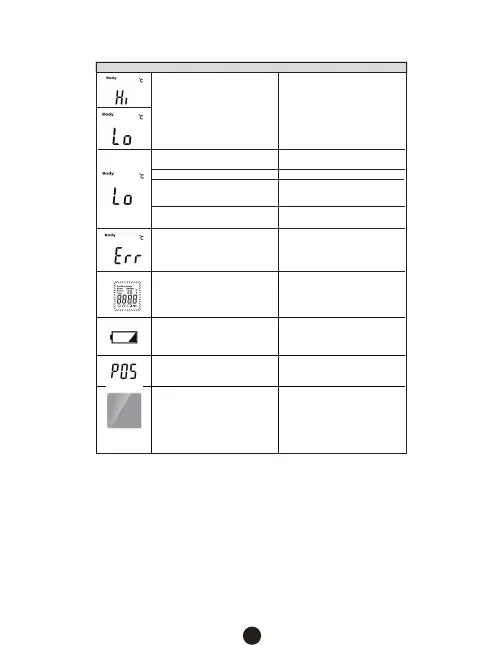
The screen flickers and then
turns o.
Replace the batteries. If the error
persists, the device may be
damaged.
Replace batteries.
The ambient temperature has
changed too quickly.
Allow the thermometer to adjust
to the new temperature.
Blank Screen
a) The power is o
b) Improper battery installation
c) The batteries are depleted.
d) Device is damaged
a) Press the On/Scan button.
b) Check battery polarity.
c) Replace the batteries
d) Contact retailer or
service center.
Body: The temperature measured
is not within the typical human
body temperature range of
93.2 °F to 109.2 °F (34.0 °C to 42.9 °C).
Surface: The temperature measure
is not within the measurable range
of
32.0 °F – 212.0 °F (0.0 °C – 100.0 °C).
Ensure the correct distance and
location is being used to measure
the temperature.
Do not attempt to measure
temperatures outside the allowable
range.
Situation
Improper Distance
Ensure the proper distance is
used: 0.4” – 2.0” (1 cm – 5 cm).
Incorrect test position.
The subject’s hair, antipyretic
stickers or perspiration is aecting
the measurement.
Remove any items that may
interfere with the measurement.
F4 temperature oset is set
incorrectly.
Adjust the temperature oset value.
The device temperature exceeds
the allowable operating
temperature range.
Move to a location within the
operating temperature range and
allow the thermometer
to adjust to the new temperature.
Message
Solution
Ensure the correct position is used.
Battery capacity is too low.
Temperature measurement is
not allowed.


 To Next Page