Mega 105WR ADSL2+ Router - Easy Start Guide
3
1.3 Mega 105WR Overview
1.3.1 Front Indicators
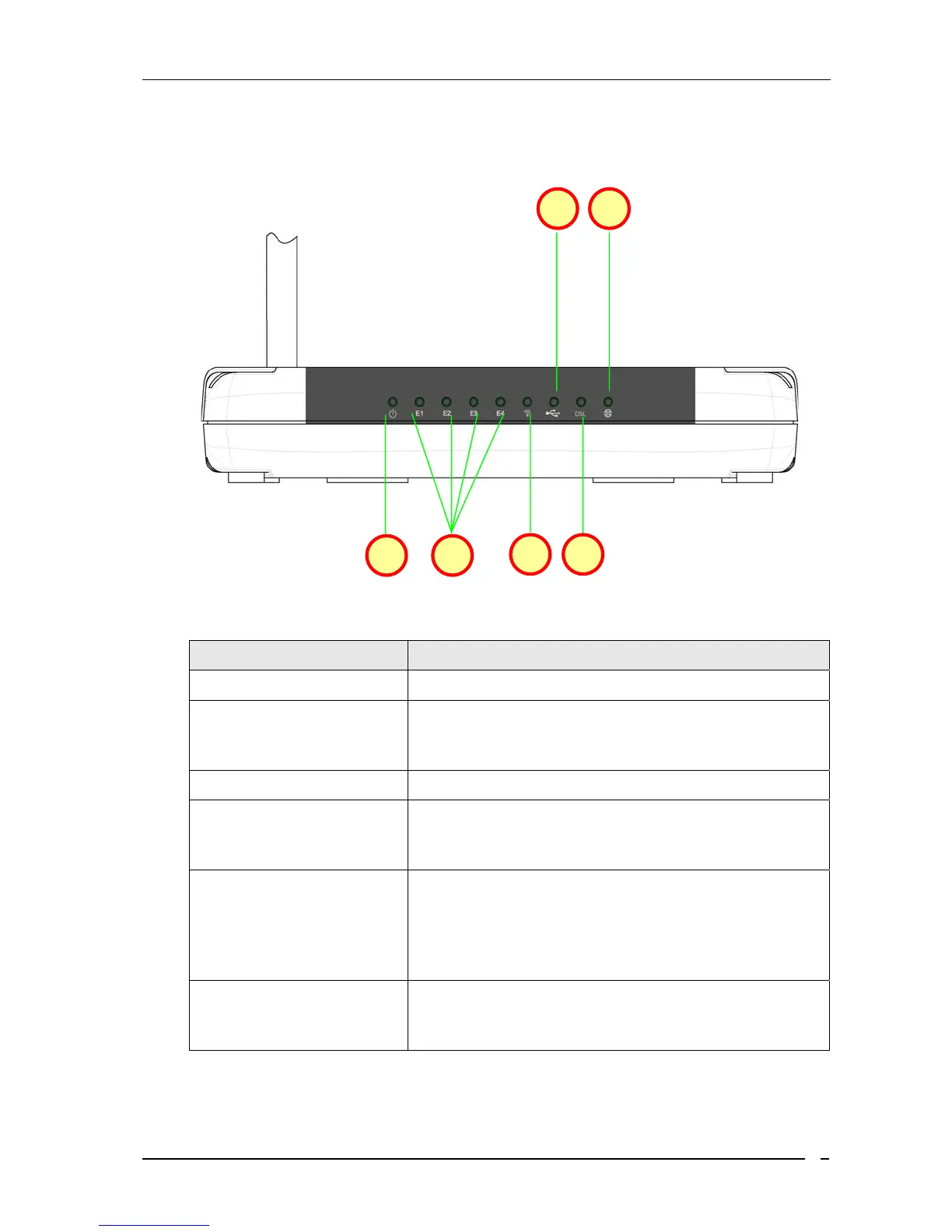
Fig 1-2 shows the front indicators of the Mega 105WR router.
Figure 1-2 : Front Indicators
LED Name Status & Meaning
1. Power
Lights up when power is supplied to the ADSL Router.
2. Ethernet(E1 - E4)
Lights up when the Ethernet cable is properly connected
from your ADSL Router to the Ethernet Card. Flickers
when the ADSL is transmitting/receiving data.
3. Wireless
Flickers when the Wireless LAN is operational.
4. USB
Lights up when the USB cable is properly connected
from your Router to the USB port. Light is Off when the
USB cable is not correctly connected
5. DSL
Light is off when no Telephone jack (RJ-11) is
connected. Flickers when the ADSL Router is trying to
establish a connection with the ADSL Service Provider
(Training). Steady Green LED. Lights up when the
ADSL connection is established.
6. Internet
Green LED lights up when the PPP connection is
established. Light is off when there is no PPP
connection.
1 2
3 5
4 6



 To Next Page