38 PN: 81127
Rev 4, 6/2017
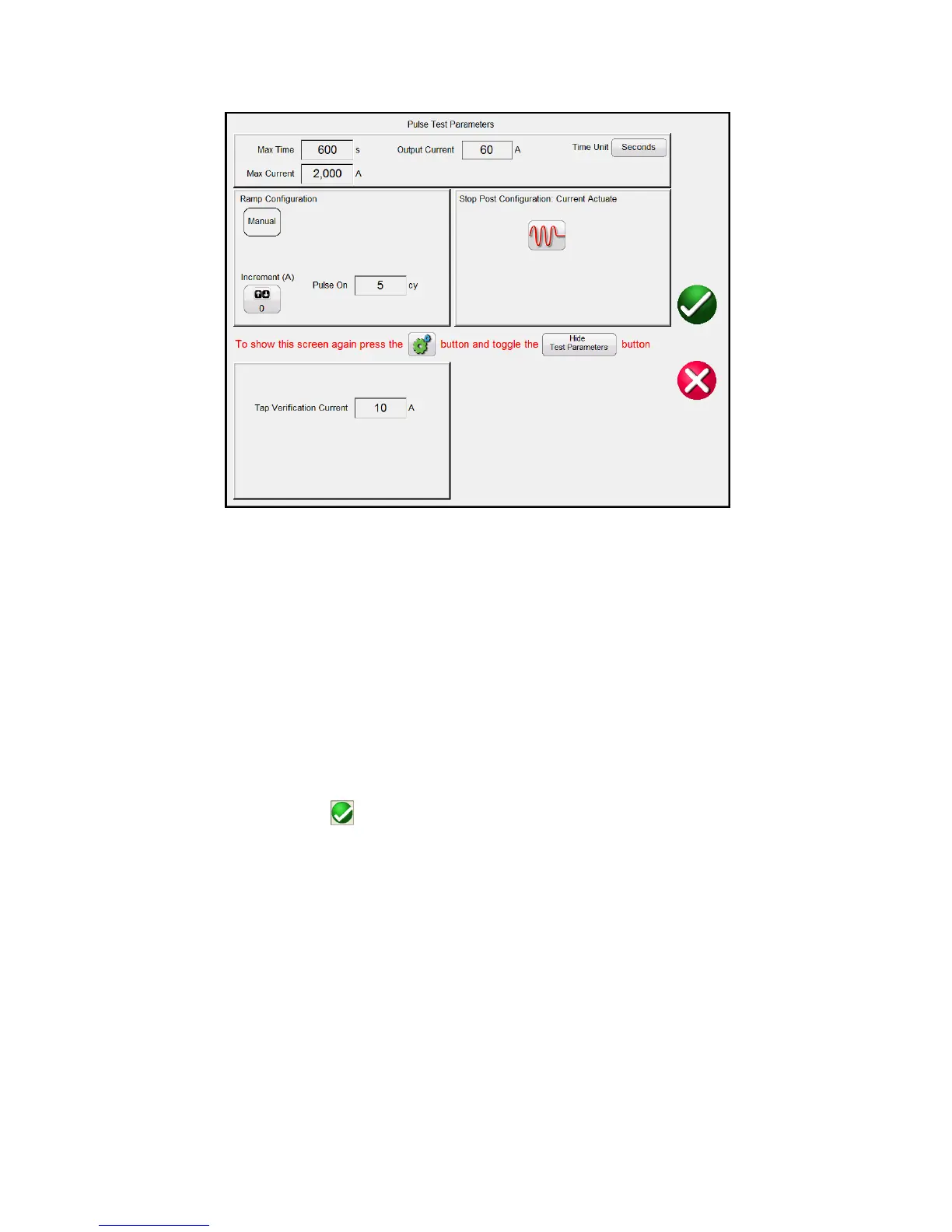
Figure 29 – Pulse Test Parameters
6) In the Pulse Test Parameters screen (Figure 29):
Set the desired Max Time and Max Current settings (see section 3.1).
Select the desired Time Unit (Seconds or Cycles).
Set the desired Ramp Increment (A) in Amps/Pulse by pressing the Increment button. Then set
the desired Pulse On duration in Cycles
Set the Tap Verification Current to an appropriate value (see section 2.3.1.3).
Set the Stop Post Configuration to the appropriate timer stop mode.
7) Press or click on the green check button. This will return you to the test screen. Using either the
Control Knob on the STVI, or the PC up and down arrows, manually ramp the output until the relay
contacts either picks up or the device trips. Note that the output will turn on for the Pulse On duration
time setting each time the control is moved up or down. Note if you try to ramp the current too fast it
will prevent the immediate ramp and display a message about cool down time.
8) When the device under test trips, the output will automatically turn off and Timer will stop indicating
the trip time. The Instantaneous Pickup value will be displayed in the Current window.
9) If this test is a continuation of the previous timing test, you simply press the Add to Report the Pickup
test value. The results have now been added to the report and the report is shown. Note that the








 To Next Page