4 Commissioning
13
Determining the network situation and changing the computer IP address
(temporary)
To ensure that the label printer can be recognized by the steam sterilizer in the practice network, the label
printer must be located in the same subnetwork as your MELAG device. The pre-programmed setting of
the label printer IP address is 192.168.40.160.
If this is not the case, the IP address of the label printer must be adapted as follows:
PLEASE NOTE
The following instructions apply to the procedure for a Windows operating system.
Should a different operating system be installed on your computer, change the IP
address manually in accordance with the relevant instructions.
ü
The label printer is connected to a power supply.
1. Connect the Ethernet cable to the Ethernet socket on the rear of the label printer and connect the
other end with a computer.
2. Working on the computer Start > Control panel > Network and Internet >Network and sharing
centre.
3. Select LAN connection and open the Properties window (right mouse-click).
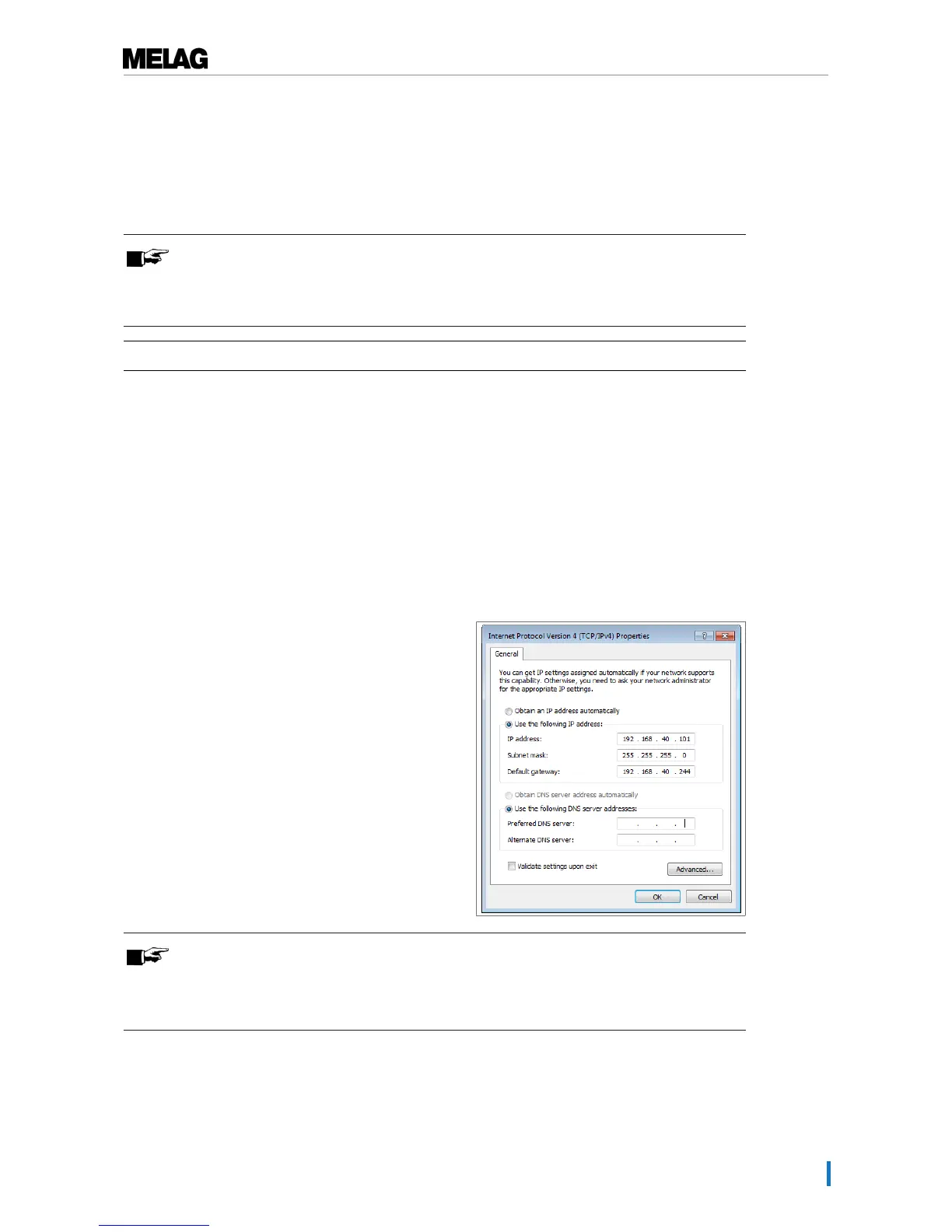
4. Working in the list Internet protocol version 4 (TCP/IP) select Properties.
5. To change the IP address of the computer, select the applicable version:
▪ The computer has a fixed IP address
▪ The computer obtains the IP address automatically
The computer has a fixed IP address:
1. Click on the [Advanced] pushbutton.
PLEASE NOTE
After concluding this configuration, reset the following settings to restore
communication between the computer and the practice network.
n Note the data displayed before continuing with the configuration.


 To Next Page