10 Settings
53
Changing the Admin PIN
PLEASE NOTE
If you forget the Admin PIN, consult your stockist/MELAG customer services provider.
The Admin PIN (standard: 1000) can be edited like every other User PIN and should be changed after de-
livery.
User authentication for sterilization
The user authentication can be set to ensure exact logging and verification. User authentication is per-
formed by entry of the user PIN. The following settings are possible:
▪ Query user authentication upon program start
▪ Query user authentication upon program end
▪ Query user authentication upon program start and end
▪ You can skip the query user authentication
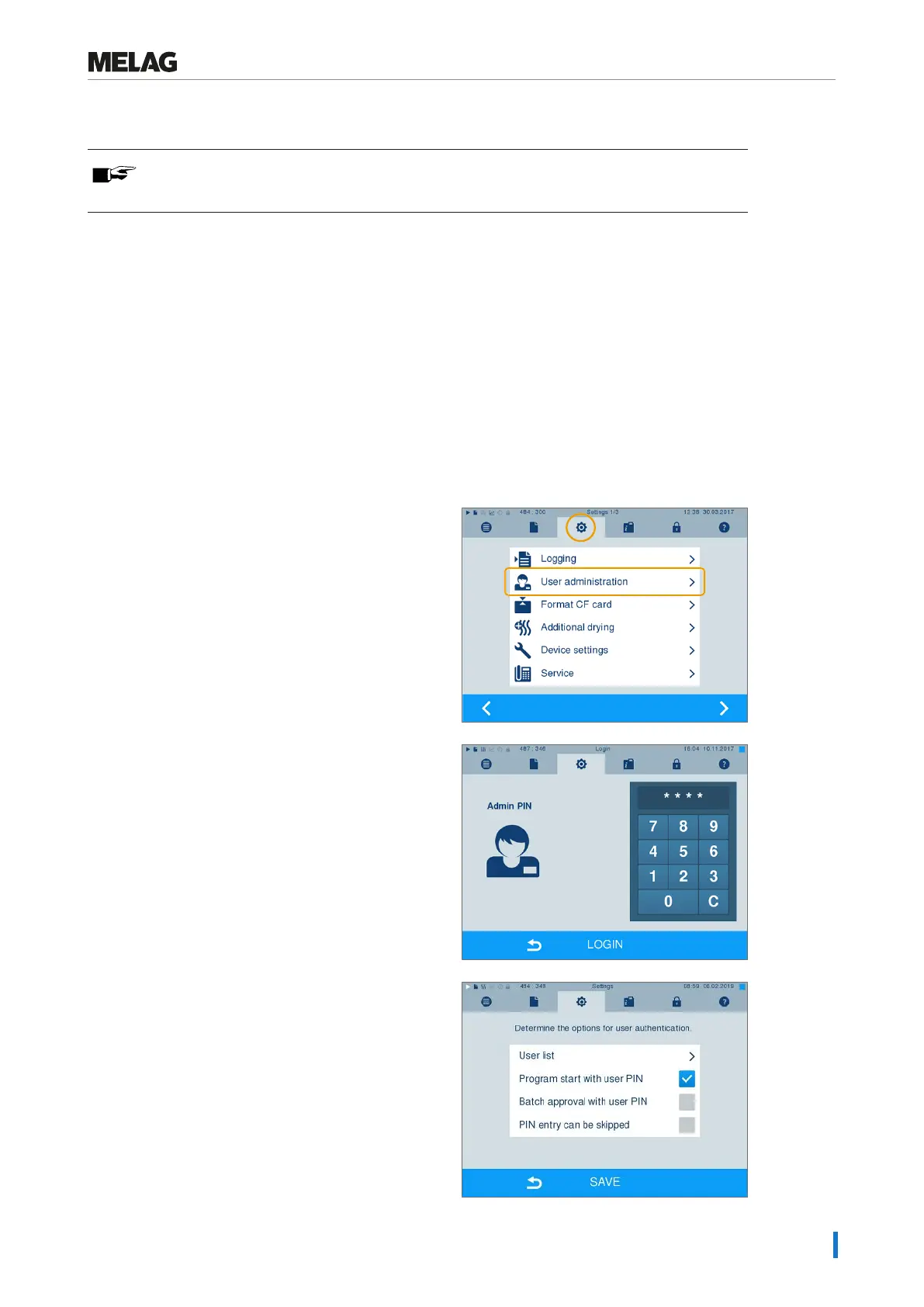
Determining options for the user authentication
1. Select menu Settings > User administration.
2. User administration menu and perform settings,
LOGIN. In order to access the User
administration menu and perform settings, enter
the admin PIN (standard: 1000) and confirm with
LOGIN. The display switches to window User
administration.
3. Set a checkmark next to Program start with
user PIN to perform user authentication upon every
program start. The program will start only after entry
of the user PIN.












 To Next Page