EasyManua.ls Logo

MELICONI Speedy 210 combo - Remote Control Usage and Troubleshooting; Buttons and Functions Use

MELICONI Speedy 210 combo
7 pages
Print Icon
To Next Page IconTo Next Page
To Previous Page IconTo Previous Page
Loading...
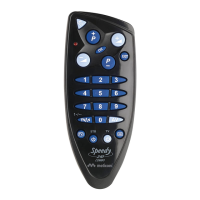
IMPORTANT: sometimes, to switch on the TV, you must press the [ON TV] button.
The functions of the buttons described below are available only if they are also present on the original device
BUTTONS AND FUNCTIONS USE
ON / OFF - switches the
decoder ON and OFF
Numeric keypad
for exiting TELETEXT
and returning to
normal screen
TELETEXT button
Exits the MENU
Turns up the TV volume
Select the previous
program
Confirm selection
ON / OFF - switches
the TV OFF and in
some cases ON
Select the next program
Indicator light
Turns down
the TV volume
Selects digital TV
and radio
For selecting an
external input source
TV ON - sometimes
needed to switch ON the TV

Other manuals for MELICONI Speedy 210 combo

Related product manuals