EasyManua.ls Logo

MELICONI FULLY 8 - User Manual

MELICONI FULLY 8
36 pages
Go to English
Print Icon
To Next Page IconTo Next Page
Loading...
1
UTILIZZO TASTI E FUNZIONI
INSERIMENTO DELLE BATTERIE
PREDISPOSIZIONE PER L’USO
Prima di iniziare la programmazione del telecomando leggete attentamente le istruzioni!
Per comandare i vostri apparecchi è indispensabile programmare il vostro FULLY 8 come descritto
nei paragrafi successivi oppure .
Avvertenza: programmate un apparecchio per volta.
Prima di utilizzare il telecomando, inserite le batterie e programmatelo.
Il telecomando necessita di 2 batterie nuove AAA/LR03 alcaline. Inseritele come illustrato:
Ricordate di sostituire le batterie una volta all’anno.
Sostituite le batterie se durante l’utilizzo del telecomando l’indicatore
luminoso inizia a lampeggiare. Le batterie stanno per esaurirsi.
Questo telecomando è dotato di memoria permanente, non perde
l’impostazione dei codici anche se rimane senza batterie.
Nel caso in cui doveste riprogrammare il telecomando è utile aver
annotato il codice relativo ai vostri apparecchi sull’etichetta adesiva che
trovate all’interno del coperchio batterie.
BA
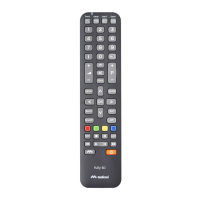
Il telecomando universale FULLY 8
è ideale per sostituire fino a 8 telecomandi di qualsiasi marca per TV, VCR (videoregistratore), DVD,
SAT, TER (Digitale Terrestre) e TV via cavo.
Conservate il Libretto Istruzioni e Codici nel caso in cui doveste
avere necessità di consultarlo ulteriormente in futuro.
I
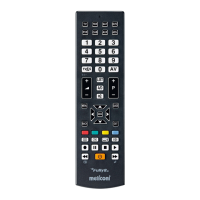
Tasti per selezionare l’apparecchio
che si vuole comandare.
Tastiera numerica.
Per selezionare un terminale di
entrata esterno.
Per controllare il volume dell’audio
-
.
Per controllare il volume dell’audio
+
.
Tasti di controllo del televideo
Per selezionare il programma successivo
o per accendere il TV.
Per selezionare il programma
precedente o per accendere il TV.
Indicatore luminoso.
Area specifica per SET TOP BOX
Interrompe e ripristina l’audio.
ON/OFF per spegnere, e in alcuni casi
per accendere l’apparecchio.
Tasti funzione VCR/DVD:
RECORD - PAUSA - STOP - PLAY
oppure funzioni di fastext
Funzioni AVANTI / INDIETRO per VCR e DVD
Per muoversi all’interno
del MENU oppure per il controllo
LUMINOSITÀ/COLORE.
Per confermare una scelta.
Question and Answer IconNeed help?

Do you have a question about the MELICONI FULLY 8 and is the answer not in the manual?

MELICONI FULLY 8 Specifications

General IconGeneral
On/off switchYes
Number of devices supported8
InterfaceIR Wireless
Input typePress buttons
Product colorBlack
Built-in displayNo
Battery technologyAlkaline

Summary

Remote Control Functions Overview

Appliance Selection and Numeric Keypad

Keys to select the desired appliance and the numeric keypad for direct input.

Volume and Channel Control

Buttons for adjusting audio volume and navigating through channels.

Menu Navigation and Special Functions

Controls for navigating menus, brightness/color, and VCR/DVD/Teletext functions.

Input Selection and Power

Keys for external input selection and the main power on/off function.

Battery Installation and Management

Fitting the Batteries

Instructions for correctly inserting new AAA/LR03 alkaline batteries into the remote.

Battery Usage Guidelines

Recommendations for battery replacement frequency and low battery indication.

Remote Control Setup and Programming

Programming by Brand Code

Method to program the remote by entering a specific 4-digit code for the appliance brand.

Global Search Programming

Procedure to search for compatible codes when the brand code is unknown or unavailable.

Code Management and Troubleshooting

Notifying and Re-Programming Codes

How to find, note, and re-enter stored codes for future use.

Troubleshooting Common Issues

Solutions for problems like non-responsive controls or incorrect functions.

Advanced Operations and Tips

Identifying Memorized Codes

Procedure to identify the 4-digit code currently stored in the remote.

Programming by Identified Code

How to program the remote using a known 4-digit code.

Usage Tips and Maintenance

Advice on operating the remote, handling batteries, and warranty information.

Related product manuals