53280 / 53281
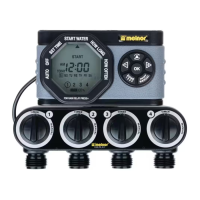
Advanced Four-Zone Electronic Water Timer
User Instructions
n
English
53280_INS_ENG_01
ZONE
RESET
AM
PM
SU FR SATHWETUMO
TODAY
DELAY
NEXT START TIME
WATER DAY EVERY
A
U
T
O
A
R
R
Ê
T
H
E
U
R
E
R
É
G
L
É
E
D
É
B
U
T
D
’
A
R
R
O
S
A
G
E
D
U
R
É
E
D
’
A
R
R
O
S
A
G
E
F
R
É
Q
U
E
N
C
E
A
U
T
O
O
F
F
S
E
T
T
I
M
E
S
T
A
R
T
W
A
T
E
R
H
O
W
L
O
N
G
H
O
W
O
F
T
E
N
F
O
R
R
A
I
N
D
E
L
A
Y
P
R
E
S
S
P
A
U
S
E
P
O
U
R
P
L
U
I
E
,
A
P
P
U
Y
E
Z
S
U
R
3280_PRL_B_01
Cursor Button
+/- Buttons
OK Button
Manual Watering Button
Manual Watering Knobs
Zone 1 2 3 4 Button
Battery Indicator
Control
Unit
Valve
Unit
ZONE RESET
AM
PM
SU FR SATHWETUMO
TODAY
DELAY
NEXT START TIME
WATER DAY EVERY
A
U
T
O
A
R
R
Ê
T
H
E
U
R
E
R
É
G
L
É
E
D
É
B
U
T
D
’
A
R
R
O
S
A
G
E
D
U
R
É
E
D
’
A
R
R
O
S
A
G
E
F
R
É
Q
U
E
N
C
E
A
U
T
O
O
F
F
S
E
T
T
I
M
E
S
T
A
R
T
W
A
T
E
R
H
O
W
L
O
N
G
H
O
W
O
F
T
E
N
F
O
R
R
A
I
N
D
E
L
A
Y
P
R
E
S
S
P
A
U
S
E
P
O
U
R
P
L
U
I
E
,
A
P
P
U
Y
E
Z
S
U
R
3280_PRL_B_01
Battery Installation & Assembly
Batteries
■n Install 2 × AA alkaline batteries by removing the battery holder from the back of the Timer Control Unit and
inserting the batteries as indicated. Replace the battery holder.
■n NOTE: Do not use rechargeable batteries . Recycle batteries after use.
Installation
■n Turn the support bracket forward on the Timer Valve Unit.
■n Slide the Timer Control Unit onto the bracket.
■n Plug the cable into the back of the Timer Valve Unit.
■n Attach the timer to an outside faucet and turn on the water. Leave the faucet on while the timer is attached.
■n NOTE: You may program the timer before attaching it to the faucet.
We recommend replacing batteries when the indicator reaches
■n
■n
Setting the Clock
■n Touch any button to wake the timer.
■n Using the Cursor Button , move the arrow to Set Time.
■n Press the & buttons to adjust the clock to the current time. Press
■n Adjust the current day-of-the-week using the & buttons. Press
■n Press the Cursor Button
again to set the time and move to the next setting, Start Water.
Select when to water
■n With the arrow pointing to Start Water, use the & buttons to select the first time of the day you want to water.
All remaining watering cycles during the day will be based on this time.
■n Press ZONE to change the zone. You must set start time for each zone you are programming. You must first enter
a start time for each zone you are programming before any other settings for a zone.
■n Press the Cursor Button
to move to the next setting.
How Long to Water
■n With the arrow pointing to How Long use the & buttons to select the length of each watering cycle.
■n Cycles can be up to 360 minutes (6 hours) in duration.
■n Press ZONE to change the zone. You must set How Long for each zone you are programming before proceding.
■n Press the Cursor Button
to move to the next setting.
ZONE
RESET
AM
PM
SU FR SATHWETUMO
TODAY
DELAY
NEXT START TIME
WATER DAY EVERY
A
U
T
O
A
R
R
Ê
T
H
E
U
R
E
R
É
G
L
É
E
D
É
B
U
T
D
’
A
R
R
O
S
A
G
E
D
U
R
É
E
D
’
A
R
R
O
S
A
G
E
F
R
É
Q
U
E
N
C
E
A
U
T
O
O
F
F
S
E
T
T
I
M
E
S
T
A
R
T
W
A
T
E
R
H
O
W
L
O
N
G
H
O
W
O
F
T
E
N
F
O
R
R
A
I
N
D
E
L
A
Y
P
R
E
S
S
P
A
U
S
E
P
O
U
R
P
L
U
I
E
,
A
P
P
U
Y
E
Z
S
U
R
ZONE
RESET
AM
PM
SU FR SATHWETUMO
TODAY
DELAY
NEXT START TIME
WATER DAY EVERY
A
U
T
O
A
R
R
Ê
T
H
E
U
R
E
R
É
G
L
É
E
D
É
B
U
T
D
’
A
R
R
O
S
A
G
E
D
U
R
É
E
D
’
A
R
R
O
S
A
G
E
F
R
É
Q
U
E
N
C
E
A
U
T
O
O
F
F
S
E
T
T
I
M
E
S
T
A
R
T
W
A
T
E
R
H
O
W
L
O
N
G
H
O
W
O
F
T
E
N
F
O
R
R
A
I
N
D
E
L
A
Y
P
R
E
S
S
P
A
U
S
E
P
O
U
R
P
L
U
I
E
,
A
P
P
U
Y
E
Z
S
U
R
ZONE
RESET
PM
SU FR SATHWETUMO
TODAY
DELAY
NEXT START TIME
WATER DAY EVERY
A
U
T
O
A
R
R
Ê
T
H
E
U
R
E
R
É
G
L
É
E
D
É
B
U
T
D
’
A
R
R
O
S
A
G
E
D
U
R
É
E
D
’
A
R
R
O
S
A
G
E
F
R
É
Q
U
E
N
C
E
A
U
T
O
O
F
F
S
E
T
T
I
M
E
S
T
A
R
T
W
A
T
E
R
H
O
W
L
O
N
G
H
O
W
O
F
T
E
N
F
O
R
R
A
I
N
D
E
L
A
Y
P
R
E
S
S
P
A
U
S
E
P
O
U
R
P
L
U
I
E
,
A
P
P
U
Y
E
Z
S
U
R
HRS
DAY
MIN
ZONE
RESET MANUAL
AM
PM
SU FR SATHWETUMO
TODAY
DELAY
NEXT START TIME
WATER DAY EVERY
A
U
T
O
A
R
R
Ê
T
H
E
U
R
E
R
É
G
L
É
E
D
É
B
U
T
D
’
A
R
R
O
S
A
G
E
D
U
R
É
E
D
’
A
R
R
O
S
A
G
E
F
R
É
Q
U
E
N
C
E
A
U
T
O
O
F
F
S
E
T
T
I
M
E
S
T
A
R
T
W
A
T
E
R
H
O
W
L
O
N
G
H
O
W
O
F
T
E
N
F
O
R
R
A
I
N
D
E
L
A
Y
P
R
E
S
S
P
A
U
S
E
P
O
U
R
P
L
U
I
E
,
A
P
P
U
Y
E
Z
S
U
R
How Often to Water
■n With the arrow pointing to How Often use the & buttons to select the watering frequency.
■n This timer offers two ways to select watering frequency. 5a. Select Days 5b. Regular Intervals
Select Days Example
SUNDAY MONDAY TUESDAY WEDNESDAY THURSDAY FRIDAY SATURDAY
Regular Intervals Examples
SUNDAY MONDAY TUESDAY WEDNESDAY THURSDAY FRIDAY SATURDAY
SUNDAY MONDAY TUESDAY WEDNESDAY THURSDAY FRIDAY SATURDAY
SUNDAY MONDAY TUESDAY WEDNESDAY THURSDAY FRIDAY SATURDAY
EVERY 2 DAY
Y
WEEK
WEEK
ONE
WEEK
TWO
WEEK
ONE
WEEK
TWO
EVERY 3 DAY
How Often to Water, Select Days
■n With the arrow pointing to How Often use the & buttons to navigate days-of-the-week.
■n When a day is flashing, you can press OK to select it. The day will be outlined when selected.
■n After selecting days, continue pressing the button until EVERY 24 HRS appears.
■n In order to water once every 24 hours (once per day) on the selected days, simply press the Cursor Button
to
move to the next setting. If you want to water more than once a day, press the button to select between 1 and 24
times per day.
■n Press ZONE to change the zone or the Cursor Button
to move to the next setting.
HRS
DAY
MIN
ZONE
RESET MANUAL
AM
PM
SU FR SATHWETUMO
TODAY
DELAY
NEXT START TIME
WATER DAY EVERY
A
U
T
O
A
R
R
Ê
T
H
E
U
R
E
R
É
G
L
É
E
D
É
B
U
T
D
’
A
R
R
O
S
A
G
E
D
U
R
É
E
D
’
A
R
R
O
S
A
G
E
F
R
É
Q
U
E
N
C
E
A
U
T
O
O
F
F
S
E
T
T
I
M
E
S
T
A
R
T
W
A
T
E
R
H
O
W
L
O
N
G
H
O
W
O
F
T
E
N
F
O
R
R
A
I
N
D
E
L
A
Y
P
R
E
S
S
P
A
U
S
E
P
O
U
R
P
L
U
I
E
,
A
P
P
U
Y
E
Z
S
U
R
HRS
DAY
MIN
ZONE
RESET MANUAL
AM
PM
SU FR SATHWETUMO
TODAY
DELAY
NEXT START TIME
WATER DAY EVERY
A
U
T
O
A
R
R
Ê
T
H
E
U
R
E
R
É
G
L
É
E
D
É
B
U
T
D
’
A
R
R
O
S
A
G
E
D
U
R
É
E
D
’
A
R
R
O
S
A
G
E
F
R
É
Q
U
E
N
C
E
A
U
T
O
O
F
F
S
E
T
T
I
M
E
S
T
A
R
T
W
A
T
E
R
H
O
W
L
O
N
G
H
O
W
O
F
T
E
N
F
O
R
R
A
I
N
D
E
L
A
Y
P
R
E
S
S
P
A
U
S
E
P
O
U
R
P
L
U
I
E
,
A
P
P
U
Y
E
Z
S
U
R
53280_INS_01.indd 1 10/2/15 10:46 AM

 Need help?
 General




 To Next Page