EasyManua.ls Logo

Melnor AquaTimer 63100 User Manual

Melnor AquaTimer 63100
5 pages
To Next Page IconTo Next Page
Page #1 background imageLoading...
Page #1 background image
DELAY
FOR
EVERY
RESET
MANUAL
NEXT START TIME
MIN
HRS
DAY
PM
AM
START WATER HOW LONG
OFF
HOW OFTEN AUTO
SET CLOCK
RAIN DELAY, HOLD
Zone 1 Zone 2
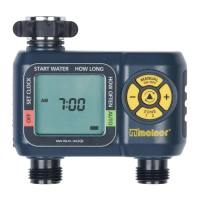
+/- Buttons
Zone Button
Battery Indicator
Manual Watering Button
Cursor Button
DELAY
FOR
EVERY
RESET
MANUAL
NEXT START TIME
MIN
HRS
DAY
PM
AM
START WATER HOW LONG
OFF
HOW OFTEN AUTO
SET CLOCK
RAIN DELAY, HOLD
We recommend replacing batteries when the indicator reaches
START WATER HOW LONG
OFF
HOW OFTEN AUTO
SET CLOCK
RAIN DELAY, HOLD
START WATER HOW LONG
OFF
HOW OFTEN AUTO
SET CLOCK
RAIN DELAY, HOLD
START WATER HOW LONG
OFF
HOW OFTEN AUTO
SET CLOCK
RAIN DELAY, HOLD
START WATER HOW LONG
OFF
HOW OFTEN AUTO
SET CLOCK
RAIN DELAY, HOLD
SUNDAY MONDAY TUESDAY WEDNESDAY THURSDAY FRIDAY SATURDAY
EVERY 2 DAY
EVERY 1 DAY
EVER
Y
WEEK
WEEK
ONE
WEEK
TWO
WEEK
ONE
WEEK
TWO
EVERY 3 DAY
Note: You will see Zone 1 highlighted at the bottom of
the screen; program Zone 1 before moving on to Zone 2.
1
6
5
4
3
2
n melnor
STARTWATER HOW LONG
RAIN DELAY,HOLD >
AquaTimer
ON/ OFF
ZONE
63100
Two-Zone Automatic Water Timer
UserInstructions English
63100 INS ENG 01
START WATER HOW LONG
ON/
ZON€
AM
o
RAIN DELAY, HOLD
Zone I
Understanding Zones
o
ManualWateringButton
Cursor Button
+/- Buttons
Zone Button
BatteryIndicator
Zone 2
I
2
Thisis a two zonetimerallowingyouto watertwo differentareasfromthe samefaucet.
Eachzonecanbe programmedwith upto four differentstarttimes.
Battery Installation & Assembly
Removethe batteryholderfromthe backof theTimer Control Unit.
InserttwoAAalkalinebatteries(Donotuserechargeablebatteries)
as indicatedonthe batteryholder.Replacethe batteryholder,making
surethat it isfirmlyandsecurelyplacedintheTimer Control Unit.
NOTE:Donotuseyourtimerwhentheairtemperatureisbelow400F
(4.50C).Whenstoringyourtimer,besureit is ina dry placeand
protectedfromfrost.
Werecommendreplacingbatterieswhenthe indicatorreaches
Installation of the Timer
Attach the timer to an outside faucet and turn on the water. The water must be left on while the
timeris attachedto thefaucetfor yourtimerto operate.
NOTE:Youmaychooseto programyourtimerbeforeor afterattachingit to thefaucet.
Question and Answer IconNeed help?

Do you have a question about the Melnor AquaTimer 63100 and is the answer not in the manual?

Melnor AquaTimer 63100 Specifications

General IconGeneral
TypeDigital
Number of Programs4
Number of Stations1
Watering Duration1 minute to 6 hours
Inlet Size3/4 inch
Outlet Size3/4 inch
MaterialPlastic
Weight1.1 pounds
Watering FrequencyEvery 6, 12, 24, 48, or 72 hours; or specific days of the week
Power Source2 AA batteries
Rain DelayYes, up to 24, 48, or 72 hours

Related product manuals