EasyManua.ls Logo

Melnor AquaTimer 63015 - User Manual

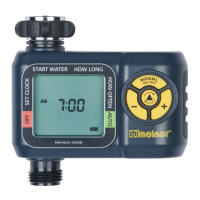
Melnor AquaTimer 63015
2 pages
Print Icon
To Next Page IconTo Next Page
Loading...
63015
Automatic Water Timer
User Instructions
n
English
63015_INS_ENG_01
START WATER HOW LONG
OFF
HOW OFTEN AUTO
SET CLOCK
RAIN DELAY, HOLD
DELAY
FOR
EVERY
RESET
MANUAL
NEXT START TIME
MIN
HRS
DAY
PM
AM
Cursor Button
+/- Buttons
Manual Watering Button
Battery Indicator
START WATER HOW LONG
OFF
HOW OFTEN AUTO
SET CLOCK
RAIN DELAY, HOLD
DELAY
FOR
EVERY
RESET
MANUAL
NEXT START TIME
MIN
HRS
DAY
PM
AM
1
Battery Installation & Assembly
Remove the battery holder from the back of the Timer
Control Unit. Insert two AA alkaline batteries (Do not
use rechargeable batteries) as indicated on the battery
holder. Replace the battery holder, making sure that it
is rmly and securely placed in the Timer Control Unit.
NOTE: Do not use your timer when the air temperature
is below 40°F (4.5° C). When storing your timer, be
sure it is in a dry place and protected from frost.
Installation of the Timer
Attach the timer to an outside faucet and turn on the water. The water must
be left on while the timer is attached to the faucet for your timer to operate.
NOTE: You may choose to program your timer before or after attaching it
to the faucet.
2
SETTING THE CLOCK
Touch any button to wake the timer.
Using the button, move the arrow to SET CLOCK.
Press the & buttons to adjust the clock to the current time.
Press the
button again to set the time and move to the next setting,
START WATER.
3
SELECT WHEN TO WATER
With the arrow pointing to START WATER, use the & buttons to
select the rst time of the day you want to water. All remaining watering
cycles during the day will be based on this time.
Press the
button to move to the next setting.
4
SELECT HOW LONG TO WATER
With the arrow pointing to HOW LONG, use the & buttons to select
the length of each watering cycle.
Cycles can be up to 360 minutes (6 hours) in duration.
Press the
button to move to the next setting.
5
SELECT HOW OFTEN TO WATER
With the arrow pointing to HOW OFTEN, use
the & buttons to select the watering
frequency.
Watering can be as often as Every 1 Hours or
little as Every 7 Days (once per week)
Press the
button to complete programming.
The timer will enter AUTO mode and the program
will be active. Watering will begin with the next
available watering time.
6
AUTO MODE
After programming, the timer will be in AUTO mode.
The screen display will toggle between the current TIME and the NEXT
START TIME. This will allow you to see at a glance what will happen next.
If the next watering cycle is more than 24 hours away, the NEXT START
TIME will be displayed in days instead showing a time.
We recommend replacing batteries when the indicator reaches
START WATER HOW LONG
OFF
HOW OFTEN AUTO
SET CLOCK
RAIN DELAY, HOLD
DELAY
FOR
EVERY
RESET
MANUAL
NEXTSTART TIME
MIN
HRS
DAY
PM
AM
START WATER HOW LONG
OFF
HOW OFTEN AUTO
SET CLOCK
RAIN DELAY, HOLD
DELAY
FOR
EVERY
RESET
MANUAL
NEXTSTART TIME
MIN
HRS
DAY
PM
AM
START WATER HOW LONG
OFF
HOW OFTEN AUTO
SET CLOCK
RAIN DELAY, HOLD
DELAY
FOR
EVERY
RESET
MANUAL
NEXTSTART TIME
MIN
HRS
DAY
PM
AM
START WATER HOW LONG
OFF
HOW OFTEN AUTO
SET CLOCK
RAIN DELAY, HOLD
DELAY
FOR
EVERY
RESET
MANUAL
NEXTSTART TIME
MIN
HRS
DAY
PM
AM
START WATER HOW LONG
OFF
HOW OFTEN AUTO
SET CLOCK
RAIN DELAY, HOLD
DELAY
FOR
EVERY
RESET
MANUAL
NEXTSTART TIME
MIN
HRS
DAY
PM
AM
START WATER HOW LONG
OFF
HOW OFTEN AUTO
SET CLOCK
RAIN DELAY, HOLD
DELAY
FOR
EVERY
RESET
MANUAL
NEXTSTART TIME
MIN
HRS
DAY
PM
AM
START WATER HOW LONG
OFF
HOW OFTEN AUTO
SET CLOCK
RAIN DELAY, HOLD
DELAY
FOR
EVERY
RESET
MANUAL
NEXT START TIME
MIN
HRS
DAY
PM
AM
SUNDAY MONDAY TUESDAY WEDNESDAY THURSDAY FRIDAY SATURDAY
EVERY 2 DAY
EVERY 1 DAY
EVERY
WEEK
WEEK
ONE
WEEK
TWO
WEEK
ONE
WEEK
TWO
EVERY 3 DAY

Question and Answer IconNeed help?

Do you have a question about the Melnor AquaTimer 63015 and is the answer not in the manual?

Overview

This document describes the Melnor AquaTimer 63015 Automatic Water Timer, a device designed for outdoor use to automate watering schedules.

Function Description:

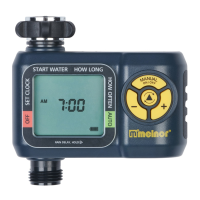
The Melnor AquaTimer 63015 is an automatic water timer that allows users to program specific watering schedules for their gardens or lawns. It connects to an outside faucet and controls the flow of water based on programmed settings. The timer features a digital display and several buttons for navigation and setting adjustments. It supports various watering frequencies, from hourly to weekly, and allows for manual watering, rain delay, and an "OFF" mode to temporarily stop watering.

Important Technical Specifications:

  • Model: 63015
  • Power Source: Two AA alkaline batteries (rechargeable batteries are not recommended).
  • Operating Temperature:
    • Water temperature: Not more than 115°F (46°C).
    • Ambient air temperature: Not less than 40°F (4.5°C).
  • Watering Duration: Can be set from 0 minutes up to 360 minutes (6 hours).
  • Watering Frequency: Can be set from every 1 hour to every 7 days.
  • Rain Delay: Up to 7 days.

Usage Features:

Battery Installation & Assembly:

  • Remove the battery holder from the back of the Timer Control Unit.
  • Insert two AA alkaline batteries, ensuring correct polarity.
  • Replace the battery holder firmly and securely.
  • Attach the timer to an outside faucet and turn on the water. The water must remain on for the timer to operate.
  • The timer can be programmed before or after attaching it to the faucet.

Setting the Clock:

  • Touch any button to wake the timer.
  • Use the cursor button to move the arrow to "SET CLOCK."
  • Use the +/- buttons to adjust the clock to the current time.
  • Press the cursor button again to set the time and move to the next setting, "START WATER."

Select When to Water:

  • With the arrow pointing to "START WATER," use the +/- buttons to select the first watering start time of the day. All subsequent watering cycles will be based on this time.
  • Press the cursor button to move to the next setting.

Select How Long to Water:

  • With the arrow pointing to "HOW LONG," use the +/- buttons to select the duration for each watering cycle (0 to 360 minutes).
  • Press the cursor button to move to the next setting.

Select How Often to Water:

  • With the arrow pointing to "HOW OFTEN," use the +/- buttons to select the watering frequency (e.g., every 1 hour, every 1 day, every 2 days, etc.).
  • Press the cursor button to complete programming.
  • The timer will enter AUTO mode, and the program will be active. Watering will begin at the next available watering time.

Auto Mode:

  • After programming, the timer operates in AUTO mode.
  • The screen toggles between the current time and the "NEXT START TIME."
  • If the next watering cycle is more than 24 hours away, the "NEXT START TIME" will display in days instead of a specific time.

Rain Delay Mode:

  • To temporarily stop watering due to rain, activate "RAIN DELAY" mode.
  • Ensure the arrow is pointing to "AUTO."
  • Press the cursor button to select the delay period (up to 7 days). The delay period can be reduced with the +/- buttons.
  • In "RAIN DELAY" mode, the screen will toggle between the current time and the remaining delay time. If the delay is greater than 12 hours, the delay will be shown in days.
  • After the delay period, the watering program will resume automatically.

OFF Mode:

  • To stop watering for an extended period, push the cursor button until the arrow points to "OFF."
  • The timer will not water automatically in this mode, and the screen will display "OFF" in large letters.
  • To restart automatic watering, press the cursor button until the arrow points to "AUTO." The program will resume at the next available Start Time.

Manual Watering:

  • Press the manual button.
  • Use the +/- buttons to select the desired watering duration.
  • After a few seconds, the valve will open and then automatically close when the selected time is reached.
  • To exit manual function, press the manual button again.
  • The timer retains the last manual time in its memory. To reset it to zero, use the arrow keys.

Timer Reset:

  • To erase all settings and return the timer to its original state, press and hold the cursor button for 7 seconds.
  • The screen will display "RESET."
  • All programming will be lost after a reset.

Maintenance Features:

Open Valve During Installation:

  • If water runs continuously during installation, turn off the water.
  • Remove batteries, wait for the screen to go blank, then reinsert them. (This will not erase existing schedules).
  • Turn the water back on.
  • If the problem persists, turn off the water and use the Manual feature to open and close the valve 3 times.

Cleaning Your Timer:

  • Periodically clean your timer to remove debris or sediments.
  • Turn off the water and remove the timer from the faucet.
  • Check the filter washer. If debris is present, remove and clean it with water.
  • Activate MANUAL mode by pressing the MANUAL button. Open the valve and spray water through the valve and the faucet connection to flush out any built-up sediments or debris.

Seasonal Storage:

  • At the end of the season or when frost is expected, turn off the water and remove the timer from the faucet.
  • Remove the batteries.
  • Store the timer indoors, away from freezing temperatures.

Tips for Battery Life:

  • Use fresh alkaline batteries.
  • Do not use rechargeable batteries.
  • Remove batteries at the end of the season before storing.
  • Batteries typically last about one season. More frequent watering times can drain batteries faster.

Warnings:

  • Intended for outdoor use only.
  • Avoid spraying water into electrical outlets or sources of electrical current to prevent severe electrical shock.
  • Do not use water hotter than 115°F (46°C).
  • Do not use when the ambient air temperature is below 40°F (4.5°C).
  • When not in use, remove batteries, drain, and store indoors away from freezing temperatures.

Melnor AquaTimer 63015 Specifications

General IconGeneral
BrandMelnor
ModelAquaTimer 63015
CategoryTimer
LanguageEnglish

Related product manuals