WATER DAY: “What days do you want to water?”
■ Check to be sure that the arrow on the screen is pointing to WATER DAY.
With this setting, you can select specic days to water or an interval period
of the day when watering will occur.
■ To set the watering day, use the and buttons to select the day-of-the-
week you wish to water. Press the button when the desired day-of-the-
week is highlighted on the screen. You can
select as many days as you like. The days
selected will have a square around them.
■ To water at preset intervals, press the
button on the buttonpad to navigate past the
days of the week. Press the and buttons
to set the time period (EVERY 1 DAY through
EVERY 7 DAY(s) ).
■ Press the button to move to START
WATER.
Note: You will see Zone 1 highlighted at the bottom of
the screen; program Zone 1 before moving on to Zone 2.
73100
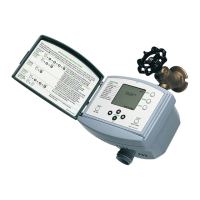
Advanced Two-Zone Electronic Water Timer
User Instructions
■
English
73100_INS_ENG_02
OK
O
N
/
O
F
F
Z
O
N
E
C
Y
C
L
E
M
A
N
U
A
L
A
B
C
D
1
2
CYCLE
HRS
DAY
MIN
RESET
MANUAL
AM
PM
TODAY
DELAY
TIME
WATER EVERY
1
2
3
4
SU
FR
SATH
WE
TUMO
A
B
C D
DAY
NEXT START
ZONE
WATER DAYSTART WATER
HOW LONG
OFF
AUTO
SET CLOCK
RAIN DELAY, HOLD
Zone 1 Zone 2
+/- Buttons
Cycle Button
Zone Button
Manual Watering Button
Battery Indicator
OK Button
Cursor Button
OK
O
N
/
O
F
F
Z
O
N
E
C
Y
C
L
E
M
A
N
U
A
L
A
B
C
D
1
2
CYCLE
HRS
DAY
MIN
RESET
MANUAL
AM
PM
TODAY
DELAY
TIME
WATER EVERY
1
2
3
4
SU
FR
SATH
WE
TUMO
A
B
C D
DAY
NEXT START
ZONE
WATER DAYSTART WATER
OFF
HOW LONG AUTO
SET CLOCK
RAIN DELAY, HOLD
Battery Installation & Assembly
■ Remove the battery holder from the back
of the Timer Control Unit. Insert two AA
alkaline batteries (Do not use rechargeable
batteries) as indicated on the battery holder.
Replace the battery holder, making sure that
it is rmly and securely placed in the Timer
Control Unit.
■ NOTE: Do not use your timer when the air
temperature is below 40°F (4.5° C). When
storing your timer, be sure it is in a dry place
and protected from frost.
Understanding Zones
■ This is a two zone timer allowing you to water two different areas from the
same faucet.
■ Each zone can be programmed with up to four different start times.
■ You can use the PLANNING TABLE provided on the back of this sheet to
help organize your watering schedule for each zone.
Installation of the Timer
■ Attach the timer to an outside faucet and turn on the water. The water must
be left on while the timer is attached to the faucet for your timer to operate.
■ NOTE: You may choose to program your timer before or after attaching it
to the faucet.
SET CLOCK: “Set Current Time and Day”
■ The Water Timer default setting is a 12-hour mode (AM/PM). To ensure
correct timing, look for either AM or PM to the left of the time. To switch
between 12-hour (AM/PM) and 24-hour (military time), hold the button
for 5 seconds. 12-hour mode shows AM or PM while 24-hour mode does
not. Note: Changing time mode will erase all programs.
■ Before setting your watering times, you must rst set the current time and
day of the week. When the batteries are rst installed, the arrow in the
screen will point to CLOCK. If it is not in that
position, press the button until the arrow
is pointing to CLOCK.
■ On your screen, a ashing box will appear
around the SU. Simply set the timer to the
current day by pressing the and buttons
on the touchpad until the square is on the
correct day. Once the correct day has been
indicated, press the button.
■ To set the time, press the and buttons
until the correct time appears on the screen, and then press .
■ Press the button (at the top of the touch pad) to move to WATER DAY.
START WATER: “What time-of-day do you want to water?”
■ You can select up to four independant start times (CYCLE A, B, C, D). With
the arrow pointing to Start Water on your screen, CYCLE A should be
highlighted, use the and buttons to select the rst watering time.
■ If you want to set another START WATER time, press to move to
CYCLE B. Repeat the process above to set the next START WATER time.
You may select up to four START WATER times.
■ When you have set all desired START WATER times, press
the
button to move to HOW LONG.
HOW LONG: “Set the length of each watering cycle.”
■ With the arrow pointing to HOW LONG, use the and buttons to select
the length of each watering cycle. After setting HOW LONG you want to
water during a selected cycle, press to move to the next cycle. Repeat
until HOW LONG has been set for each cycle.
■ HOW LONG can be set for up to 360 minutes (6 hours) for each watering
cycle. The Cycle length cannot overlap the next START WATER time.
■ Note: You can only select Watering Cycles if you have set a start time in
Step 5 above.
We recommend replacing batteries when the indicator reaches
CYCLE
HRS
DAY
MIN
RESET
MANUAL
AM
PM
TODAY
DELAY
TIME
WATER EVERY
1
2
3
4
SU
FR
SATH
WE
TUMO
A
B
C D
DAY
NEXT START
ZONE
START WATER
OFF
HOW LONG AUTO
RAIN DELAY, HOLD
WATER DAY
SET CLOCK
CYCLE
HRS
DAY
MIN
RESET
MANUAL
AM
PM
TODAY
DELAY
TIME
WATER EVERY
1
2
SU
FR
SATH
WE
TUMO
A
B
C D
DAY
NEXT START
ZONE
START WATER
OFF
HOW LONG AUTO
RAIN DELAY, HOLD
WATER DAY
SET CLOCK
CYCLE
HRS
DAY
MIN
RESET
MANUAL
AM
PM
TODAY
DELAY
TIME
WATER EVERY
1
2
3
4
SU
FR
SATH
WE
TUMO
A
B
C D
DAY
NEXT START
ZONE
WATER DAYSTART WATER
OFF
HOW LONG AUTO
SET CLOCK
RAIN DELAY, HOLD
CYCLE
HRS
DAY
MIN
RESET
MANUAL
AM
PM
TODAY
DELAY
TIME
WATER EVERY
1
2
3
4
SU
FR
SATH
WE
TUMO
A
B
C D
DAY
NEXT START
ZONE
START WATER
OFF
HOW LONG AUTO
RAIN DELAY, HOLD
WATER DAY
SET CLOCK
Hold the or buttons to advance settings
more quickly.
SETTING ANOTHER ZONE: “Keep your plants watered
on separate cycles.”
■ When you have set WATER DAY, START WATER, and HOW LONG for
Zone 1, press the button back to WATER DAY.
■ Press to select Zone 2, and repeat steps 4-6 above.
■ When all desired zones are set, press the button to enter AUTO mode.
CYCLE
HRS
DAY
MIN
RESET
MANUAL
AM
PM
TODAY
DELAY
TIME
WATER EVERY
1
2
SU
FR
SATH
WE
TUMO
A
B
C D
DAY
NEXT START
ZONE
START WATER
OFF
HOW LONG AUTO
RAIN DELAY, HOLD
WATER DAY
SET CLOCK
AUTO MODE: “Your timer is ready to go.”
■ In AUTO Mode, your timer will run the watering program you have entered.
■ The screen display will alternate between showing the current time and the
next watering cycle of each zone.

 Need help?

 To Next Page
 General