16
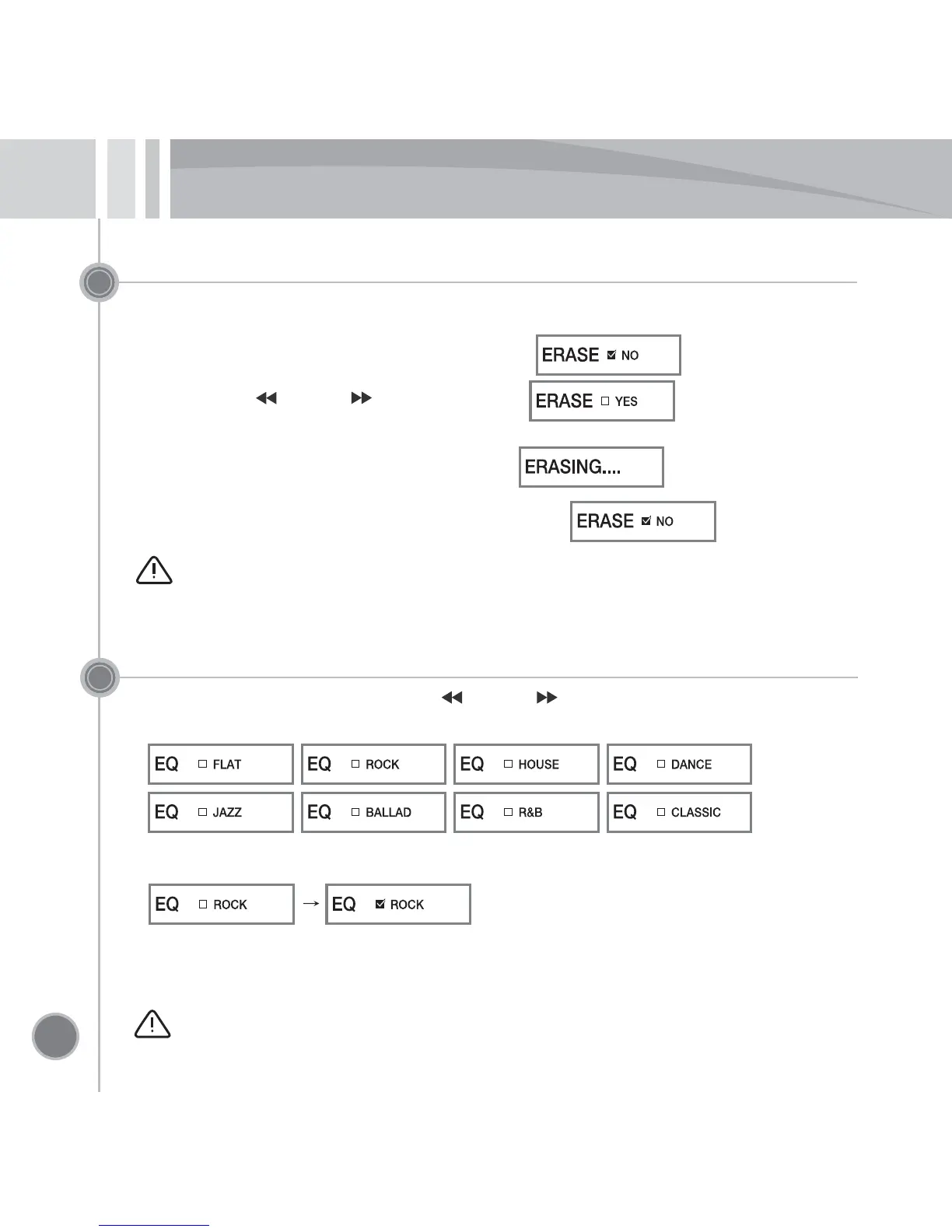
ERASE (deleting the file)
•
Play the file to delete, and check its contents.
•
Press the PLAY button to pause.
•
Pressing and holding the MODE button to switch to screen.
•
Use Previous ( ) or Next ( ) jog button to select .
•
When you press the MODE button, the screen for confirming to erase is display.
If you select ‘YES’ and press the MODE button, screen is displayed and
then disappears, and the selected file is deleted.
•
For canceling the file deletion, it is cancelled by selecting and then pressing
the MODE button.
Caution – 1) It is not possible to restore the deleted file.
2) File deletion is also possible at the PC.
Setting the EQ (playing characteristics)
•
At the EQ mode screen, Use Previous ( ) or Next ( ) jog button to select the playing
characteristics (EQ).
•
At the selected, press the MODE key to set the displayed mode.
•
When you press and hold the MODE button for 3 seconds or longer, the mode setting is saved
and the mode setup function is disabled.
* Select and play the music via the EQ (playing characteristics) setup by genre and preference.
Caution – The EQ (playing characteristics) is applied when playing the music file,
but it is set to FLAT (EQ OFF) when playing the voice file.


 To Next Page