EasyManua.ls Logo

Memorex MJB179 - User Manual

Memorex MJB179
2 pages
Print Icon
To Next Page IconTo Next Page
Loading...
Controls & Inputs
1. Power ON/OFF
2. Mute
3. Disco Light ON/OFF
4. Display
5. Stop
6.
Pair / : Press and hold to pair to a
Bluetooth device.
Press to play or pause tracks (BLUETOOTH/
USB).
7. Source: Press to change play mode: Bluetooth/
Line In/USB.
8. Mic ON/OFF
9. Speaker Light ON/OFF
10. Mic Echo Adjust
11. Master Volume Adjust
12. Mic Volume Adjust
13.
: Short press to skip audio tracks
(BLUETOOTH/USB).
Press and hold to skip 10 tracks (USB).
14. Mic Inputs
15. USB Media Port
16. Line In (3.5mm audio input)
17. Micro-USB DC Power Input
USB
LINE IN
DC IN
SPEAKER LIGHT
MASTER VOLUME
ECHO
DISCO LIGHT
POWER
MIC LEVEL
SOURCE
MIC 1 MIC 2
MIN MAX
MIN MAX
MIN MAX
MIC ON/OFF
MUTE
STOP
PAIR/
SKIP/ –10 10 /
Important Safety Instructions
• ReadtheseInstructions.
• KeeptheseInstructions.
• HeedallWarnings.
• Followallinstructions.
• Donotusethisapparatusnearwater.
• Cleanonlywithadrycloth.
• Donotblockanyventilationopenings.Installinaccordancewiththe
manufacturer’sinstructions.
• Donotinstallnearanyheatsourcessuchasradiators,heatregisters,stoves,or
otherapparatus(includingampliers)thatproduceheat.
• Donotdefeatthesafetypurposeofthepolarizedorgrounding-typeplug.A
polarizedplughastwobladeswithonewiderthantheother.Agroundingtype
plughastwobladesandathirdgroundingprong.Thewidebladeorthethird
prongareprovidedforyoursafety.Whentheprovidedplugdoesnottinto
youroutlet,consultanelectricianforreplacementoftheobsoleteoutlet.
• Protectthepowercordfrombeingwalkedonorpinchedparticularlyatplugs,
conveniencereceptacles,andthepointwheretheyexitfromtheapparatus.
• Onlyuseattachments/accessoriesspeciedbythemanufacturer.
• Unplugthisapparatusduringlightningstormsorwhenunusedforlong
periodsoftime.
• Referallservicingtoqualiedservicepersonnel.Servicingisrequired
whentheapparatushasbeendamagedinanyway,suchaspower-supply
cordorplugisdamaged,liquidhasbeenspilledorobjectshavefalleninto
theapparatus,theapparatushasbeenexposedtorainormoisture,doesnot
operatenormally,orhasbeendropped.
• Useonlywithacart,stand,tripod,bracket,ortablespeciedby
themanufacturer,orsoldwiththeapparatus.Whenacartisused,
usecautionwhenmovingthecart/apparatuscombinationtoavoid
injuryfromtip-over.
Overview
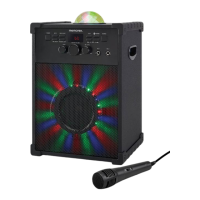
Karaoke Party Machine
Users Guide for Model MJB179 v2748-01
NOTE:Thisequipmenthasbeentestedandfoundtocomplywiththelimits
foraClassBdigitaldevice,pursuanttoPart15oftheFCCRules.Theselimits
aredesignedtoprovidereasonableprotectionagainstharmfulinterferencein
aresidentialinstallation.Thisequipmentgenerates,uses,andcanradiateradio
frequencyenergyand,ifnotinstalledandusedinaccordancewiththeinstructions,
maycauseharmfulinterferencetoradiocommunications.However,thereis
noguaranteethatinterferencewillnotoccurinaparticularinstallation.Ifthis
equipmentdoescauseharmfulinterferencetoradioortelevisionreception,which
canbedeterminedbyturningtheequipmentoffandon,theuserisencouragedto
trytocorrecttheinterferencebyoneormoreofthefollowingmeasures:
• Reorientorrelocatethereceivingantenna.
• Increasetheseparationbetweentheequipmentandreceiver.
• Connecttheequipmentintoanoutletonacircuitdifferentfrom
thattowhichthereceiverisconnected.
• Consultthedealeroranexperiencedradio/TVtechnicianforhelp.
Additional Warnings and Precautions
• CAUTION:TOPREVENTELECTRICSHOCK,MATCHWIDEBLADE
OFPLUGTOWIDESLOT,FULLYINSERT.
• Mainsplugisusedasdisconnectdeviceanditshouldremainreadilyoperable
duringintendeduse.Inordertodisconnecttheapparatusfromthemains
completely,themainsplugshouldbedisconnectedfromthemainssocket
outletcompletely.
• WARNING:Shockhazard-DoNotOpen.
• CAUTION:Useofcontrolsoradjustmentsorperformanceofprocedures
otherthanthosespeciedmayresultinhazardousradiationexposure.
• WARNING:Changesormodicationstothisunitnotexpresslyapprovedby
thepartyresponsibleforcompliancecouldvoidtheuser’sauthoritytooperate
theequipment.
• WARNING:Donotplacethisunitdirectlyontofurnituresurfaceswithany
typeofsoft,porous,orsensitivenish.Aswithanyrubbercompoundmade
withoils,thefeetcouldcausemarksorstainingwherethefeetreside.We
recommendusingaprotectivebarriersuchasaclothorapieceofglass
betweentheunitandthesurfacetoreducetheriskofdamageand/orstaining.
• CAUTION:ThedevicehasbeenevaluatedtomeetgeneralRFexposure
requirement.Thedevicecanbeusedinxed/mobile(min20cm)exposure
conditionwithoutrestriction.
WARNING:Toreducetheriskofelectric
shock,donotremovecover(orback).No
user-serviceablepartsinside.Referservicing
toqualiedservicepersonnel.
WARNING:Thisproductcanexposeyouto
chemicalsincludinglead,whichisknownto
theStateofCaliforniatocausecancer.For
moreinformationgoto:www.P65Warnings.
ca.govThisproductmeetsandcomplieswith
requiredFederalproductguidelines.
ATTENTION
RISQUE D' ÉLECTROCUTION
NE PAS OUVRIR
CAUTION
RISK OF ELECTRIC SHOCK
DO NOT OPEN
Theexclamationpointwithinanequilateral
triangleisintendedtoalerttheuserto
thepresenceofimportantoperatingand
maintenance(servicing)instructionsinthe
literatureaccompanyingtheappliance.
Thissymbolindicatesthatthisproduct
incorporatesdoubleinsulationbetween
hazardousmainsvoltageanduseraccessible
parts.
Thelightningashwitharrowheadsymbol,
withinanequilateraltriangle,isintendedto
alerttheusertothepresenceofun-insulated
“dangerousvoltage”withintheproduct’s
enclosurethatmaybeofsufcientmagnitude
toconstituteariskofelectricshocktopersons.
Rear InputsFront Controls
Features
• Bluetooth 5.0 wireless - range 60 ft.
• Voice prompts announce speaker functions
• Built-in speaker
• LED color changing lights
• 2 microphone inputs
• Microphone echo and volume control
• 3.5mm Line In
• USB port - supports MP3 le format
Includes
• USB power adapter
• Microphone
15 16 17
1 32 5 76
9 10 11 12 13 148
FCC Warnings
Warning:Changesormodicationstothisunitnotexpresslyapprovedbythe
partyresponsibleforcompliancecouldvoidtheuser’sauthoritytooperatethe
equipment.
SKIP/ –10 10 / SPEAKER LIGHT
MASTER VOLUME
ECHO
DISCO LIGHT
POWER
MIC LEVEL
SOURCE
MIC 1 MIC 2
MIN MAX
MIN MAX
MIN MAX
MIC ON/OFF
MUTE
STOP
PAIR/
4

Question and Answer IconNeed help?

Do you have a question about the Memorex MJB179 and is the answer not in the manual?

Overview

This document describes the Memorex MJB179-7248-01 Karaoke Machine, a portable audio device designed for entertainment and public address.

Function Description

The Memorex MJB179-7248-01 is a versatile karaoke machine that combines audio playback, microphone input, and Bluetooth connectivity. It allows users to play music from various sources, sing along using microphones with echo and volume control, and project LED lighting effects. The device is designed for both personal and group entertainment, offering features suitable for karaoke sessions, public speaking, or simply playing music.

Important Technical Specifications

  • Power Source: DC 9V 2A via an AC/DC power adapter. It also supports a standard USB power outlet for charging.
  • Bluetooth: Bluetooth 5.0 wireless connectivity with a range of 60 ft.
  • Audio Output: Built-in speaker.
  • Inputs:
    • Microphone inputs (1/4 inch jack).
    • USB port (supports MP3 file format).
    • Line In (3.5mm audio input).
    • DC 9V 2A power input.
  • Controls:
    • Power ON/OFF button.
    • Display.
    • Disco Light ON/OFF button.
    • Master Volume Adjust knob.
    • Mic Volume Adjust knob.
    • Mic Echo Adjust knob.
    • Speaker Light ON/OFF button.
    • USB Media Port controls: Play/Pause, Previous Track, Next Track.
    • Source button (to switch between Bluetooth/USB/Line In).
    • Micro-USB DC Power Input.
  • Included Accessories:
    • USB power adapter.
    • Microphone.

Usage Features

Powering On/Off: To power the machine, connect the USB power adapter (included) into the DC Power Input on the speaker and a standard power outlet. Press the Power ON/OFF button to turn the device on or off.

Bluetooth Wireless Pairing & Playing Audio:

  1. When the speaker first powers ON, it defaults to Bluetooth Mode and is ready to pair automatically. The display will show "Bluetooth."
  2. On your Bluetooth device, select "MJB179-7248-01" from the list of available devices.
  3. Once paired, the speaker will announce "Bluetooth is connected."
  4. Use the speaker controls or the connected Bluetooth device to play, pause, and skip tracks. Adjust the volume using the Master Volume Adjust knob on the speaker or your connected device.
  5. After initial pairing, the speaker will automatically connect to the last Bluetooth device used whenever it is in Bluetooth Mode.

USB Media Playback:

  1. Load a USB drive into the USB Media Port. The speaker will automatically switch to USB Mode, indicated on the display, and begin playing media on the drive.
  2. Use the controls on the speaker to select and play audio from the connected drive (Play/Pause, Previous Track, Next Track).

Line In Playback:

  1. Connect a 3.5mm audio cable (not included) from your audio source to the Line In port on the unit.
  2. Press the Source button to switch to Line In Mode.
  3. Use the controls on your connected device to select and play audio. Adjust the volume using the Master Volume Adjust knob on the speaker or your connected device.

Microphone Usage:

  1. Connect a microphone (included) into either of the Mic inputs (1/4 inch jack).
  2. When a microphone is connected, the microphone audio will be added to the main audio output.
  3. Before use, ensure the Mic Volume Adjust knob and Mic Echo Adjust knob are in the ON position.
  4. Use the Mic Volume Adjust knob to control the microphone volume and the Mic Echo Adjust knob to add echo effects.

Disco Light Functionality: The device features LED lighting effects. Press the Disco Light ON/OFF button to activate or deactivate these lights. The Speaker Light ON/OFF button controls the main speaker lights.

Source Selection: The Source button allows users to switch between Bluetooth, USB, and Line In input modes.

Maintenance Features

Safety Instructions: The manual emphasizes several safety precautions to ensure proper operation and longevity of the device:

  • Read All Warnings: Users must read and understand all safety warnings and instructions.
  • Clean Only with a Dry Cloth: Avoid using liquid cleaners or aerosols.
  • No Heat Sources: Do not install near heat sources such as radiators, heat registers, stoves, or other apparatus (including amplifiers) that produce heat.
  • Polarized Plug: The device uses a polarized plug (one blade wider than the other). This plug is designed to fit into a polarized outlet only one way. If it doesn't fit, reverse the plug. If it still doesn't fit, contact an electrician. Do not defeat the safety purpose of the polarized plug.
  • Power-Cord Protection: Protect the power cord from being walked on or pinched, especially at plugs, convenience receptacles, and the point where they exit from the apparatus.
  • Only Use Attachments/Accessories Specified by the Manufacturer: Using unauthorized attachments may lead to hazards.
  • Unplug During Lightning Storms or When Unused for Long Periods: This prevents damage from power surges.
  • Refer Servicing to Qualified Personnel: If the apparatus has been damaged in any way (e.g., power-supply cord or plug is damaged, liquid has been spilled, objects have fallen into the apparatus, the apparatus has been exposed to rain or moisture, does not operate normally, or has been dropped), it must be serviced by qualified personnel.
  • No Open Flames: Do not place open flame sources, such as lit candles, on the apparatus.
  • Ventilation: Ensure proper ventilation by not blocking any ventilation openings.
  • Mains Plug as Disconnect Device: The mains plug is used as the disconnect device; the disconnect device shall remain readily operable.

FCC Compliance: The device complies with Part 15 of the FCC Rules, indicating that it operates without causing harmful interference and accepts any interference received. Users are cautioned that any changes or modifications not expressly approved by the party responsible for compliance could void the user's authority to operate the equipment.

Additional Warnings and Precautions:

  • CAUTION: TO PREVENT ELECTRIC SHOCK, MATCH WIDE BLADE OF PLUG TO WIDE SLOT, FULLY INSERT.
  • WARNING: To reduce the risk of fire or electric shock, do not expose this apparatus to rain or moisture.
  • WARNING: The mains plug is used as a disconnect device and should remain readily operable.
  • WARNING: Shock Hazard - Do Not Open.
  • WARNING: Use of controls, adjustments, or performance of procedures other than those specified herein may result in hazardous radiation exposure.
  • WARNING: Changes or modifications to this unit not expressly approved by the party responsible for compliance could void the user's authority to operate the equipment.
  • WARNING: Do not place this unit directly onto furniture surfaces with any type of soft, porous, or sensitive finish. As with any rubber compound, the feet could contain plasticizers that could cause damage or staining where the product sits. Always use a protective barrier between the unit and the surface to reduce the risk of damage and/or staining.
  • WARNING: Lithium batteries, like all rechargeable batteries, are recyclable and should be recycled or disposed of in accordance with state and local guidelines. They should never be disposed of in normal household waste.
  • WARNING: This product can expose you to chemicals including lead, which is known to the State of California to cause cancer and birth defects or other reproductive harm. For more information go to www.P65Warnings.ca.gov.

These guidelines ensure the safe and effective use of the Memorex MJB179-7248-01 karaoke machine, promoting both user safety and product longevity.

Memorex MJB179 Specifications

General IconGeneral
BrandMemorex
ModelMJB179
CategoryKaraoke System
LanguageEnglish

Related product manuals