8
COMPACT DISC (CD) OPERATION (CONTINUED)
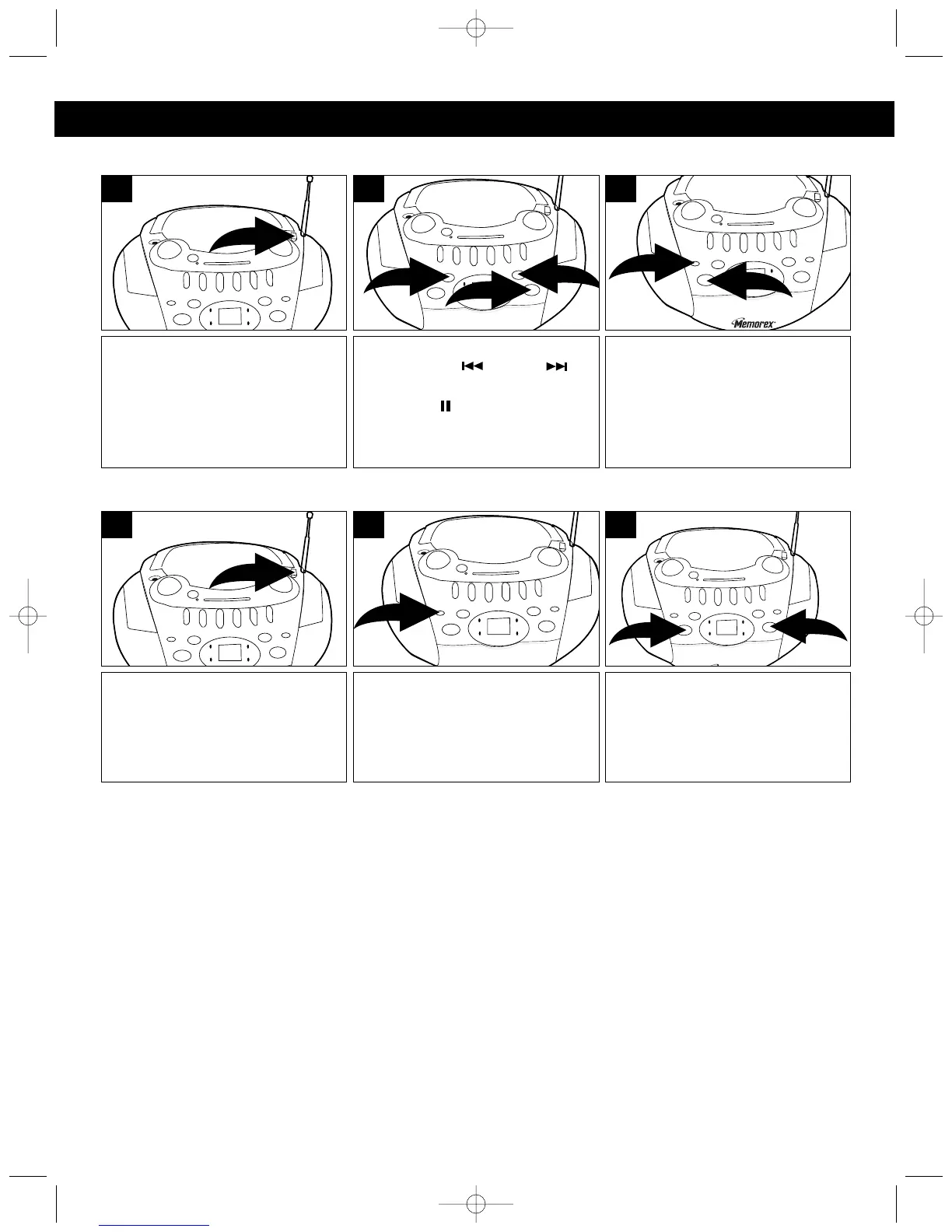
TO REPEATEDLY PLAY BACK ONE TRACK
TO REPEATEDLY PLAY BACK ALL TRACKS
Slide the Function switch to the
CD position and insert a CD as
described in the TO INSERT A
CD section on page 6.
1
Press the REPEAT button ❶
once, the REPEAT indicator will
blink and the unit will play the
selected track over and over until
the STOP (■ ) button ❷ is
pressed.
2
1
3
Select a track using the
Skip/Search ( ) ❶ or ( ) ❷
button and press the PLAY/
PAUSE (/) button ❸.
2
1
3
2
Slide the Function switch to the
CD position and insert a CD as
described in the TO INSERT A
CD section on page 6.
1
Press the PLAY/PAUSE button ❶
to begin playback and the unit will
play the entire disc over and over
until the STOP (■) button ❷ is
pressed.
1
2
3
Press the REPEAT button twice,
the REPEAT indicator will light.
2
NOTE:
To stop and cancel Repeat playback, press the STOP (■) button.
MP3126.OM.QXD 5/5/03 10:11 AM Page 8



 To Next Page