OPERATION (CONTINUED)
16
SINGLE SESSION
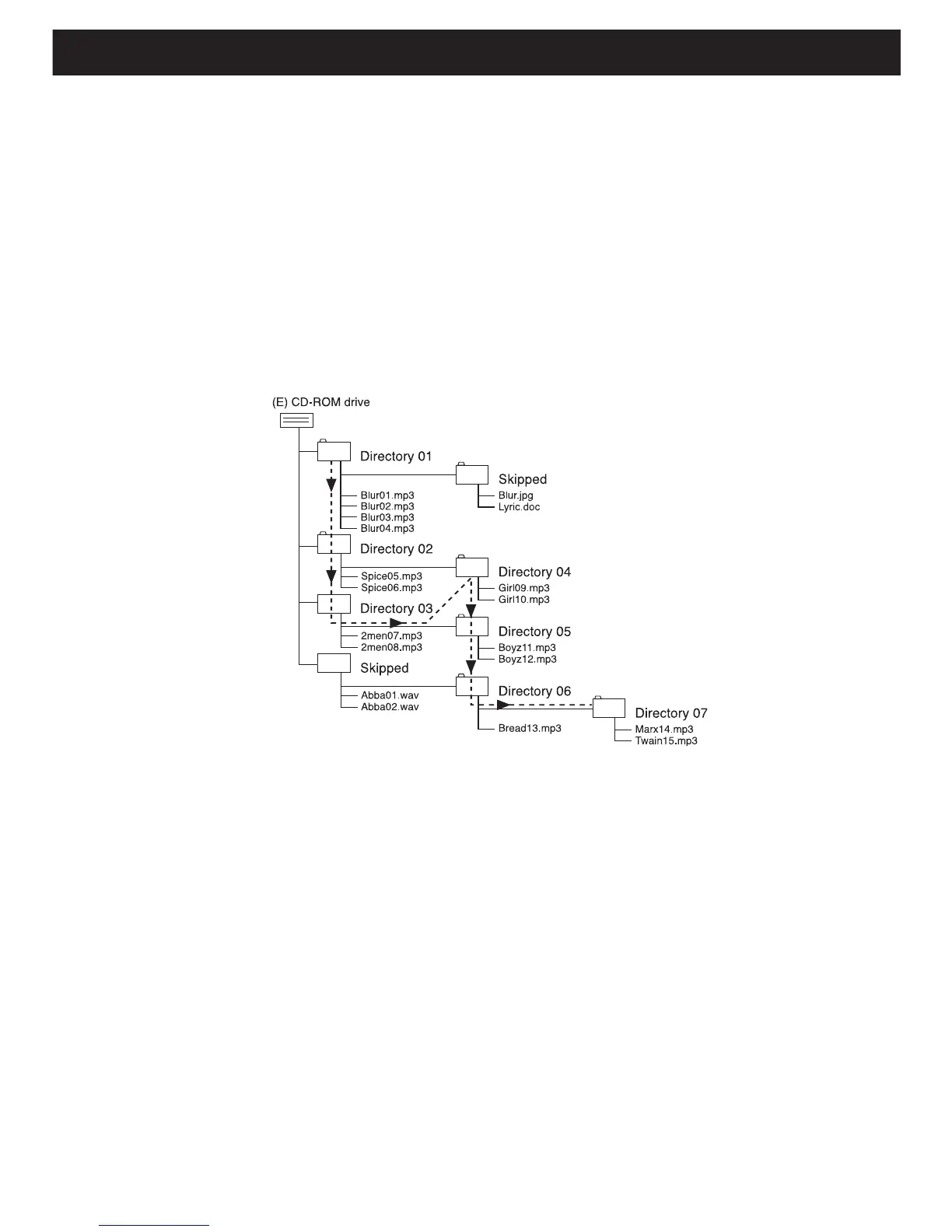
The chart below is an example of a Windows Explorer display that will appear
on your computer monitor for a single session MP3 disc with directories/albums.
Check the added notes to help you understand the MP3 disc unit display and
the playback sequence of directories/albums and files on a single session MP3
disc.
MULTI SESSION
The computer user does not need to finalize the CDR disc as music is burned
on the disc. Because of this, the music can be downloaded at different times
until the whole disc is full.
NOTES:
•
The arrow pathway shows the sequence of MP3 directory and file playback.
• This example has a total of seven MP3 directories.
• Based on this layout, the first file will be “Blur01.mp3” and the last file will be
“Twain15.mp3”.
• “Skipped” denotes a directory which contains non-audio files only, e.g. jpg,
wav, etc. These cannot be detected nor played on this player. When an album
contains mixed format files, the non-MP3 files will be skipped.



 To Next Page