OPERATION (CONTINUED)
10
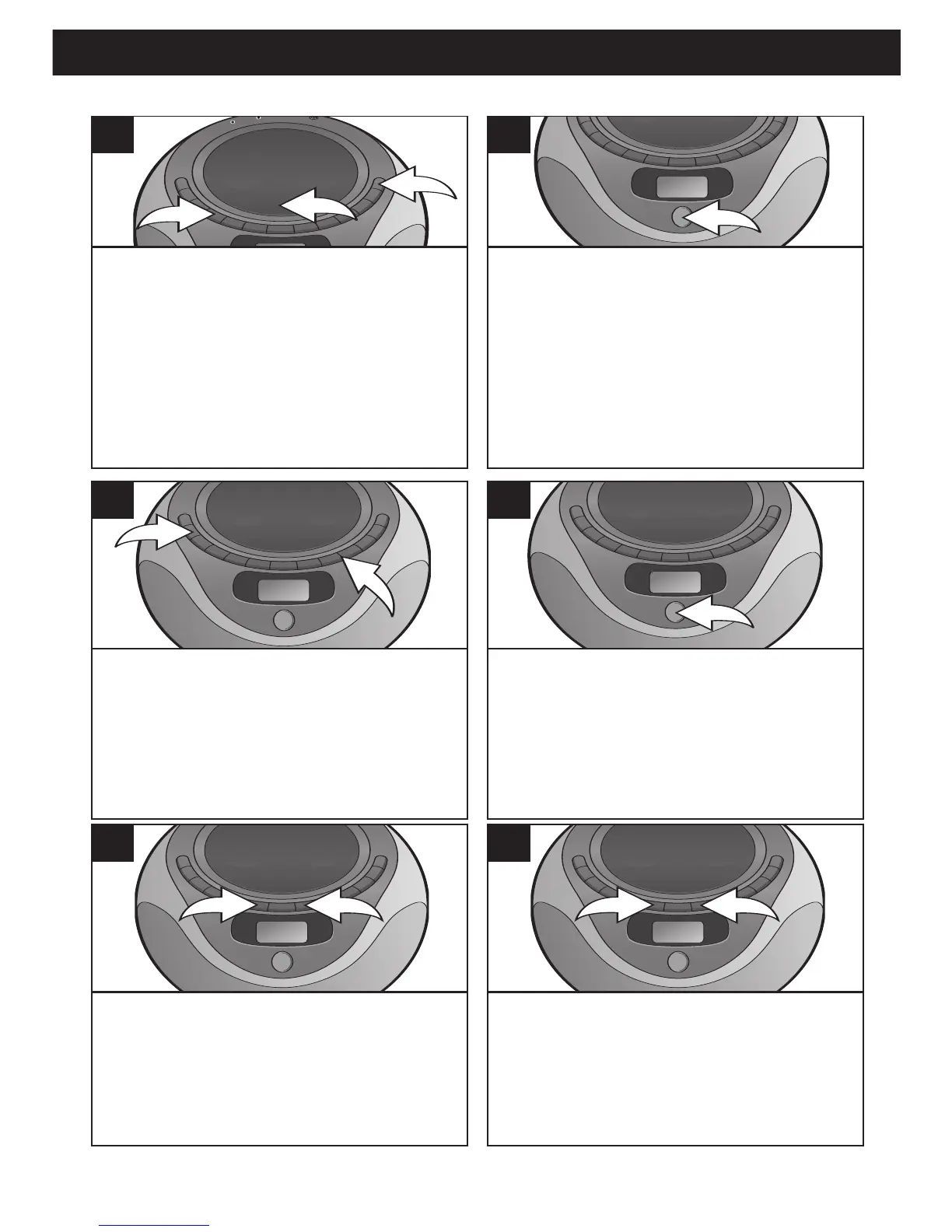
Press the POWER button 1 to turn the
unit on. Press the CD Function button
2
to select the CD mode. Open the CD
compartment door by pressing the CD
Door OPEN area
3. Place a CD on the
center spindle, with the printed label side
facing up. Close the CD compartment
door.
1
Press the PLAY/PAUSE (®p)/Preset
Up button; playback will start
automatically and the elapsed time
will start counting in the display.
2
Adjust the VOLUME Up/Down buttons 1
and BOOM BASS button 2 as desired.
Press the BOOM BASS button
2 to On
(BOOM BASS will appear in the display)
to enhance the overall bass sound.
Press again for normal bass sound.
3
Press the PLAY/PAUSE (®p)/Preset
Up button again to pause playback; the
track number will blink. Press the
PLAY/PAUSE (
®p)/Preset Up button
once again to continue playback; the
track number will stop blinking.
4
To skip forward or backward through
the tracks on the disc, press the
Skip/Search/Tune
o 1 or n 2 button.
5
To search forward or backward
through the music on a disc, press and
hold the Skip/Search/Tune o 1 or n 2
button, a chattering noise will be
heard.
6
TO PLAY A CD
CONTINUED ON THE NEXT PAGE



 To Next Page