24
POWER
EJECT
TV/VCR
COUNTER RESET
INPUT SELECT
REC/OTR
SLOW
SPEED
MENU
–+
–
+
SET
SKIP
SEARCH
CLOCK/
COUNTER
–+
TRACKING
AUTO
CANCEL
ENTER
STOP
PLAY
F.FWD
REW
TIMER REC
PAUSE/STILL
CHANNEL
CALL
1
2
3
456
78
0
9
3
4
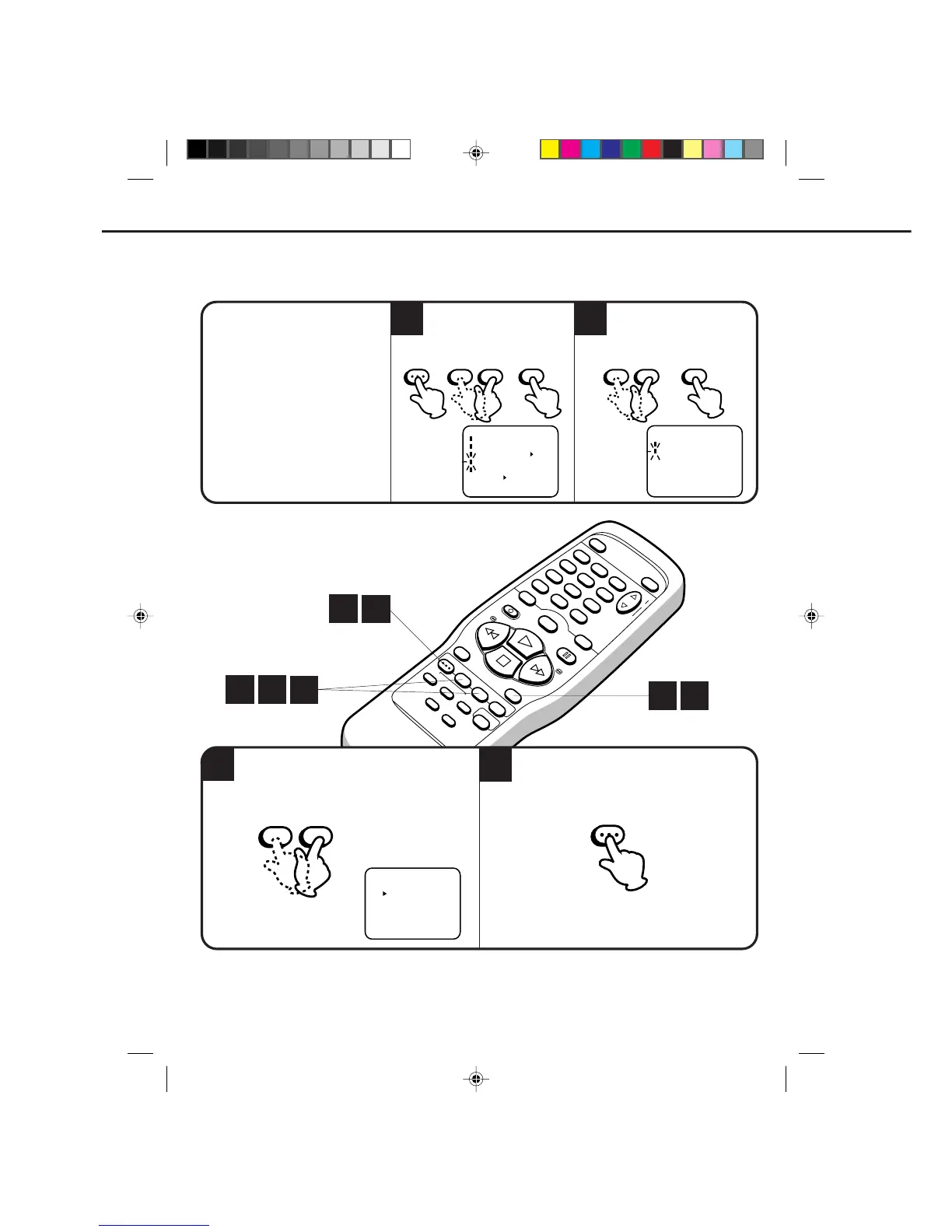
This VCR can display on the TV screen in the English, Spanish or French languages.
ON-SCREEN LANGUAGE SELECTION
Press the MENU button three times.Press the SET + or – button to select the desired
language: ENGLISH, ESPAÑOL or FRANCAIS.
1
2
CHECK BEFORE YOU BEGIN
•Turn ON the TV and set to the
video channel 3 or 4.
•Turn ON the VCR POWER button.
•Press the TV/VCR selector button
to select the VCR mode.
When a TV is connected with an
audio/video cable, turn the TV and
this VCR on and select the video
input mode on the TV.
MENU
–+
SET
ENTER
〈
+
/
–
/ENTER/MENU
〉
SYSTEM SET UP
CLOCK SET
LANGUAGE/LENGUA/LANGUE
Press the MENU button.
Press the SET + or – button to
select the SYSTEM SET UP
option, then press the ENTER button.
Press the SET + or – button
to select the LANGUAGE
option, then press the
ENTER button.
–+
SET
ENTER
2
3
4
1
1
2
〈
+
/
–
/ENTER/MENU
〉
LANGUAGE/IDIOMA/LANGUE
ENGLISH
FRANCAIS
ESPAÑOL
MENU
–+
SET
1
〈
+
/
–
/ENTER/MENU
〉
MENU
TIMER REC SET
CH SET UP
AUTO REPEAT ON OFF
SYSTEM SET UP
NO NOISE BACKGROUND
ON OFF
4C80401A-E(P20-29) 25/2/99, 21:2624



 To Next Page