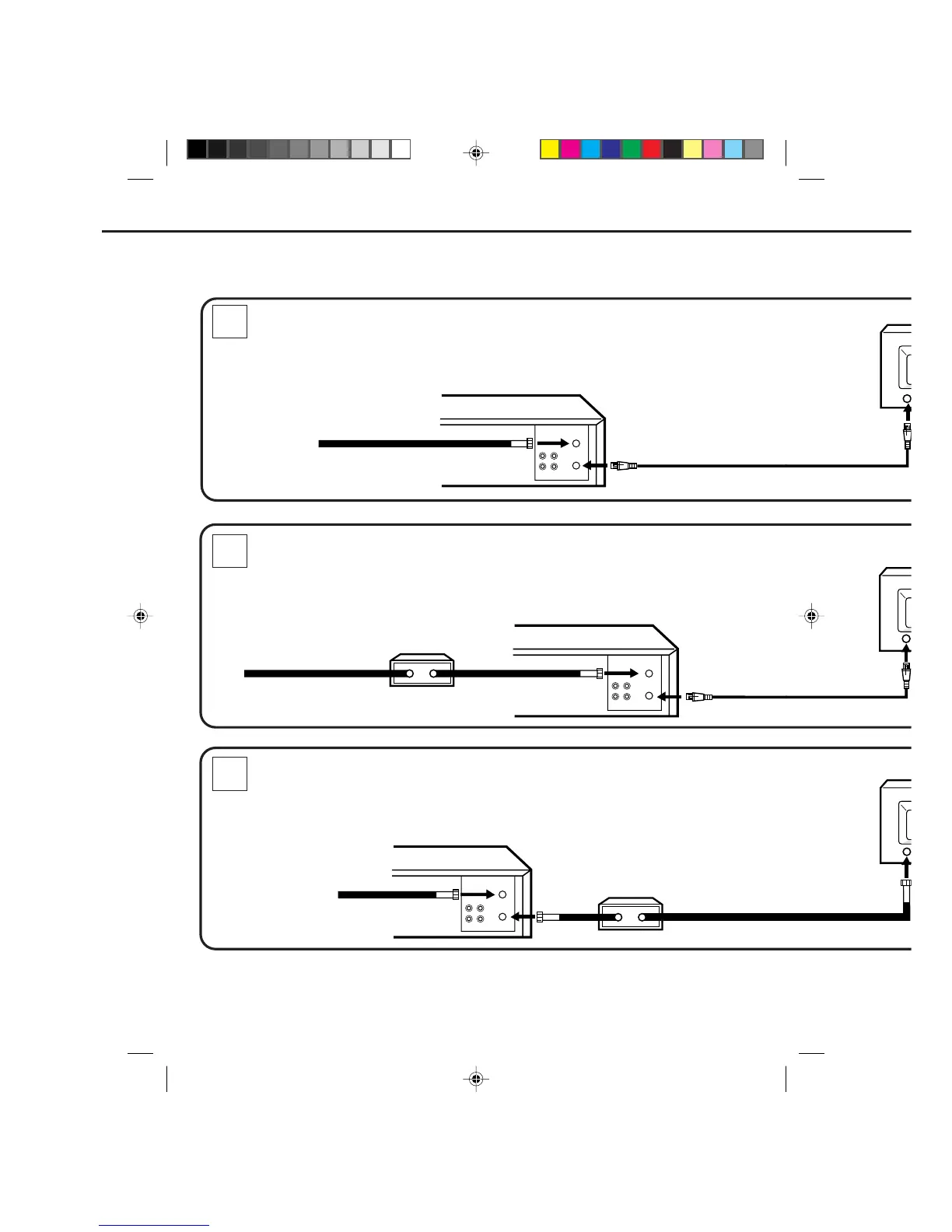
OUT
IN
VHF/UHF
OUT
IN
VHF/UHF
1
3
2
IMPORTANT:
Make sure the TV/CATV MENU option is set to "CATV" mode.
IMPORTANT:
Make sure the TV/CATV MENU option is set to "CATV" mode.
IMPORTANT:
Make sure the TV/CATV MENU option is set to "CATV" mode.
WHENEVER A CONVERTER/DESCRAMBLER BOX IS PLACED BEFORE THE VCR, YOU MUST TUNE
THE VCR TO THE OUTPUT OF THE CONVERTER/DESCRAMBLER BOX, USUALLY CHANNEL 3 OR 4.
NOTE:
CATV (CABLE TV) CONNECTIONS
Many cable companies offer services permitting reception of extra channels including pay or subscription
channels. This VCR has an extended tuning range and can be tuned to most cable channels without using a
cable company supplied converter box, except for those channels which are intentionally scrambled. If you
subscribe to a special channel which is scrambled, you must have a descrambler box for proper reception.
VCR
INCOMING CABLE
VCR
INCOMING CABLE
VCR
INCOMING CABLE
CONVERTER/DESCRAMBLER
CONVERTER/DESCRAMBLER
4C80401A-E(P10-19) 25/2/99, 21:2418



 To Next Page