29
ENGLISH
POWER
EJECT
TV/VCR
COUNTER RESET
INPUT SELECT
REC/OTR
SLOW
SPEED
MENU
–+
–
+
SET
SKIP
SEARCH
CLOCK/
COUNTER
–+
TRACKING
AUTO
CANCEL
ENTER
STOP
PLAY
F.FWD
REW
TIMER REC
PAUSE/STILL
CHANNEL
CALL
1
2
3
456
78
0
9
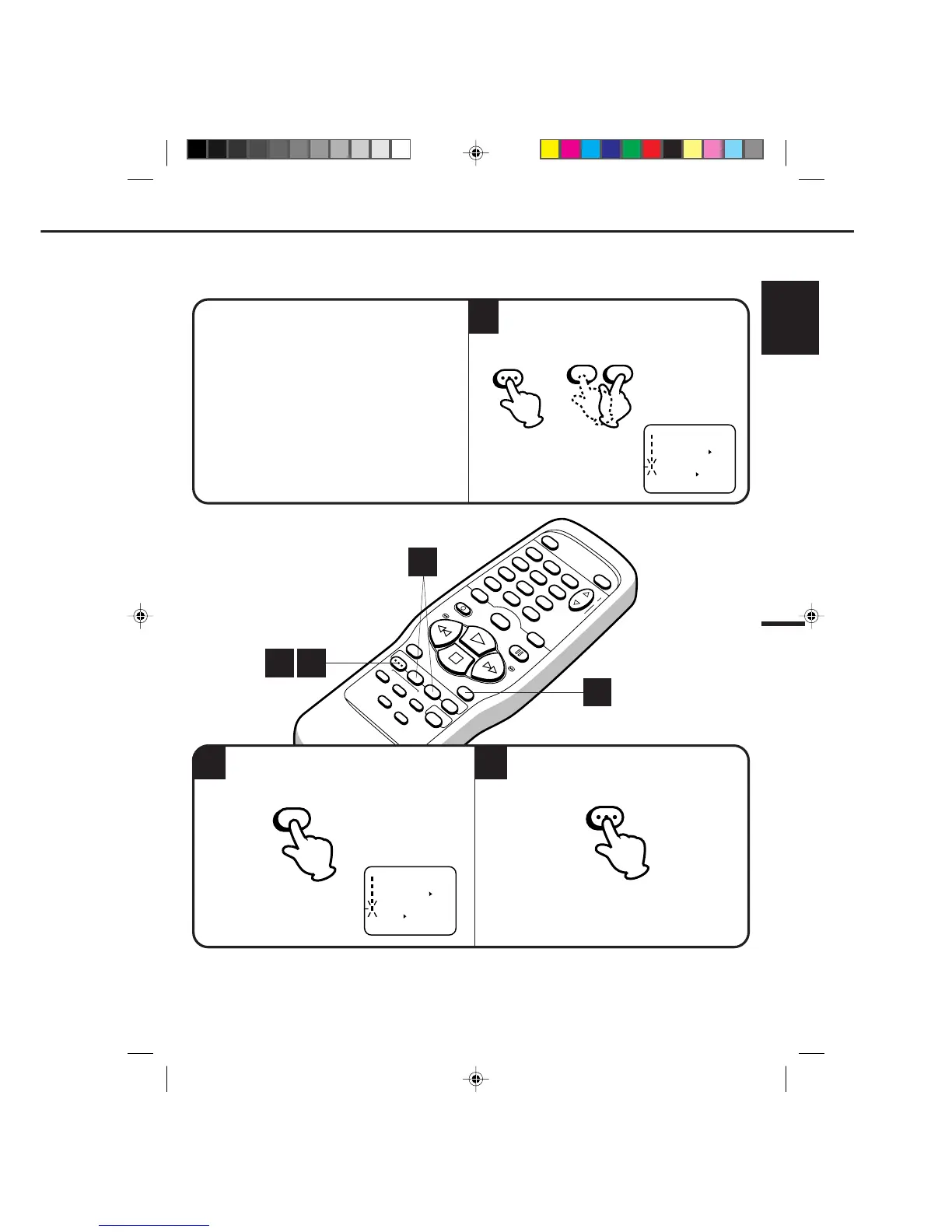
Press the MENU button again.
1
2
When you don't want to receive a weak signal broadcast, the Blue back screen can be obtained by selecting
the NO NOISE BACKGROUND "ON". When the unit is shipped from the factory, the NO NOISE BACK-
GROUND is set to the "ON".
CHECK BEFORE YOU BEGIN
• Turn ON the TV and set to the video channel 3 or 4.
• Turn ON the VCR POWER button.
• Press the TV/VCR selector button to select the
VCR mode.
When a TV is connected with an audio/video cable,
turn the TV and this VCR on and select the video
input mode on the TV.
NOISE ELIMINATION (BLUE SCREEN)
Press the MENU button, then press the SET + or
– button to select the NO NOISE BACKGROUND
option.
3
Press the ENTER button to select the ON position.
MENU



 To Next Page