11
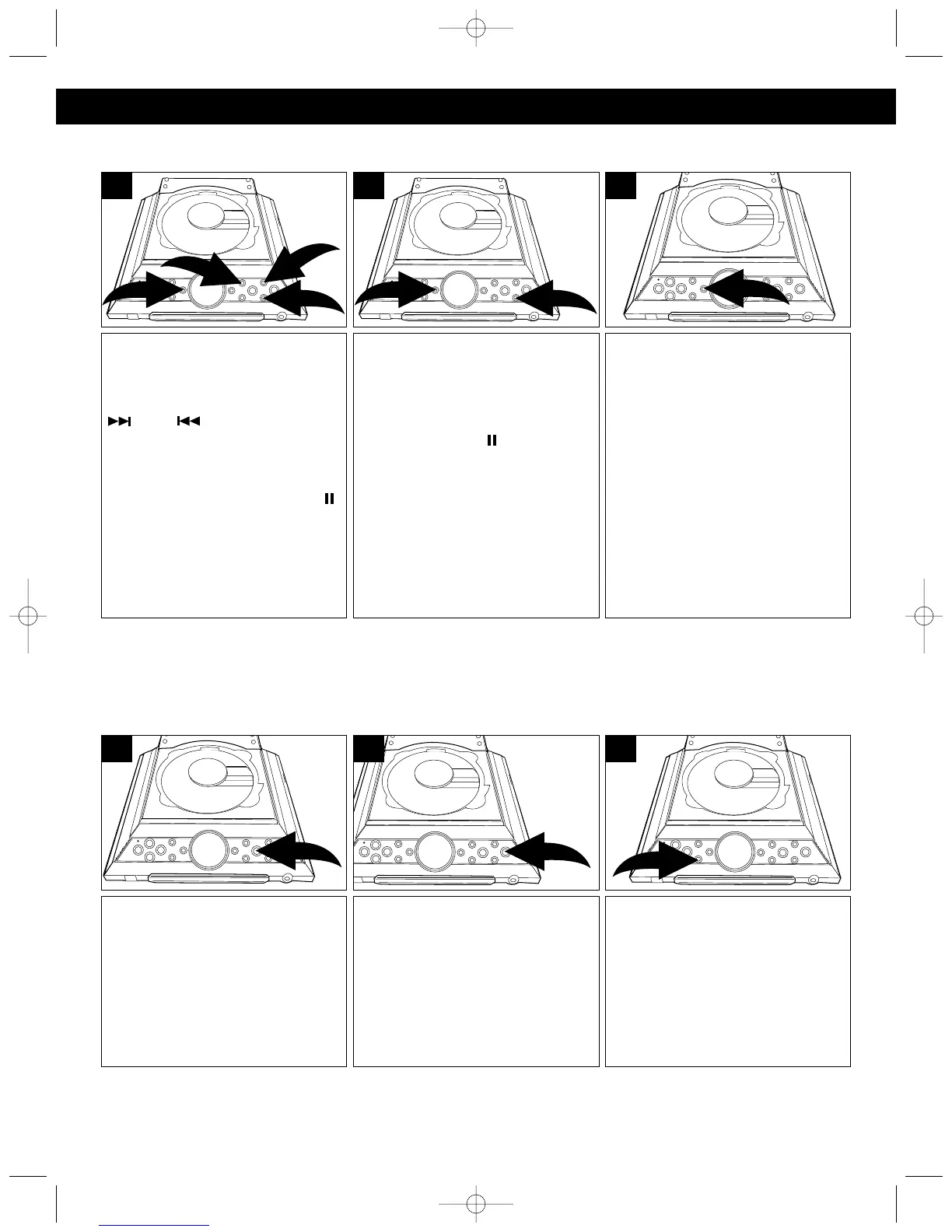
To repeat a single track, press the
REPEAT/MEM-UP button ❶ once;
“REPEAT” will blink in the display.
Press the TUNING/SKIP/Search
❷ or ❸ button to select
the specific track that you wish to
repeat. When the desired track
number appears in the display,
press the PLAY/PAUSE ( )
button ❹ to begin playback. The
specific track you selected will be
repeated continuously.
4
2
1
3
1
To cancel Repeat Playback,
press the REPEAT/MEM-UP
button until “REPEAT” disappears
from the display.
3
To repeat all of the tracks on a
disc continuously, press the
REPEAT/MEM-UP button ❶
twice; “REPEAT” will light solid in
the display. Press the
PLAY/PAUSE ( ) button ❷ to
begin all tracks repeating.
2
1
2
REPEAT PLAYBACK
Press the CD Function button.
1
Press the MEM/CLOCK ADJ
button; “P-01” (program number),
“01” (track number) will appear
and “MEMORY” will blink in the
display.
3
Press the OPEN/CLOSE button
and insert a CD with the label side
facing up.
2
PROGRAMMED PLAYBACK
The CD player in this unit has a 20 track programmable memory that allows you to program up to 20 tracks
on any disc for playback in any desired order. You may program 20 different tracks or you may also program
certain tracks to play more than once.
To perform programmed playback, proceed as follows:
PROGRAMMED PLAYBACK SECTION CONTINUED ON NEXT PAGE.
OPERATING INSTRUCTIONS (CONTINUED)
MX4114.O/M.QXD 2/11/03 8:17 AM Page 11



 To Next Page