7
OPERATING INSTRUCTIONS (CONTINUED)
MUTE
To temporarily mute the sound, press the MUTE button on the
remote control; “MUTE” will appear in the display and the sound will
be muted. Press the MUTE button again to restore the sound and
“MUTE” will disappear from the display.
1
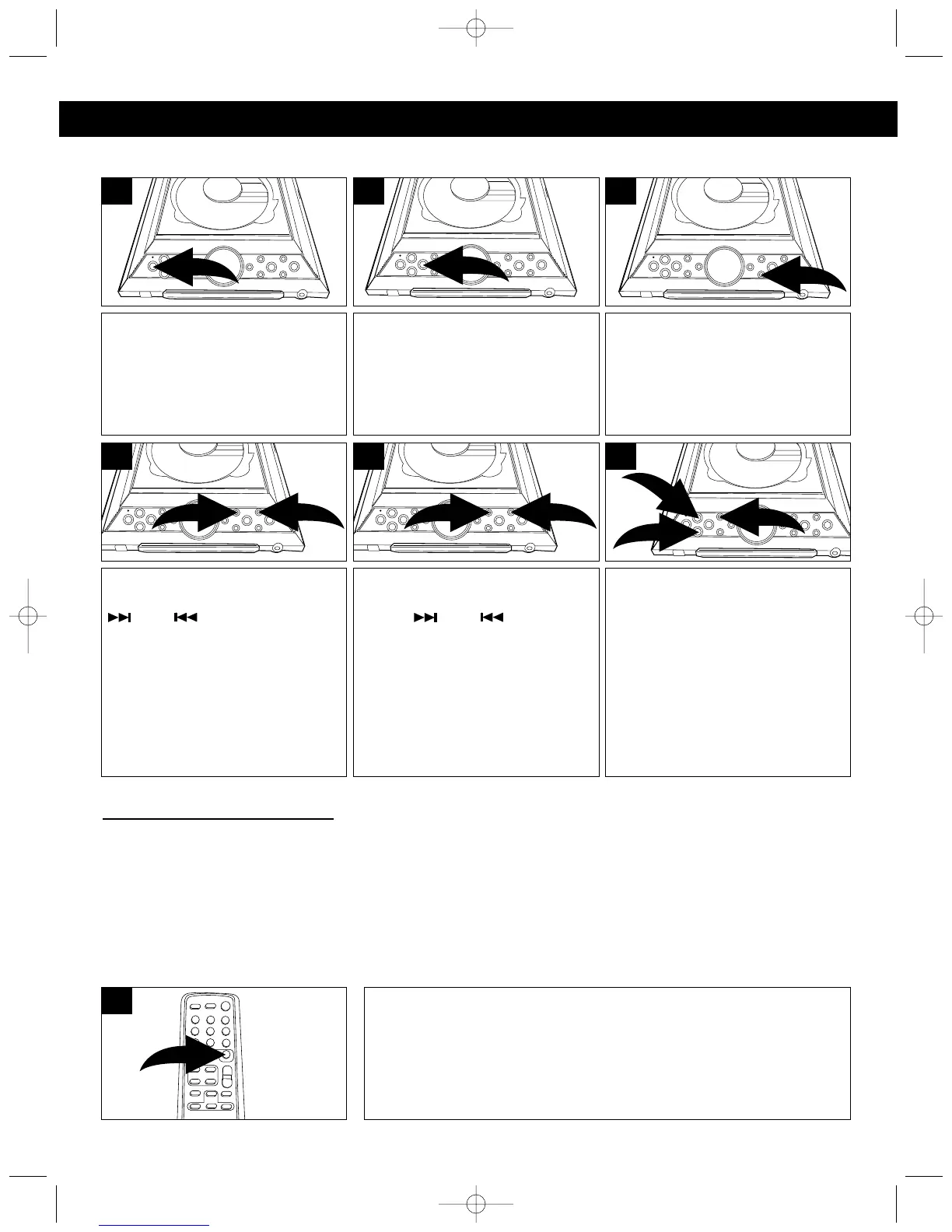
Press the POWER/STANDBY
button to turn the unit on; the
Standby indicator will go out.
1
MANUAL TUNING: Repeatedly
press the TUNING/SKIP/Search
❶ or ❷ button to
manually advance the frequency
in the display up or down until the
desired frequency appears.
1
2
4
Press the STOP/BAND (■) button
to select AM or FM.
3
Press the TUNER Function
button; “TUNER” appears in the
display.
2
AUTOMATIC TUNING: Press
and hold the TUNING/SKIP/
Search ❶ or ❷ button
until the frequency in the display
starts to scan, and then release
the button; the tuner will search
and then stop on the next strong
station it finds. Repeat this
procedure until the desired
frequency appears in the display.
1
2
5
Adjust the PRESET EQ button ❶
and VOLUME buttons ❷ as
desired.
NOTE: If the FM STEREO band is
selected and you have tuned to an
FM Stereo station, the FM Stereo
indicator will light in the display.
1
2
2
6
Hints for Better Reception
AM - The AM ferrite bar antenna is located inside the unit. It may be necessary to turn the unit slightly so
that the internal antenna is pointing in the direction of the AM transmitter. You may have to experiment to
find the position that provides the strongest reception for each of your favorite AM stations.
FM - Make sure that the AC Cord is extended to its full length. You may have to vary the direction of the AC
Cord to find the strongest signal for each FM station.
LISTENING TO THE RADIO
MX4114.O/M.QXD 2/11/03 8:17 AM Page 7



 To Next Page