6
OPERATING INSTRUCTIONS
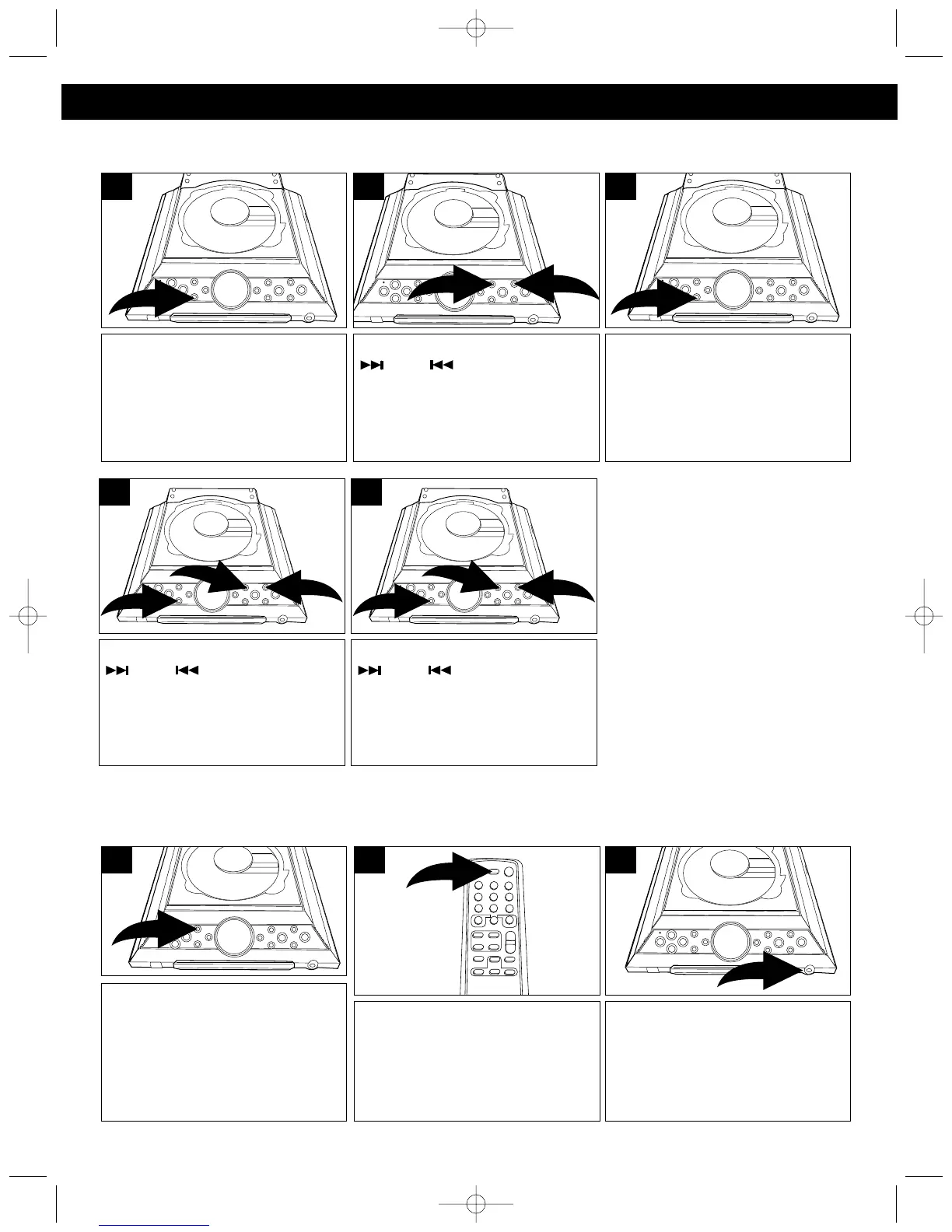
With the power on, press the
PRESET EQ button to cycle
through the preset EQ settings, or
to turn the EQ off. Each press of
the PRESET EQ button will cycle
as follows: CLASSIC, ROCK,
POP, Off.
1
PRESET EQ
Press the DISPLAY button on the
remote once to show the clock on
the display. Press again to show
the timer on the display.
1
DISPLAY BUTTON
To listen to the unit through
headphones, simply insert the
headphones (not included) into the
Headphones jack. The speakers
will be disconnected when the
Headphones are plugged in.
1
HEADPHONE JACK
With the power off, press and hold
the MEM/CLOCK ADJ button;
“24H” will blink.
1
Press the MEM/CLOCK ADJ
button and the hours will blink.
3
Press the TUNING/SKIP/Search
❶ or ❷ button to set the
unit to the 24 hour (24H) mode
(also known as military time), or
12 hour (12H) mode.
2
SETTING THE CLOCK
Press the TUNING/SKIP/Search
❶ or ❷ button to set the
current hour, then press the
MEM/CLOCK ADJ button ❸
again; the minute digits will blink.



 To Next Page