5
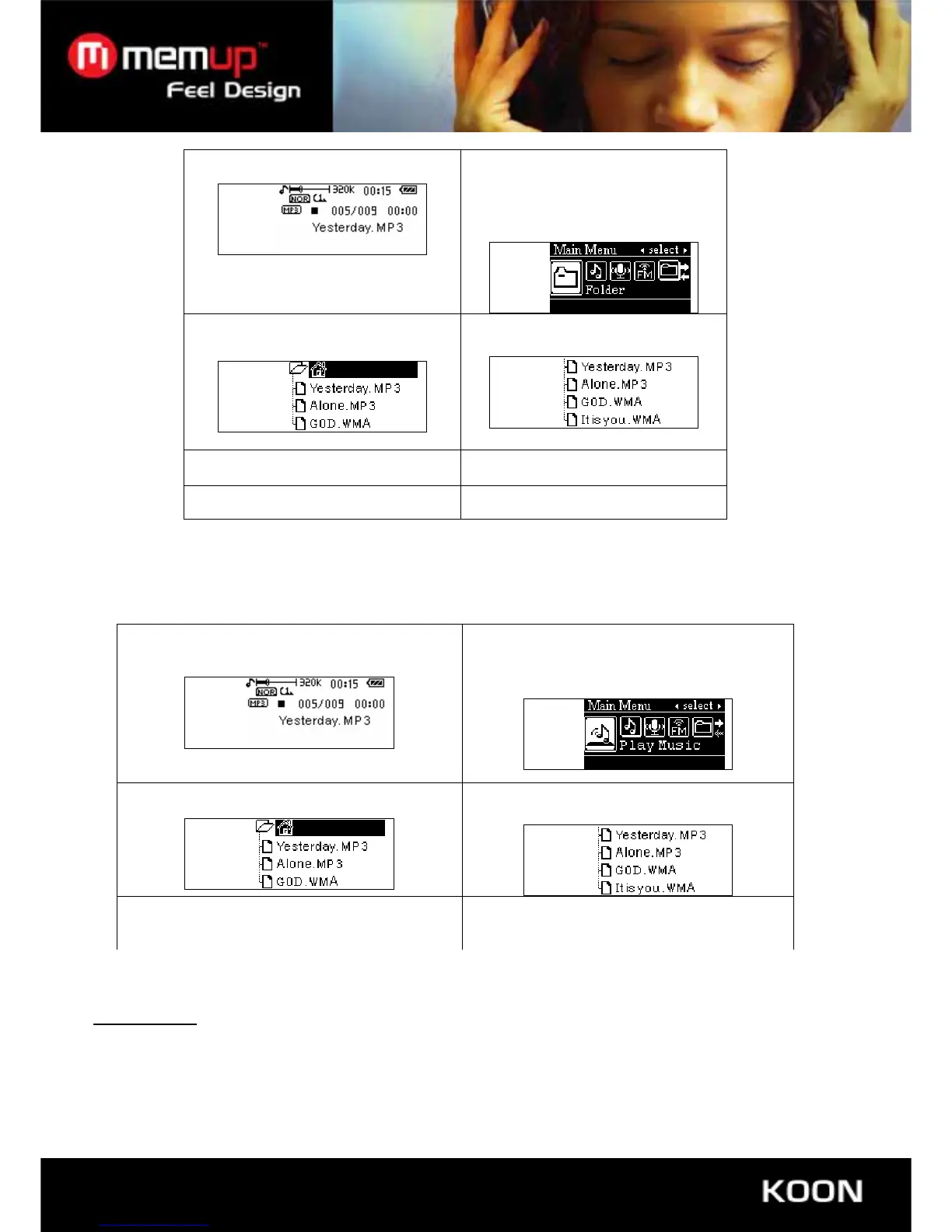
2. Press and hold “Mode”
button to enter in main menu,
then press “+” button to
choose ”Folder”.
1. In music play mode
4.Press“-/+”button to
choose folder
3.Press “play” button again to enter in
“folder” mode
5. Press “Play” button to conform the
files in folder you have chosen.
• Delete file and play file
Under music mode and play mode, you can delete corresponded file.
1. Stop interface 2. Press and hold “Mode” to entry main
menu ,then press “” to choose
“Folder”
3.Press “Play” to see the different folders
4.Press “-/+”key to choose files
5. Press “Mode” key that will show you a
dialog box. Press again “-/+”to choose
starting delete or play.
6. Press “Play” for confirmation and start delete
or play
8. SYSTEM SETTING
User Guidance
Entry the Main menu, press“-/+”key to choose “setting”,then press “Play” key and entry “setting”



 To Next Page