Need help?
Do you have a question about the Merck RQflex 10 and is the answer not in the manual?
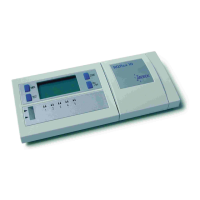
Details on the instrument's display and operational buttons.
Specifications of the RQflex 10 instrument, including dimensions and power.
Step-by-step instructions for inserting batteries into the RQflex 10.
Procedure for setting the instrument's current time and date.
Explanation of why coding the instrument with test-specific codes is necessary.
Step-by-step guide for entering test codes into the instrument.
Basic measurement procedure focusing on strip reaction time.
Measurement procedure including auxiliary reagent reaction times.
Calibration procedure using an unused Reflectoquant® strip.
Calibration procedure using an already used Reflectoquant® strip.
How measurement results are automatically stored with time and date.
Instructions for displaying previously stored measurement results.
Method for transferring measurement data to a computer for analysis.
Steps to erase stored measurement results from the instrument's memory.
General guidelines for careful handling and operation of the instrument.
Instructions for cleaning the instrument's strip adapter components.
Steps to recalibrate the RQflex 10 using calibration standards.
Explanations of common error messages and their corresponding solutions.
Contact details and procedures for servicing the RQflex 10 instrument.
Information on the warranty period, terms, and claim process for the RQflex 10.
 General
| Type | Reflectometer |
|---|---|
| Measurement Principle | Reflectometry |
| Display | LCD |
| Interface | RS-232 |
| Measurement Range | Dependent on the test strips used |
| Power Supply | 4 AA batteries or AC adapter |
| Battery | 4x AA batteries |
| Operating Conditions | 10 to 40°C, 20 to 80% RH |
| Wavelength | Dependent on the test strips used |
| Data Storage | Up to 1000 measurements |
| Weight | Approx. 400 g |

 To Next Page