13
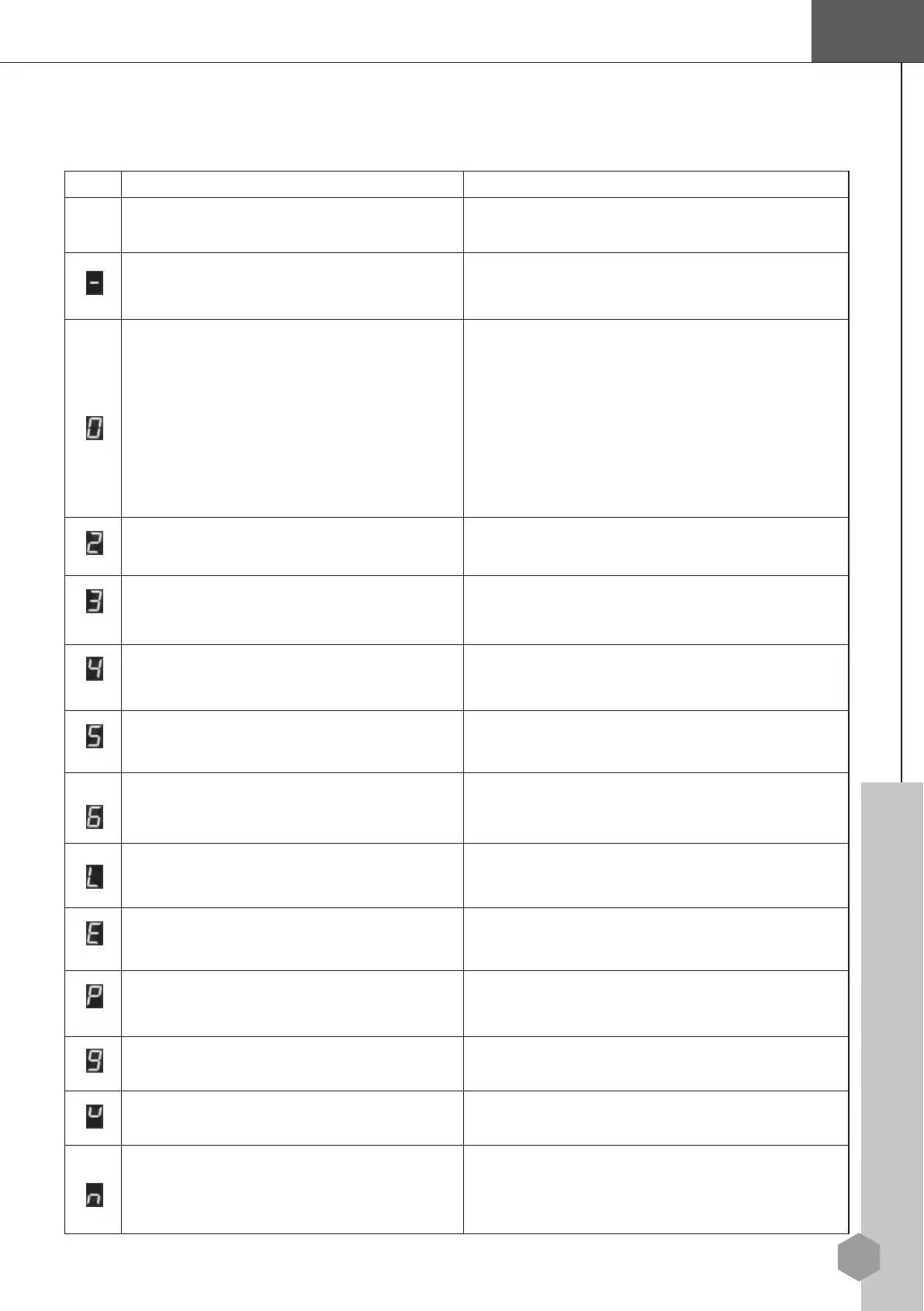
8.2 Diagnostic Codes
Refer to the following table to help diagnose and correct any faults.
Cod
e
Status/Fault
Recommended
Corrective
Action
No display.
Check
that
the key switch and
ON/OFF
switch
are
turne
on.
The stairlift is
read
y
to
u
s
e.
o action
requi
r
e
d
.
1. T
h
e swivel seat switch is activated.
2. The armrest switch is activated.
3. The Emergency Stop Button has been
pressed.
4. The final limit switch is activated.
5. The over speed governor (optional) is
activated.
1. Rotate and lock the seat in the right position.
2. Fold down the armrest.
3. Release the Emergency Stop Button.
4. Contact your authorized dealer.
5. Contact your authorized dealer.
Batteries are not
charging.
Check that the charger is
plugged in
and
c
h
arging.
Upper limit switch is
activated
.
You
have reached the upper
limit.
Run the unit in
the down
d
i
rect
ion.
Safety sensor in
u
p
direction is
activated.
Remove any obstacle that may
have
activated
the
switch.
Lower limit switch is
activated
.
You
have reached the lower
limit.
Run the unit in
the up
d
i
rect
ion.
Safety sensor in down direction is activated.
Remove any obstacle that may have activated the
switch.
Motor current limit is exceeded
Contact your authorized dealer.
Main control board error.
Switch off the key switch for 30 seconds and then
switch on again.
activated when power on.
Release the switch or button. No action required.
Motor brake is not engaged.
Push down the lever of motor brake.
The batteries voltage is too high.
Switch off the key switch for 30 seconds and then
switch on a
ain.
The batteries voltage is too low.
Move the stairlift to the downstairs end and
recharge the battery. Contact your authorized
dealer if the battery cannot be recharged.
Rocker switch or remote controller is


 To Next Page